Skip to content

Printer setup for Oracle EBS r12

you need to do the below steps for printer configuration for oracle ebs r12 running on Linux environment.

Step 1.

Please check CUPS  running on your application tier installed server.

[root@hrms-ruh-104-26 ~]# rpm -qa|grep cups
hal-cups-utils-0.6.2-5.2.el5
libgnomecups-0.2.2-9
cups-libs-1.3.7-26.el5
cups-1.3.7-26.el5
cups-libs-1.3.7-26.el5

Its running, If it’r not running, Please install CUPS on your machine.


Step 2:  please open your browser in the application tier.

http://localhost:631

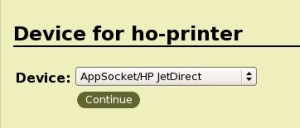
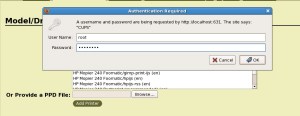
Add printer :
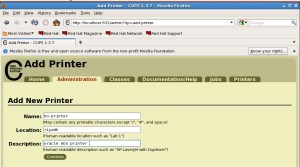
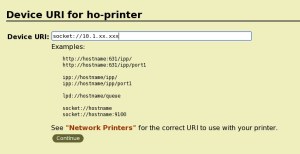
your printer should be on your local network. give your printer IP address
 

select your printer Driver from the drop-down list. Or If not, choose any one of the drivers of related and test, Still not work, Please install the related driver on the application tier and then select correct ppd file from the driver installed location.


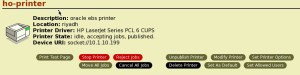
Test page.
Step 3: Configure printer on EBS Application

Responsibility = System Administrator

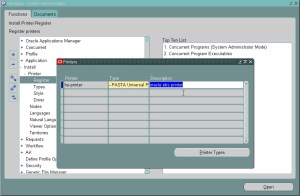
Navigate –> Install: Register

Query the target printer’s name (add printer name)

Update the printer “Type” field with the “–Pasta Universal Printer Type”
Step 4: Restart concurrent manager

[appluat@hrms-ruh-104-26 scripts]$ ./adcmctl.sh stop

[appluat@hrms-ruh-104-26 scripts]$ ./adcmctl.sh start


Step 5: Run any  report,  before submitting your request,

Here options –> Style -> “PDF Publisher” and choose your printer and then submit the request.

Your report will print now


Change hostname in OEL 7

Method 1 :  nmtui  tool on terminal

Method 2 : [root@EDB-LEB-4-53 ~]# hostnamectl status
Static hostname: EDB-LEB-4-53.ace-ins.com
Icon name: computer-vm
Chassis: vm
Machine ID: 11cc4d26c75c476db3fa89a66a0fcae9
Boot ID: afc4b181973e40b9ab46ca774e6130c4
Virtualization: vmware
Operating System: Oracle Linux Server 7.0
CPE OS Name: cpe:/o:oracle:oracle_linux:7.0:GA:server
Kernel: Linux 3.8.13-35.3.1.el7uek.x86_64
Architecture: x86_64


[root@EDB-LEB-4-53 ~]# hostnamectl set-hostname ezylebuatdb.damana.com
[root@EDB-LEB-4-53 ~]# hostnamectl status
Static hostname: ezylebuatdb.damana.com
Icon name: computer-vm
Chassis: vm
Machine ID: 11cc4d26c75c476db3fa89a66a0fcae9
Boot ID: afc4b181973e40b9ab46ca774e6130c4
Virtualization: vmware
Operating System: Oracle Linux Server 7.0
CPE OS Name: cpe:/o:oracle:oracle_linux:7.0:GA:server
Kernel: Linux 3.8.13-35.3.1.el7uek.x86_64
Architecture: x86_64


Junk character issue in R12 report

Our developer complaint about when they trying to take Oracle standard report with arabic format, They got output of report with junk character


Solution:

Login EBS, In home page , Select preference,

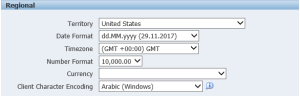
Client chracter encoding – Arabic(Windows)

Run Standard report using language settings — arabic

ora–0845: memory_target not supported on this system while grid installation

I have faced ASM configuration assistant failed while install grid on linux  with very less RAM.  So I crosschecked the log file, It shows below issues

ora–0845: memory_target not supported on this system

So I skip this activity and then started next activity progress is finished. The grid infrastructure installation was successful. After that, I tried to configure asm configuration using by asmca. Here I changed Memory_target parameter to Zero value in init file. Then ASM configuration was successful and asm instance status is started.


E-Business Suite 12.2.7 Now Available

Oracle announced that E-Business Suite 12.2.7 Now Available

Please refer
https://blogs.oracle.com/stevenchan/oracle-e-business-suite-1227-now-available

ezyconnect error ORA-12504

[premiadb:oracle:oradb]$ sqlplus apps@”ebsuat.xxxx.com:1586/ebsuat”

SQL*Plus: Release 12.1.0.2.0 Production on Mon Sep 11 11:04:08 2017

Copyright (c) 1982, 2014, Oracle. All rights reserved.

ERROR:
ORA-12504: TNS:listener was not given the SERVICE_NAME in CONNECT_DATA

Cause :

Syntax issue

Solution :

[premiadb:oracle:oradb]$ sqlplus apps@\”ebsuat.xxxx.com:1586/ebsuat\”

SQL*Plus: Release 12.1.0.2.0 Production on Mon Sep 11 11:04:30 2017

Copyright (c) 1982, 2014, Oracle. All rights reserved.

Enter password:

Connected to:
Oracle Database 11g Enterprise Edition Release 11.2.0.2.0 – 64bit Production
With the Partitioning, OLAP, Data Mining and Real Application Testing options

SQL>


EBS 12.1.3 Data masking issue with 11.2.0.2

I tried to data mask the EBS 12.1.3 data with database version 11.2.0.2. but After i masked, I can’t open the application because of SYSADMIN and Guest user was missed. So I raised SR, As per support we need to upgrade database version to 11.2.0.3 otherwise we need to do backport activity. If your database version is 11.2.0.2, you need to check with Oracle support before you do data masking.

I upgraded to 12c, it’s working fine.

toad and oracle client are getting ora-12560 tns protocol adapter error after upgraded windows 10

Yesterday morning I came to office, One of my colleague complaint, My toad not working , I am getting “ora-12560 tns protocol adapter error” while connecting to target database through toad.

I asked him when was this issue started , He said, After upgraded my pc to windows 10. I am getting this issue. I told him, My pc also upgraded to windows 10 but I am not getting this issue. I can able to connect target database through toad and Oracle Client too.

Now I am started to fix his pc tns protocal adapter issue. I thought It might be a ORALCE_HOME AND TNS_ADMIN  path issue because He installed  lot of Oracle Client software like (Dev Suite and Oracle Client and Oracle instant Client) on his pc.

So I just tried change ORACLE_HOME AND TNS_ADMIN  path and I tried to open target database through toad, I am getting same issue.

And then I added sqlplus binaries in Oracle instant client and I tried to open, I am getting same issue.

And then I am tried to open through direct connection, I am getting issue.

And then I installed Oracle 12c client, I tried to created tns name using netca, It says ” sgslunUDPNew: unable to create communication endpoint” and getting tns protocol issue.

So I had decided, That issue was not related with Oracle Client, That issue might be due to network problem.  So I tried to open that target database with appropriate port using telnet. It says ” telnet could not open connection to port. A system call has failed”.

I checked His PC firewall is blocking or not. But His PC firewall was off. OOPS then I am thinking What is the problem?.

Finally I got the solution from the below link. Please refer here.

https://answers.microsoft.com/en-us/windows/forum/windows_10-networking/some-programsapps-unable-to-connect-after-windows/689f7204-63fa-4f03-857a-3e4b0ff7d0ce


Enable DDL logging

Enable DDL Logging:

ENABLE_DDL_LOGGING enables or disables the writing of a subset of data definition language (DDL) statements to a DDL log.

SQL> show parameter enable_ddl_logging

NAME TYPE VALUE
———————————— ———– ——————————
enable_ddl_logging boolean FALSE

SQL> alter system set enable_ddl_logging=TRUE scope=both;

System altered.

SQL> show parameter enable_ddl_logging

NAME TYPE VALUE
———————————— ———– ——————————
enable_ddl_logging boolean TRUE

SQL> select value from v$diag_info where name=’ADR Home’;

VALUE
——————————————————————————–
/premia/app/12c/oracle/diag/rdbms/oradb/oradb

SQL>

SQL> select value from v$diag_info where name=’ADR Home’;

VALUE
——————————————————————————–
/premia/app/12c/oracle/diag/rdbms/oradb/oradb

SQL> conn test/test123
Connected.
SQL> create table invoicenum(invoice number);

Table created.

SQL> exit
Disconnected from Oracle Database 12c Enterprise Edition Release 12.1.0.2.0 – 64bit Production
With the Partitioning, Oracle Label Security, OLAP, Advanced Analytics
and Real Application Testing options

[premiadb:oracle:oradb]$ pwd
/premia/app/12c/oracle/diag/rdbms/oradb/oradb/log/ddl

[premiadb:oracle:oradb]$ cat log.xml

<msg time=’2017-02-21T15:25:47.163+03:00′ org_id=’oracle’ comp_id=’rdbms’
msg_id=’opiexe:4383:2946163730′ type=’UNKNOWN’ group=’diag_adl’
level=’16’ host_id=’premiadb’ host_addr=’10.1.4.66′>
<txt>create table invoicenum(invoice number)
</txt>
</msg>

Reference :

https://docs.oracle.com/database/121/REFRN/GUID-6FBA6147-D545-4E7D-94F0-A97EC1C721AE.htm#REFRN10302


Listener Exception : Could not create listener: TNS-04414: File error

When I tried to add listner using netca for my test database, I am getting below issue

“Listener Exception : Could not create listener: TNS-04414: File error’

It could be possible ” Listener file having some wrong entries, so you need to check” or renaming current listener and tried to add (Here Please be note, your current listener configuration will be removed).