DATA MASKING on EBS 12.1.3 with Enterprise Manager 12.1.0.5
Please follow the step by step document of Data masking on EBS 12.1.3
Jan 4
Please follow the step by step document of Data masking on EBS 12.1.3
As a system administrator, you please submit the below request
Workflow Directory Services User/Role Validation
optional
yes
yes
yes
Optional run If it does not work after done above steps
Synchronize WF LOCAL tables
Jan 3
Script for find out completed concurrent request of particular SID
SELECT ( select USER_CONCURRENT_PROGRAM_NAME from Fnd_Concurrent_Programs_tl where LANGUAGE=’US’ and CONCURRENT_PROGRAM_ID=a.CONCURRENT_PROGRAM_ID)prog_name
,a.phase_code,a.status_code,a.request_id, d.sid, d.serial# ,d.osuser,d.process , c.SPID
FROM apps.fnd_concurrent_requests a, apps.fnd_concurrent_processes b, v$process c, v$session d
WHERE a.controlling_manager = b.concurrent_process_id AND c.pid = b.oracle_process_id
AND b.session_id=d.audsid and d.sid= 242
order by a.REQUEST_DATE
Jan 3
you need to do the below steps for printer configuration for oracle ebs r12 running on Linux environment.
Step 1.
Please check CUPS running on your application tier installed server.
[root@hrms-ruh-104-26 ~]# rpm -qa|grep cups
hal-cups-utils-0.6.2-5.2.el5
libgnomecups-0.2.2-9
libgnomecups-0.2.2-9
cups-libs-1.3.7-26.el5
cups-1.3.7-26.el5
cups-libs-1.3.7-26.el5
Its running, If it’r not running, Please install CUPS on your machine.
Step 2: please open your browser in the application tier.

Add printer :
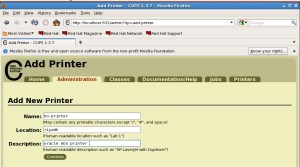
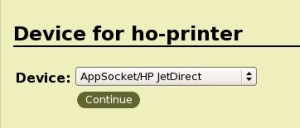
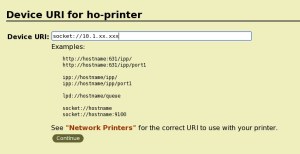
your printer should be on your local network. give your printer IP address
select your printer Driver from the drop-down list. Or If not, choose any one of the drivers of related and test, Still not work, Please install the related driver on the application tier and then select correct ppd file from the driver installed location.


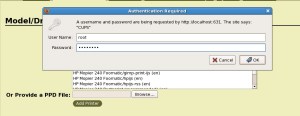
Test page.
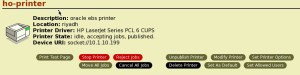
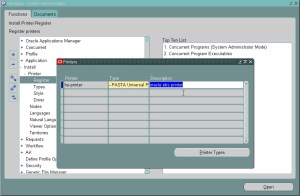
Step 3: Configure printer on EBS Application
Responsibility = System Administrator
Navigate –> Install: Register
Query the target printer’s name (add printer name)
Update the printer “Type” field with the “–Pasta Universal Printer Type”
Step 4: Restart concurrent manager
[appluat@hrms-ruh-104-26 scripts]$ ./adcmctl.sh stop
[appluat@hrms-ruh-104-26 scripts]$ ./adcmctl.sh start
Step 5: Run any report, before submitting your request,
Here options –> Style -> “PDF Publisher” and choose your printer and then submit the request.

Your report will print now
Our developer complaint about when they trying to take Oracle standard report with arabic format, They got output of report with junk character
Solution:
Login EBS, In home page , Select preference,
Client chracter encoding – Arabic(Windows)
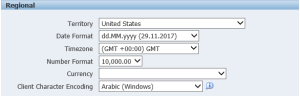
Run Standard report using language settings — arabic
Oracle announced that E-Business Suite 12.2.7 Now Available
Please refer
https://blogs.oracle.com/stevenchan/oracle-e-business-suite-1227-now-available
I tried to data mask the EBS 12.1.3 data with database version 11.2.0.2. but After i masked, I can’t open the application because of SYSADMIN and Guest user was missed. So I raised SR, As per support we need to upgrade database version to 11.2.0.3 otherwise we need to do backport activity. If your database version is 11.2.0.2, you need to check with Oracle support before you do data masking.
I upgraded to 12c, it’s working fine.
Nov 22
Here I am going to explain how to configure Oracle EBS integrated soa gateway for SOAP services on 12.2.6.
The E business suite integrated soa gateway configuration require a Oracle SOA suite with weblogic on separate server.
Refer the document for how to install
Installing Oracle E-Business Suite Integrated SOA Gateway, Release 12.2 (Doc ID 1311068.1)
In this note, Go to
Section 1: Configuring Oracle E-Business Suite Integrated SOA Gateway for SOAP Services on a New Installation of Release 12.2.3 or Higher
In this section , They mentioned to install oracle SOA suite server as per section 4
Here I had chosen the below version of Oracle SOA suite to install on the separate server
How to Install Oracle SOA Suite:
Download Oracle SOA Suite software from edelivery.oracle.com
Prepare a new linux server for Oracle SOA Suite
Complete all the prerequisites on this server. (See my OBIEE installation guide for complete prerequisites activities)
Install Oracle Database software and create a database for SOA Suite.
Install Jdk (jdk-7u79-linux-x64.rpm)
Create repository creation for SOA
Select the below component while creating repository
–> AS Common Schemas –> Metadata Services
–> SOA and BPM infrastructure –> SOA Infrastructure & Business Activity Monitoring & User Messaging Service
https://docs.oracle.com/cd/E21764_01/doc.1111/e14259/rcu.htm#RCUUG268
Install Oracle weblogic Server 10.3.6
Install Oracle SOA suite
http://docs.oracle.com/cd/E28280_01/install.1111/e13925/install.htm#INSOA209
Configure Oracle SOA Suite
http://docs.oracle.com/cd/E28280_01/install.1111/e13925/configure.htm#INSOA212
Integartion SOA gateway :
Installing Oracle E-Business Suite Integrated SOA Gateway, Release 12.2 (Doc ID 1311068.1)
Go to Section 1.1: Setup Tasks on Oracle E-Business Suite Release 12.2.3 or Higher
Here you noted : ASADMIN password change, Try to change user management If you can’t see reset password field , change password using secutiry – users -define.
And also Weblogic and SOA gateway server address should be you mentioned which you are installed Oracle SOA suite server and weblogic server address and ipaddress.
Section 1.2: Configuration Steps on Oracle SOA Suite to Integrate with Oracle E-Business Suite
Once done the above steps, you may go to Integrated SOA responsibility–> select your interface name or internal name and regenerate the wsdl and deploy the SOAP service. please verify can you able to view wsdl file or not. If you can able to view wsdl with soa suite server address, the SOAP service is working fine.
I am trying to deploy the SOAP service in ebs 12.2.6 with integrated SOA gateway. I can able to deploy the wsdl file but I can’t able to view wsdl files. The below error appeared when I try to open view wsdl file
“Failed to Load a composite for composite identified by default”
So I realized the error seems to be part of SOA server. I looked the SOA server log from EM console. It shows below error
#
#SEARCH_CRITERIA
# START_TIME: 2016-11-17T11:16:46.968+03:00
# END_TIME: 2016-11-17T12:16:46.968+03:00
# MESSAGE_TYPES:INCIDENT_ERROR, ERROR, UNKNOWN
#SELECTED_TARGETS_LIST
# /Farm_base_domain/base_domain/soa_server1/soa-infra:oracle_soainfra
#
[2016-11-17T12:00:57.533+03:00] [soa_server1] [ERROR] [SOA-21537] [oracle.integration.platform.blocks.deploy.servlet] [host: dbs-10-1-4-201.tst.RUH.ace-ins.com] [nwaddr: 10.1.4.201] [tid: [ACTIVE].ExecuteThread: ‘2’ for queue: ‘weblogic.kernel.Default (self-tuning)’] [userId: ASADMIN] [ecid: 005GNi0iuAiESO15zvg8yW00004y00001p,1:26140:36] [APP: soa-infra] [DSID: 0000LXlX7_9EOP15zvg8yW1OBMle000006] Sending back error message: User ASADMIN does not have the privilege of deploying/undeploying composites. Only users of SOAAdmin/SOAOperator role are authorized to deploy/undeploy composites..
[2016-11-17T12:01:17.366+03:00] [soa_server1] [ERROR] [SOA-21537] [oracle.integration.platform.blocks.deploy.servlet] [host: dbs-10-1-4-201.tst.RUH.ace-ins.com] [nwaddr: 10.1.4.201] [tid: [ACTIVE].ExecuteThread: ‘0’ for queue: ‘weblogic.kernel.Default (self-tuning)’] [userId: ASADMIN] [ecid: 005GNi1pk8XESO15zvg8yW00004y00001q,1:26142:37] [APP: soa-infra] [DSID: 0000LXlXCYjEOP15zvg8yW1OBMle000007] Sending back error message: User ASADMIN does not have the privilege of deploying/undeploying composites. Only users of SOAAdmin/SOAOperator role are authorized to deploy/undeploy composites..
#
#MESSAGE_COUNT: 2
#
So The ASADMIN requires some privileges in SOA server for deploying services.
Solution :
SOA Server Enterprise Manager Console
–> Weblogic Domain –> <domain name>
–> Security –> Application roles
–> Application Stripe — soa-infra
Select SOAAdmin roleand click edit, and add user ASADMIN
Select SOAOperator role and click edit, and add user ASADMIN
Again now I tried to deploy the services, it’s working fine.
Nov 7
Here I am going to explain about how to upgrade from 12.2.0 to 12.26 version.
Well, I hope you’re now successfully completed 12.1.3 to 12.2 version upgrade .So What is the next step to follow
First Step is you need to enable online patching, P
Enable Online Patching :
follow the below document for enabling online patching
https://docs.oracle.com/cd/E26401_01/doc.122/e48839/T579510T580325.htm
1.Verify the database version
I hope you’re upgraded database to 11.2.0.4 or 12c while during upgrade 12.1.3 to 12.2
2.Ensure that the required Database patches for Release 12.2 have been applied
Database Preparation Guidelines for an E-Business Suite Release 12.2 Upgrade (Doc ID: 1349240.1)
check with checkMTpatch.sh, If you need to apply database patches or not. you please review the above document as well
3.Apply the latest Oracle E-Business Suite Online Patching Readiness and GSCC Report Patch
Using the Online Patching Readiness Report in Oracle E-Business Suite Release 12.2 (Doc ID 1531121.1)
you need to apply the patch
4.Run the Online Patching Enablement – Readiness Reports
Follow the instructions as per the document, you may get list or reports. you may analyze the report and try to fix the EBS violations. If High priority violations, fix it before you start to apply enable online patch.
However , you should check with Oracle Support Team regarding those reports you got.
5.Fix Violations Listed in the Online Patching Readiness Report that Require Manual Intervention
Follow document
6. Verify database tablespace free space
Follow document
7. Run the Online Patching Enablement – Status Report
Follow document
8.Ensure that all middle-tier E-Business Suite services are shut down
Stop the service
9.Download and apply the Online Patching Enablement patch
Download and apply the Online Patching Enablement patch: 13543062:R12.AD.C. Use Autopatch in hotpatch mode to apply the patch (adpatch options=hotpatch,forceapply).
10. Compile Invalid Objects
connect with apps schema
exec sys.utl_recomp.recomp_parallel
Afterwards , follow the document and get the report again, try to fix the EBS violations.
Database Initialization Parameters
SQL> show parameter service_names
NAME TYPE VALUE
———————————— ———– ——————————
service_names string EBSUPGR, EBS_PATCH
SQL> show parameter recyclebin
NAME TYPE VALUE
———————————— ———– ——————————
recyclebin string OFF
If the _SYSTEM_TRIG_ENABLED parameter is set to false, then system triggers are not processed. The post Online Patching Enablement parameter must be set to true.
SQL> select x.ksppinm name,
y.ksppstvl value,
ksppdesc description
from x$ksppi x,
x$ksppcv y
where x.inst_id = userenv(‘Instance’)
and y.inst_id = userenv(‘Instance’)
and x.indx = y.indx
and x.ksppinm = ‘_system_trig_enabled’ 2 3 4 5 6 7 8 9 ;
NAME
——————————————————————————–
VALUE
——————————————————————————–
DESCRIPTION
——————————————————————————–
_system_trig_enabled
TRUE
are system triggers enabled
Upgrade to 12.2.6 :
follow the document
https://docs.oracle.com/cd/E26401_01/doc.122/e48839/T579510T579526.htm
Apply the Latest AD and TXK for Release 12.2
refer this document
Oracle E-Business Suite Release 12.2: Suite-Wide Release Update Pack and AD/TXK Delta Information (Doc ID 1583092.1)
Section 1: AD and TXK RUP Information
Applying the Latest AD and TXK Release Update Packs to Oracle E-Business Suite Release 12.2 (Doc ID 1617461.1)
Please ensure required database patches applied or not (checkMTpatch.sh) and also check application patches as well (check MTpatch.sh)
Database parameter
SQL> show parameter optimizer_adaptive_features
NAME TYPE VALUE
———————————— ———– ——————————
optimizer_adaptive_features boolean FALSE
Apply the R12.AD.C.Delta.8 and R12.TXK.C.Delta.8 Release Update Packs
3.1 Path A — Upgrade and New Installation Customers
Stop the all services and Start up only the Oracle Weblogic Admin Server on the run edition application tier file system.
you should apply patch using adop, you can download those patches and put it in default $PATCH_TOP location.
remaining steps , follow the document 1617461.1
Mandatory Steps for Custom Schema Upgrade for 11i / 12.0 / 12.1
Follow the document
For creating a Custom application:
For the custom products that already exist, you must run adsplice on the Run File system to lay down the file system. For running adsplice, refer to
Creating a Custom Application in Oracle E-Business Suite Release 12.2(Doc ID: 1577707.1)
Apply the Latest Oracle E-Business Suite Release Update Pack for Release 12.2
please refer to Oracle E-Business Suite Release 12.2.6 Readme (Doc ID 2114016.1)
Once applied patches, you can see the application EBS version is upgraded to 12.2.6
Then follow the Post upgrade steps
https://docs.oracle.com/cd/E26401_01/doc.122/e48839/T579510T579526.htm


Database Administrator, Blogger, Contributor


 DBA
DBA 