RMAN: Create Catalog
How to create catalog for rman backup.I just provided here for step by step create catalog.
Mar 28
How to create catalog for rman backup.I just provided here for step by step create catalog.
Mar 16
I just installed windows 7 on my new machine and I try to connect Oracle server database through on Telnet but unfortunately i cannot connect telnet. The telnet program doesnot configured on windows 7 when you’re done first installation.so you need to configure Telnet program.In this case,you should follow these steps and then you can connect telnet program.
Step 1: Open Control panel and Choose program on control panel, then click Turn windows features on or off.

Step 2: After click , a new window appear, you can choose Client telnet and then OK.

Step 3: The windows make new feautre.

Step 4: After changes, you can now connect Telnet, cmd> telnet Enter.

Step 6: Now you can connect Oracle database through on telnet.

Step 6: Enter your OS oracle group username and password.
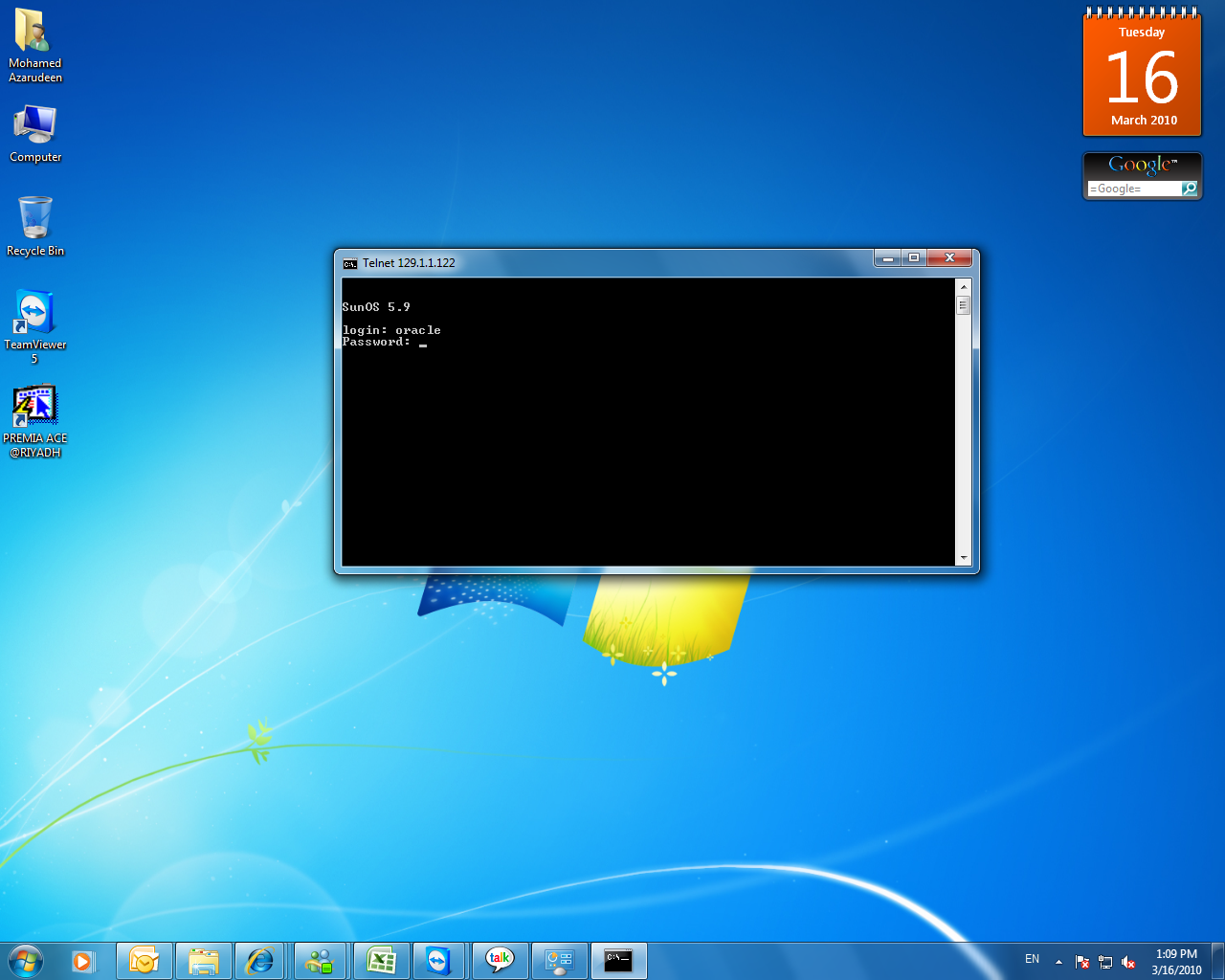
Step 7: Finally you can connect database after you given oracle username and password.

One of my friend asked me about this error on today morning,i just want to explain about the snapshot too old error.
Undo data is stored in the undo tablespace, the tablespace nominated by the UNDO_TABLESPACE instance parameter. This tablespace should be sized according to the rate at which undo data is being generated and the length of the queries running in the database.
But even if the undo tablespace is inadequately sized and therefore comes under space pressure, automatic undo retention tuning will tend to minimize problems.
Undo data generated by a transaction must always be kept until the transaction commits. This is an absolute; under no circumstances will Oracle ever overwrite undo data that might be needed to rollback a transaction. This data is known as “active” undo data.
Once a transaction has committed, its undo data is no longer active, but it could still be needed to support long running queires that began before the transaction. Data that may be needed for this purpose is known as “unexpired” undo data.
“Expired” undo is data that is no longer needed either to rollback a transaction or to be read by queries.. Active undo will never be overwritten, and ideally expired undo can be safely overwritten at any time.
Unexpired undo can be overwritten, but at the risk of causing queries to fail with the “ORA-01555 : Snapshot too old” error.
The point at which data transitions from “unexpired” to “expired” is controlled by the instance parameter UNDO_RETENTION.
With release 9i of the Oracle database,Oracle would overwrite any expired undo. This meant that if the UNDO_RETENTION parameter were not set appropriately or (not set at all, in which case it defaults to 9oo seconds), there would be great danger of ORA-1555 errors.
Oracle 10g relaeas of the database effectively ignores the UNDO_RETENTION parameter. It will always overwrite the oldest bit of undo data.This means that is a sense there is no longer any difference between expired and unexpired undo and that the UNDO_RETENTION instance parameter is redundant, because undo retention is automatically tuned for the longest possible query.
To monitor the automatic undo retention tuning ,query V$UNDOSTAT this query will show,
SQL> SELECT BEGIN_TIME,END_TIME,TUNED_UNDORETENTION,ACTIVEBLKS,UNEXPIREDBLKS,EXP
IREDBLKS FROM V$UNDOSTAT;
Iin fivteen minutes intervals, how old(in seconds) the oldest block of inactive undo data was. provided that no query started earlier than that, you will never receive a snapshot too old error. The larger the undo tablespace is and the less the transaction workload is, the further back the TUNED_UNDORETENTION will be.
Feb 16
How to take logical database backup automatically using Data pump .
We can use many method to achieve this one. i choosed to play with DBMS SCHEDULER.
Step 1:
Connect sys user.
sql> grant execute on dbms_lock to system;
Connect System user .
Step 2 : Create Directory
SQL> CREATE DIRECTORY NEW_DIR AS ‘D:\ORACLE\DUMP’;
Directory created.
SQL> GRANT READ,WRITE ON DIRECTORY NEW_DIR TO SYSTEM;
Grant succeeded.
SQL> COMMIT;
Commit complete.
Step 3: Create Package
SQL> CREATE OR REPLACE PACKAGE fullexport
2 IS
3 PROCEDURE exp;
4 END fullexport;
5 /
Package created.
Step 4 : Create Package Body
SQL> CREATE OR REPLACE PACKAGE BODY fullexport
2 IS
3 h1 NUMBER := NULL; PROCEDURE exp
4 IS
5 BEGIN
6 BEGIN
7 DBMS_LOCK.sleep(30);
8 END;
9 –DO THE EXPORT
10 BEGIN
11 h1 := DBMS_DATAPUMP.open(
12 operation => ‘EXPORT’,
13 job_mode => ‘FULL’,
14 job_name => ‘MYTEST’,
15 version => ‘COMPATIBLE’);
16 DBMS_DATAPUMP.add_file(
17 handle => h1,
18 filename => ‘FULLEXP.LOG’,
19 directory => ‘NEW_DIR’,
20 filetype => 3);
21 DBMS_DATAPUMP.add_file(
22 handle => h1,
23 filename => ‘MYTEST.DMP’,
24 directory => ‘NEW_DIR’,
25 filetype => 1);
26 DBMS_DATAPUMP.START_JOB(h1);
27 END;
28 END;
29 END fullexport;
30 /
Package body created.
Step 5: Run procedure
SQL> exec fullexport.exp;
PL/SQL procedure successfully completed.
Step 6: Create DBMS_SCHEDULER
SQL> BEGIN
2 DBMS_SCHEDULER.CREATE_JOB_CLASS(
3 job_class_name => ‘BACKUP’,
4 resource_consumer_group => ‘DEFAULT_CONSUMER_GROUP’,
5 comments => ‘BACKUP, EXPORT ETC’);
6 END;
7 /
PL/SQL procedure successfully completed.
SQL> BEGIN
2 DBMS_SCHEDULER.CREATE_JOB(
3 job_name => ‘TEST’,
4 job_type => ‘STORED_PROCEDURE’,
5 job_action => ‘FULLEXPORT.EXP’,
6 start_date => ’16-FEB-10 01:00:00 PM’,
7 repeat_interval => ‘FREQ=DAILY;BYHOUR=13’,
8 job_class => ‘BACKUP’,
9 comments => ‘FULL EXPORT’);
10 END;
11 /
PL/SQL procedure successfully completed.
SQL> BEGIN
2 DBMS_SCHEDULER.ENABLE(‘TEST’);
3 END;
4 /
PL/SQL procedure successfully completed.
SQL>
VIEW :
DBA_DATAPUMP_JOBS
USER_TAB_PRIVS
Feb 10
Block Corruption :-
Block may be corrupted in two ways
Media Corruption :-
Logical corruption :-
Parameter Relating to Block Corruption :-
DB_BLOCK_CHECKSUM
DB_BLOCK_CHECKING
Detecting Block Corruptions :-
The Corrupted Block Error Message :-
Sql>select count(*) from corrupt_tab;
count(*)
——-
50
sql>select * from corrupt_tab;
select * from corrupt_tab
*
ERROR at line 1:
ORA-01578:ORACLE data block corrupted(file # 7, block # 5)
ORA-01110:data file 7: ‘C:\ORACLE\ORADATA\DAM.DBF’
sql>
Ex: – objd=52077
sql>select owner,object_name,object_type from dba_objects where object_id=52077;
An alternative Query to identify the object would be to match the data block address against the DBA_EXTENTS view.
sql>select owner,segment_name,segment_type from dba_extents where file_id=7 and 5 between block_id and block_id + blocks;
owner segment_name segment_type
——- ———— ————-
HR CORRUPT_TAB TABLE
Unless the corruption is in the header blocks of the datafile, it will only be detected when the block is read by a server process.
DBVERIFY Utility :-
Executable –> Unix – $oracle_home/bin/dbv
windows – %oracle_home%\bin\dbv.exe
C:\Documents and Settings\mazar>dbv file=D:\oracle\product\10.2.0\oradata\riyadh
\USERS01.DBF
DBVERIFY: Release 10.2.0.1.0 – Production on Tue Feb 9 15:22:25 2010
Copyright (c) 1982, 2005, Oracle. All rights reserved.
DBVERIFY – Verification starting : FILE = D:\oracle\product\10.2.0\oradata\riyad
h\USERS01.DBF
DBVERIFY – Verification complete
Total Pages Examined : 640
Total Pages Processed (Data) : 35
Total Pages Failing (Data) : 0
Total Pages Processed (Index): 2
Total Pages Failing (Index): 0
Total Pages Processed (Other): 53
Total Pages Processed (Seg) : 0
Total Pages Failing (Seg) : 0
Total Pages Empty : 550
Total Pages Marked Corrupt : 0
Total Pages Influx : 0
Highest block SCN : 1685733 (0.1685733)
C:\Documents and Settings\mazar>
The ANALYZE command :-
sql>analyze table validate structure;
sql>analyze index validate struture;
sql>analyze table validate struture cascade;
ANALYZE..VALID STRUTURE are that for partitioned tables it will check that rows are in the correct partition ,and for indexes it will compute the ratio of space devoted to active index entries and space wasted because the index entries refer to deleted rows. VIEW INDEX_STATS.
DBMS_REPAIR Package :-
DBMS_REPAIR is a set of procedures that will check objects for problems and make the objects usable again.
The following table lists the procedures included in the DBMS_REPAIR package.
Comparison of Corruption Detection Methods
Step 1: Create a repair table
BEGIN
DBMS_REPAIR.ADMIN_TABLES (
TABLE_NAME => ‘REPAIR_TABLE’,
TABLE_TYPE => dbms_repair.repair_table,
ACTION => dbms_repair.create_action,
TABLESPACE => ‘USERS’);
END;
/
desc repair_table;
query select tablespace_id, schema_name, object_name, block_id from repair_Table;
SET SERVEROUTPUT ON
DECLARE num_corrupt INT;
BEGIN
num_corrupt := 0;
DBMS_REPAIR.CHECK_OBJECT (
SCHEMA_NAME => ‘SCOTT’,
OBJECT_NAME => ‘DEPT’,
REPAIR_TABLE_NAME => ‘REPAIR_TABLE’,
CORRUPT_COUNT => num_corrupt);
DBMS_OUTPUT.PUT_LINE(‘number corrupt: ‘ || TO_CHAR (num_corrupt));
END;
/
SELECT OBJECT_NAME, BLOCK_ID, CORRUPT_TYPE, MARKED_CORRUPT,
CORRUPT_DESCRIPTION, REPAIR_DESCRIPTION
FROM REPAIR_TABLE;
Fixing corrupt blocks
SET SERVEROUTPUT ON
DECLARE num_fix INT;
BEGIN
num_fix := 0;
DBMS_REPAIR.FIX_CORRUPT_BLOCKS (
SCHEMA_NAME => ‘SCOTT’,
OBJECT_NAME=> ‘DEPT’,
OBJECT_TYPE => dbms_repair.table_object,
REPAIR_TABLE_NAME => ‘REPAIR_TABLE’,
FIX_COUNT=> num_fix);
DBMS_OUTPUT.PUT_LINE(‘num fix: ‘ || TO_CHAR(num_fix));
END;
/
Skipping Corrupt Blocks
BEGIN
DBMS_REPAIR.SKIP_CORRUPT_BLOCKS (
SCHEMA_NAME => ‘SCOTT’,
OBJECT_NAME => ‘DEPT’,
OBJECT_TYPE => dbms_repair.table_object,
FLAGS => dbms_repair.skip_flag);
END;
/
Querying scott’s tables using the DBA_TABLES view shows that SKIP_CORRUPT is enabled for table scott.dept.
SELECT OWNER, TABLE_NAME, SKIP_CORRUPT FROM DBA_TABLES WHERE OWNER = ‘SCOTT’;
…………
Recovering Corrupt Blocks with RMAN
–> If you are making user-managed backups, you cannot perform a block recovery becuase the granularity of a user managed restore is the datafile
–> If one block of a file many gigabytes big is corrupted, you must restore and recover the entire datafile through the usual.
This can be done with zero loss, but the impact on your users ,in terms of downtime , may be enormous.
RMAN backups open the possibilty of block level restore and recovery, perhaps with no downtime at all.
Note :- Block media recovery is applicable only to datafile blocks. If a block of an online log file, an archive log file or a controlfile is coruupted. you must have a multiplexed copy available if you ever need to recover.
Detection Of Corrupt Blocks :-
–> RMAN ,being an Oracle aware tool, will verify the contents of data blocks as it reads them; unless instructed otherwise,it wil lterminate the backup as soon as it hits a corrupt block.
–>If you wish, you can run RMAN backups that specify a tolerance for corrupted blocks. If this is done ,then rather than throwing an error and terminating the backup immediately when aa corruption is detected, RMAN will continue to backup the datafile but will record the address of any corruptions it encounters in its repository.
Example :-
Rman to continue a backup as long as no more than one hundred corrupt blocks are encountered.
RMAN>run {
set maxcorrupt for datafile 7 to 100;
backup datafile 7;}
the details of Corrupt blocks are visible in two places.
V$DATABASE_BLOCK_CORRUPTION –> the address of the cause of the problem. the datafile and block number.
V$BACKUP_CORRUPTION –> for backup set backups
V$COPY_CORRUPTION –>backup were to an image copy.
RMAN will always check for physical corruption, known as “media corruption” in the non RMAN world.
Example : this would be a block that oracle cannot process at all: an invalid checksum, or a block full of zeros.
RMAN can also be instructed to check for logical corruption, also known as “SOftware Corruption” as well.
These checks will occur whenever a file is backed up, whether as an image copy or into a backup set.
RMAN>backup nochecksum datafile 7;
will not check for physical corruption and
RMAN>backup check logical datafile 6;
Overview of BLock Media Recovery : BMR
–> BMR changes the granularity of a restore and recovery operation from the datafile to just the damaged blocks.
Advantage :-
–>The file does not have to be taken offline ; normal DML can continue.
–> The mean time to recover is much reduced, since only the damaged blocks are involved in the operation, not the whole file. The only downtime that will occur is if a session happens to hit a block that is actully damaged and has not yet been recovered.
Process :
Block Recover Command :
The block recover command always specifies a list of one or more blocks to be restored and recoverd.
RMAN>blockrecover datafile 7 block 5;
RMAN to restore and recover the one specified block from the most recent backup set or image copy of the file
RMAN>blockrecover datafile 7 block 5,6,7 datafile 9 block 21,25;
There may be doubt regarding 7 block 5 from backupset 1093;
Will restore from the nominated backup set, which could also be specified by a tag:
RMAN>blockrecover datafile 7 block 5 from tag monthly_whole;
Instructs RMAn to restore and recover every block that has been discovered to be damaged by a previous backup operation, using only backups made at least one week ago.
Note :- BMR context, the keyword UNTIL does not denote an incomplete recovery. It means that the restore must be from a backup made before a particular date ( or sequence number or SCN).
Jan 30
This Book will release on April 2010. I hope this book will be useful for all DBA guys and me also…
Oracle 11g R1 / R2 Real Application Clusters Handbook
RAC or Real Application Clusters is a grid computing solution that allows multiple nodes (servers) in a clustered system to mount and open a single database that resides on shared disk storage. Should a single system (node) fail, the database service will still be available on the remaining nodes. RAC is an integral part of the Oracle database setup: one database, multiple users accessing it, in real time. This book will enable DBAs to get their finger on the pulse of the Oracle 11g RAC environment quickly and easily.
This practical handbook documents how to administer a complex Oracle 11g RAC environment. It covers all areas of the Oracle 11g R1 RAC environment, with bonus R2 information included, and is indispensable if you are an Oracle DBA charged with configuring and implementing Oracle11g. It presents a complete method for the design, installation, and configuration of Oracle 11g RAC, ultimately enabling rapid administration of Oracle 11g RAC environments.
Packed with real-world examples, expert tips, and troubleshooting advice, the book begins by introducing the concept of RAC and High Availability. It then dives deep into the world of RAC design, installation, and configuration, enabling you to support complex RAC environments for real-world deployments. Chapters cover RAC and High Availability, Oracle 11g RAC Architecture, Oracle 11g RAC Installation, Automatic Storage Management, Troubleshooting, Workload Management, and much more.
By following the practical examples in the book, you will learn every concept of the RAC environment and how to successfully support complex Oracle 11g R1 and R2 RAC environments for various deployments in real-world situations.
What you will learn from this book
- Administer, implement, and manage Oracle 11g RAC environments for real-world deployments
- Understand the high availability concepts and solutions that are available for Oracle 11g RAC
- Discover the key architectural design and installation techniques required to successfully deploy Oracle 11g RAC
- Add functionality to your RAC environment by incorporating new RAC features such as Automatic Storage Management
- Effectively manage the complex 11g Clusterware, using key troubleshooting tips and techniques.
- Successfully implement database creation methods, manage the RAC database, and handle workload in your RAC environment efficiently
- Plan your backup and recovery strategy appropriately
- Know when and how to upgrade your RAC environment effectively
- Deploy Oracle 11g RAC with complex standard-off-the-shelf systems like Oracle EBS
- Understand key new features for 11g R1/R2 RAC and ASM
Recycle Bin :
Example :-
Sql>select sum(bytes) from dba_free_space where tablespace_name=’SMALL’;
sum(bytes)
———-
sql>select segment_name,bytes from dba_segments where tablespace_name=’SMALL’;
SEGMENT_NAME BYTES
————- ——
LARGE 983040
sql>drop table large;
Table dropped.
sql>select sum(bytes) from dba_free_space where tablespace_name=’SMALL’;
sum(bytes)
———-
983040
sql>select segment_name,bytes from dba_segments where tablespace_name=’SMALL’;
SEGMENT_NAME BYTES
————- ——
BIN$ 983040
—-
Each user has his own recycle bin
SQL> conn scott/tiger;
Connected.
SQL> show user;
USER is “SCOTT”
SQL> create table trial as select * from dept;
Table created.
SQL> drop table trial;
Table dropped.
SQL> show recyclebin;
ORIGINAL NAME RECYCLEBIN NAME OBJECT TYPE DROP TIME
—————- —————————— ———— ——————-
TRIAL BIN$1vHeLSXYTROOaynkYZGpCg==$0 TABLE 2010-01-25:11:29:00
SQL> desc dba_recyclebin;
ERROR:
ORA-04043: object “SYS”.”DBA_RECYCLEBIN” does not exist
( Sys user only can access this above view).
SQL> select original_name,type,ts_name,droptime,can_undrop,space from user_recyc
lebin;
ORIGINAL_NAME TYPE
——————————– ————————-
TS_NAME DROPTIME CAN SPACE
—————————— ——————- — ———-
TRIAL TABLE
USERS 2010-01-25:11:29:00 YES 8
SQL>
Drop the table and do not move it to the recycle bin
SQL> create table test as select * from dept;
Table created.
SQL> drop table test purge;
Table dropped.
SQL> show recyclebin;
ORIGINAL NAME RECYCLEBIN NAME OBJECT TYPE DROP TIME
—————- —————————— ———— ——————-
TRIAL BIN$1vHeLSXYTROOaynkYZGpCg==$0 TABLE 2010-01-25:11:29:00
Remove the table from the recycle bin.If there are several objects with the same Original name, the oldest is removed.
SQL> drop table test;
Table dropped.
SQL> show recyclebin;
ORIGINAL NAME RECYCLEBIN NAME OBJECT TYPE DROP TIME
—————- —————————— ———— ——————-
TEST BIN$a2qVloT+Q5q1roJlQz+ZKw==$0 TABLE 2010-01-25:11:37:21
TRIAL BIN$1r9D5xVUQtu0IBhxh8q6kA==$0 TABLE 2010-01-25:11:36:44
SQL> purge table test;
Table purged.
SQL> show recyclebin;
ORIGINAL NAME RECYCLEBIN NAME OBJECT TYPE DROP TIME
—————- —————————— ———— ——————-
TRIAL BIN$1r9D5xVUQtu0IBhxh8q6kA==$0 TABLE 2010-01-25:11:36:44
Remove an index from the recycle bin
sql>purge index <index_name>;
Remove all dropped objects from the tablespace
SQL> purge tablespace users;
Tablespace purged.
SQL> show recyclebin;
Remove all dropped objects belonging to one user from the tablespace
sql>purge tablespace <tablespace_name> user <user_name>;
Remove all your dropped objects
sql>purge user_recyclebin
Remove all dropped objects.You will need DBA privileges to execte this.
sql>purge dba_recyclebin
Jan 23
Step 1: Configure Bridge network on vmware.

Step 2: Login as root user .

Step 3:Login as Oracle user. Check Emctl status whether Enterprise Manager console is running or not, if its not running ,start dbconsole(emctl start dbconsole).You must check listner is running or not.
Lsnrctl>status ‘If its not start ,start listner.

Step 4: Note your solaris Ip address.
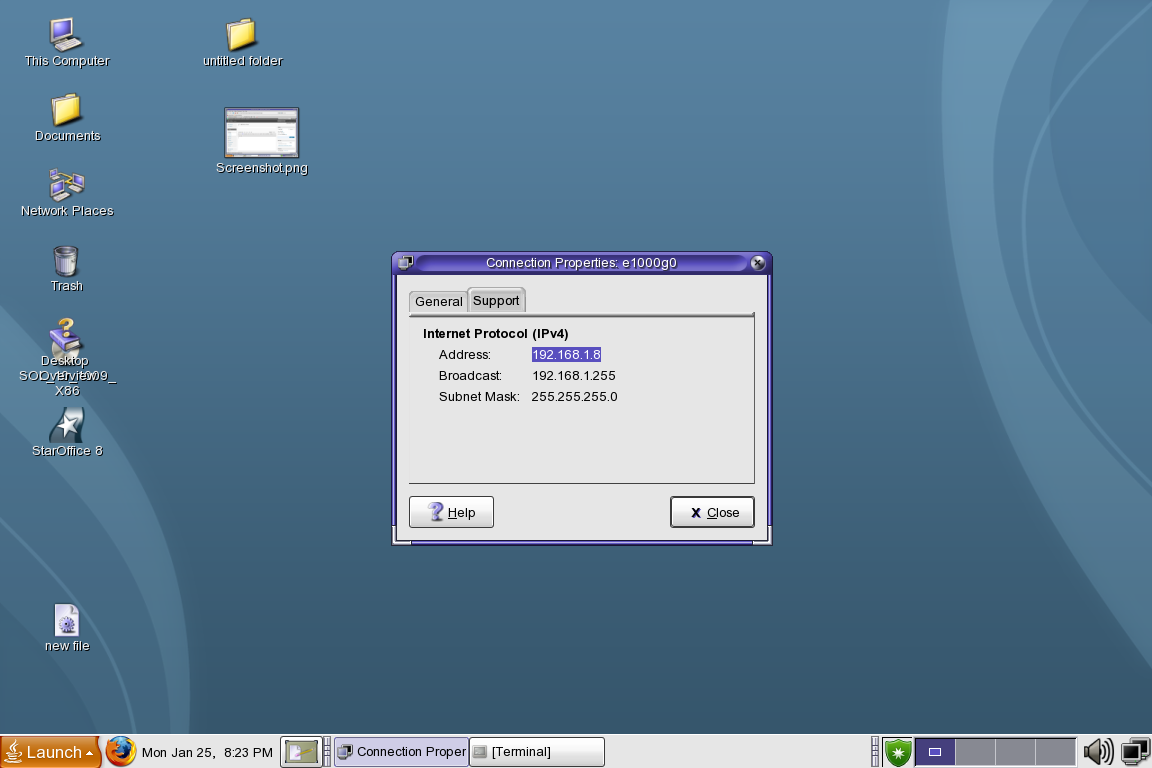 Step 5: Comeout from vmware and ping solaris ip address on windows command prompt.
Step 6 : After ping , open browser and type Enterprise manager URL in url address bar. Now you can easily access EM on windows 7.

Jan 23
Flashback DROP
SQL> select file_id,block_id,bytes from dba_extents where segment_name=’EMP’;
FILE_ID BLOCK_ID BYTES
———- ———- ———-
4 25 65536
SQL> alter table EMP rename to EMPLOYEE;
alter table EMP rename to EMPLOYEE
*
ERROR at line 1:
ORA-00942: table or view does not exist
SQL> conn scott/tiger
Connected.
SQL> alter table EMP rename to EMPLOYEE;
Table altered.
SQL> conn sys/sys@riyadh as sysdba
Connected.
SQL> select file_id,block_id,bytes from dba_extents where segment_name=’EMP’;
no rows selected
SQL> select file_id,block_id,bytes from dba_extents where segment_name=’EMPLOYEE’;
FILE_ID BLOCK_ID BYTES
———- ———- ———-
4 25 65536
Flashback DROP Example :
Step 1
Create user
SQL> show user;
USER is “SYS”
SQL> create user dropper identified by dropper;
User created.
SQL> grant connect,resource to dropper;
Grant succeeded.
Step 2
Create a table, with an index and a constraint and insert a row.
SQL> connect dropper/dropper@riyadh;
Connected.
SQL> create table test(name varchar2(10));
Table created.
SQL> create index test_idx on test(name);
Index created.
SQL> alter table test add(constraint name_u unique(name));
Table altered.
SQL> insert into test values(‘Azar’);
1 row created.
SQL> commit;
Commit complete.
SQL> select * from test;
NAME
———-
Azar
Step 3
Confirm the contents of your schema
SQL> select object_name,object_type from user_objects;
OBJECT_NAME
——————————————————————————–
OBJECT_TYPE
——————-
TEST
TABLE
TEST_IDX
INDEX
SQL> select constraint_name,constraint_type,table_name from user_constraints;
CONSTRAINT_NAME C TABLE_NAME
—————————— – ——————————
NAME_U U TEST
Step 4
Drop the table
SQL> drop table test;
Table dropped.
Step 5
Re-run the queries from step 3.Note that the objects and the constaints do still exist but that they now
have system generated names, all prefixed with BIN$.
SQL> select object_name,object_type from user_objects;
OBJECT_NAME
——————————————————————————–
OBJECT_TYPE
——————-
BIN$Zl4wALngQtKfJL+9mgzJgg==$0
TABLE
BIN$WvYAWvXkQ/qWhSjzqs9UKQ==$0
INDEX
SQL> select constraint_name,constraint_type,table_name from user_constraints;
CONSTRAINT_NAME C TABLE_NAME
—————————— – ——————————
BIN$BBKVasdjRsqyYqne8rM8VQ==$0 U BIN$Zl4wALngQtKfJL+9mgzJgg==$0
Step 6
Query your recycle bin to see the mapping of the original name to the recyclebin names.
SQL> select object_name,original_name,type from user_recyclebin;
OBJECT_NAME ORIGINAL_NAME
—————————— ——————————–
TYPE
————————-
BIN$WvYAWvXkQ/qWhSjzqs9UKQ==$0 TEST_IDX
INDEX
BIN$Zl4wALngQtKfJL+9mgzJgg==$0 TEST
TABLE
Step 7
Query the recycle bin but that you cannot do DML against it.
SQL> select * from “BIN$Zl4wALngQtKfJL+9mgzJgg==$0”;
NAME
———-
Azar
SQL> insert into “BIN$Zl4wALngQtKfJL+9mgzJgg==$0” values (‘Mohd’);
insert into “BIN$Zl4wALngQtKfJL+9mgzJgg==$0” values (‘Mohd’)
*
ERROR at line 1:
ORA-38301: can not perform DDL/DML over objects in Recycle Bin
Step 8
Recover the table with Flashback Drop
SQL> flashback table test to before drop;
Flashback complete.
Step 9
Rerun the step 3.
SQL> select object_name,object_type from user_objects;
OBJECT_NAME
——————————————————————————–
OBJECT_TYPE
——————-
TEST
TABLE
BIN$WvYAWvXkQ/qWhSjzqs9UKQ==$0
INDEX
SQL> select constraint_name,constraint_type,table_name from user_constraints;
CONSTRAINT_NAME C TABLE_NAME
—————————— – ——————————
BIN$BBKVasdjRsqyYqne8rM8VQ==$0 U TEST
Step 10
Rename the index and constraint to the original names.
SQL> alter index “BIN$WvYAWvXkQ/qWhSjzqs9UKQ==$0” rename to name_idx;
Index altered.
SQL> alter table test rename constraint “BIN$BBKVasdjRsqyYqne8rM8VQ==$0” to name_u;
Table altered.
SQL> select object_name,object_type from user_objects;
OBJECT_NAME
——————————————————————————–
OBJECT_TYPE
——————-
TEST
TABLE
NAME_IDX
INDEX
SQL> select constraint_name,constraint_type,table_name from user_constraints;
CONSTRAINT_NAME C TABLE_NAME
—————————— – ——————————
NAME_U U TEST
SQL> select * from test;
NAME
———-
Azar
Jan 18
C:\Documents and Settings\mazar>set oracle_sid=riyadh
C:\Documents and Settings\mazar>sqlplus
SQL*Plus: Release 10.2.0.1.0 – Production on Mon Jan 18 11:17:37 2010
Copyright (c) 1982, 2005, Oracle. All rights reserved.
Enter user-name: sys/sys as sysdba
Connected to:
Oracle Database 10g Enterprise Edition Release 10.2.0.1.0 – Production
With the Partitioning, OLAP and Data Mining options
Step 1
Ensure that the database in archivelog mode.
Archivelog mode is a prerewuistite for enabling flashback database.
SQL> select log_mode from v$database;
LOG_MODE
————
ARCHIVELOG
Step 2
Set up a flash recovery area.
The flash recovery area is the location for the flashback logs. YOu have no control over them other than setting the flah recovery area directory and limiting its size. It is controlled with two instance paramenters: DB_RECOVERY_FILE_DEST specifies the destination directory;
DB_RECOVERY_FILE_DEST_SIZE restricts that the flash recovery area is used for purposes other than flashback logs and it will need to be sized appropriately.
SQL> show parameter db_recovery_file_dest;
NAME TYPE VALUE
———————————— ———– ——————————
db_recovery_file_dest string D:\flashrecovery
db_recovery_file_dest_size big integer 2G
SQL> alter system set db_recovery_file_dest_size=4G;
System altered.
Step 3
Set the lifespan for the flashback retention target.
This setting is controlled by the DB_FLASHBACK_RETENTION_TARGET instance parameter, which specifies a time in minutes (the default is one day).
The flashback log space is reused in a circular fashion, older data being overwritten by newer data.This parameter instructs Oracle to keep flashback data for a certan cumber of minutes before overwriting it
SQL> alter system set db_flashback_retention_target=240;
System altered.
It is only a target(four hour in this example), and if the flash recovery area is undersized, Oracle may not be able to keep it.but is principle, you should be able to flash back to any time within this target.
Step 4
Cleanly Shutdown the database and mount
SQL> shutdown immediate;
Database closed.
Database dismounted.
ORACLE instance shut down.
SQL> startup mount
ORACLE instance started.
Total System Global Area 247463936 bytes
Fixed Size 1248332 bytes
Variable Size 104858548 bytes
Database Buffers 134217728 bytes
Redo Buffers 7139328 bytes
Database mounted.
Step 5
Enable flashback logging, while in mount mode.
SQL> alter database flashback on;
Database altered.
This will start the RVWR process and allocate a flashback buffer in the SGA. The process startup will be automatic from now on.
Step 6
Open the database.
SQL> alter database open;
Database altered.
Logging of data block images from the database buffer cache to the flashback buffer will be enabled from now on.
Step 7
Check Whether Flashback On or Off.
SQL> select flashback_on from v$database;
FLASHBACK_ON
——————
YES


Database Administrator, Blogger, Contributor


 DBA
DBA 