Skip to content

ORA-01045: user TESTME lacks CREATE SESSION privilege; logon denied

I just review a answer from OTN forums.

I tested here

SQL> create role testme_role identified by test;

Role created.

SQL> grant create session to testme_role;

Grant succeeded.

SQL> create user testme identified by testme;

User created.

SQL> grant testme_role to testme;

Grant succeeded.

SQL> conn testme/testme;
ERROR:
ORA-01045: user TESTME lacks CREATE SESSION privilege; logon denied

Warning: You are no longer connected to ORACLE.

The issue is caused by the fact that the roles are not active in the user's session. 
Although the roles have been granted, they may not be default roles

SQL> select * from dba_role_privs where grantee='TESTME';

GRANTEE                        GRANTED_ROLE                   ADM DEF
------------------------------ ------------------------------ --- ---
TESTME                         TESTME_ROLE                    NO  YES
SQL> SELECT * FROM DBA_SYS_PRIVS WHERE GRANTEE='CONNECT';

GRANTEE                        PRIVILEGE                                ADM
------------------------------ ---------------------------------------- ---
CONNECT                        CREATE SESSION                           NO

SQL> grant create session to testme;

Grant succeeded.

SQL> conn testme/testme;
Connected.
SQL> select * from session_roles;

no rows selected

SQL> create table abc(empno number);
create table abc(empno number)
*
ERROR at line 1:
ORA-01031: insufficient privileges
SQL> conn / as sysdba
Connected.
SQL> grant create table to testme_role;

Grant succeeded.

SQL> conn testme/testme
Connected.
SQL> set role testme_role;
set role testme_role
*
ERROR at line 1:
ORA-01979: missing or invalid password for role 'TESTME_ROLE'

SQL> set role testme_role identified by test;

Role set.

SQL> select * from session_roles;

ROLE
------------------------------
TESTME_ROLE

SQL> create table abc(empno number);

Table created.

SQL>

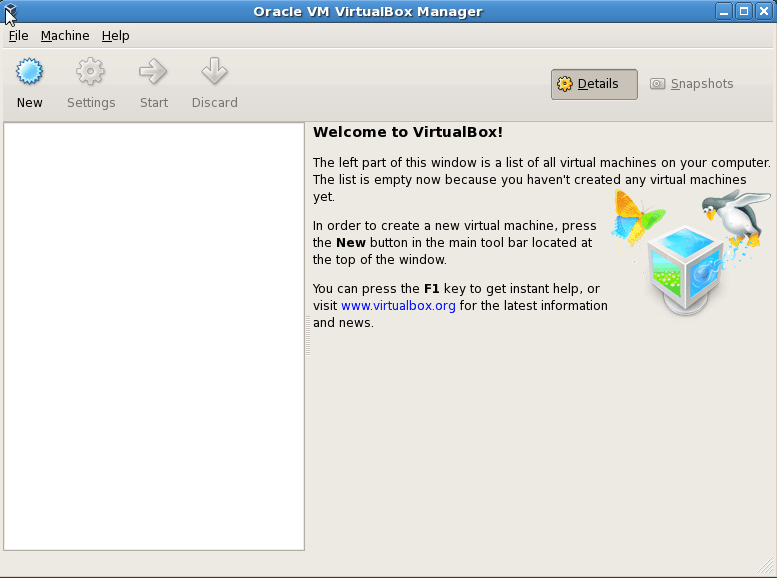
Hanging the process while installing Oracle Solaris 64bit on virtualbox

If you’re a beginner to install Oracle Solaris 64bit on Virtualbox, You may be get some hanging process while installing solaris at beginning stage like below

SunOS Release 5.10 Version Generic_14.... 64-bit

So They may be more confuse what I mistake, they may thought Everything I was selected Okay like

If you plan to install Solaris 64bit,  We must want to enable VT-x/AMD-v But It was default selected when you’re chooses subject page Solaris 64bit, then they may think what mistake, take a few more hours to analyze this one.

But Answer is simple .

You may select RAM memory size max 1GB RAM while configuration. But Oracle Solaris needs minimum 1536MB memory. then only you start the Oracle Solaris installation page…


csscan: error while loading shared libraries: libnnz10.so: cannot open shared object file

When i trying to execute csscan utility for Oracle 10g home ,I have faced the below errors

[oracle@netbackuptest ~]$ csscan
csscan: error while loading shared libraries: libnnz10.so: cannot open shared object file: No such file or directory

I try to fix this error

[oracle@netbackuptest ~]$  ldd `which sysresv`
        linux-vdso.so.1 =>  (0x00007fff33d89000)
        libclntsh.so.11.1 => /u01/app/oracle/product/11.2.0/dbhome_1/lib/libclntsh.so.11.1 (0x00002b026dc36000)
        libnnz11.so => /u01/app/oracle/product/11.2.0/dbhome_1/lib/libnnz11.so (0x00002b0270260000)
        libdl.so.2 => /lib64/libdl.so.2 (0x0000003495000000)
        libm.so.6 => /lib64/libm.so.6 (0x0000003494c00000)
        libpthread.so.0 => /lib64/libpthread.so.0 (0x0000003495400000)
        libnsl.so.1 => /lib64/libnsl.so.1 (0x0000003498800000)
        libc.so.6 => /lib64/libc.so.6 (0x0000003494800000)
        libaio.so.1 => /usr/lib64/libaio.so.1 (0x00002b027063b000)
        /lib64/ld-linux-x86-64.so.2 (0x0000003494400000)

Everything was okay.but I can see Oracle 11g home path was default on bash_profile environment. So in this case, I need to set oracle 10g home and library path.

[oracle@netbackuptest ~]$ export ORACLE_HOME=/u02/oracle/product/10.2.0/db_1
[oracle@netbackuptest ~]$ export PATH=$ORACLE_HOME/bin
[oracle@netbackuptest ~]$ LD_LIBRARY_PATH=$ORACLE_HOME/lib:/usr/lib; export LD_LIBRARY_PATH
[oracle@netbackuptest ~]$ export CLASSPATH=$ORACLE_HOME/JRE:$ORACLE_HOME/jlib:$ORACLE_HOME/rdbms/jlib
[oracle@netbackuptest ~]$ csscan

Character Set Scanner v2.1 : Release 10.2.0.0.0 - Production on Sat Oct 8 03:39:43 2011

Copyright (c) 1982, 2005, Oracle.  All rights reserved.

Username

Now I can able to run csscan utility.

Oracle Latest release notice Big Data Appliance, NoSQL

Oracle Recently released some new products

Look here

Oracle Big Data Appliance Latest

Oracle Big Data Appliance

Oracle NoSql Database

Oracle Loader for Hadoop

Oracle R enterprise.

Oracle Magazine – November/December 2011‏

Oracle Magazine – November/December 2011‏ issues was released.

Get it from here.

Something special was here…

http://www.oraclemagazine-digital.com/oraclemagazine/20111112emea?sub_id=y9Mvuy2s8SaT&u1=loadspring#pg40

Watch Oracle Open world live session on youtube

If you’re missed out on OOW11, SF, you can switch on to youtube  and watch OOW11 live session on youtube.

Session Schedule

http://www.oracle.com/openworld/live/index.html?origref=http://www.oracle.com/us/dm/h2fy11/seo100009338-wwmk11054630mpp011c003-496766.html

OOW 11 Live session at Youtube

http://www.youtube.com/oracle

Oracle EBS 12.1.1 three tier step by step installation guide on Linux

Yes I am still working as a Core DBA, not act like as a Apps DBA. But I got a some opportunity to work for EBS Environment. So here First I installed the three tier EBS 12.1.1 on Linux machine. In this document I just demonstrate How do we install Oracle EBS 12.1.1 on Linux machine. I hope It may very useful for who willing to learn EBS installation. Just review my installation document. Hope you’re all like this document…

Download PDF Document here.

Oracle EBS 12.1.1. three tier step by step installation guide on Linux

Download right click on this url, choose save target as and save it on your local machine.

Enabling and Disabling Database feature after installation using chopt tool

When you install Oracle Database, some options are enabled and others are disabled. To enable or disable a particular database feature for an Oracle home, shut down the database and use the chopt tool.

The chopt tool is a command-line utility that is located in the directory ORACLE_HOME/bin. It uses the following syntax, where db_option is the option whose status you want to modify:

chopt [enable | disable] db_option

Refer :

http://bit.ly/p1CPxR

Example : Disable Data mining options

[oracle@netbackuptest bin]$ pwd
/u01/app/oracle/product/11.2.0/dbhome_1/bin
[oracle@netbackuptest bin]$ chopt disable dm
Writing to /u01/app/oracle/product/11.2.0/dbhome_1/install/disable_dm.log…
%s_unixOSDMakePath% -f /u01/app/oracle/product/11.2.0/dbhome_1/rdbms/lib/ins_rdbms.mk dm_off
%s_unixOSDMakePath% -f /u01/app/oracle/product/11.2.0/dbhome_1/rdbms/lib/ins_rdbms.mk ioracle[oracle@netbackuptest bin]$

Book Review : Programming Android

Recently I have received Programming Android  book from oreilly publications for book review. I have interest to review this books because of this is the word now a days very popular across this world. What is Android? Android is a software stack for mobile devices that includes an operating system, middleware and key applications. The Android SDK provides the tools and APIs necessary to begin developing applications on the Android platform using the Java programming language. Features :

  • Application framework enabling reuse and replacement of components
  • Dalvik virtual machine optimized for mobile devices
  • Integrated browser based on the open source WebKit engine
  • Optimized graphics powered by a custom 2D graphics library; 3D graphics based on the OpenGL ES 1.0 specification (hardware acceleration optional)
  • SQLite for structured data storage
  • Media support for common audio, video, and still image formats (MPEG4, H.264, MP3, AAC, AMR, JPG, PNG, GIF)
  • GSM Telephony (hardware dependent)
  • Bluetooth, EDGE, 3G, and WiFi (hardware dependent)
  • Camera, GPS, compass, and accelerometer (hardware dependent)
  • Rich development environment including a device emulator, tools for debugging, memory and performance profiling, and a plugin for the Eclipse IDE.
Why this book need for you?
This is the book guideline and explain about what is android? how do we use this product? and also Are you developer? If you want to know programming about Andorid , I am sure this is the book right choice for you. Here this book guide you , where you can start from ? and how do we install SDK? and also learn android programming
Android Developer Download

I mentioned this book written by Zigurd Mednieks,Laird Dornin,Blake Meike,Mausmi Nakamura.
This is the book having contents of  18 chapters.

Chapter 1 Your Toolkit
Chapter 2 Java for Android
Chapter 3 The Ingredients of an Android Application
Chapter 4 Getting Your Application into Users’ Hands
Chapter 5 Eclipse for Android Software Development
Chapter 6 Effective Java for Android
Chapter 7 Building a View
Chapter 8 Fragments and Multiplatform Support
Chapter 9 Drawing 2D and 3D Graphics
Chapter 10 Handling and Persisting Data
Chapter 11 A Framework for a Well-Behaved Application
Chapter 12 Using Content Providers
Chapter 13 Exploring Content Providers
Chapter 14 Multimedia
Chapter 15 Location and Mapping
Chapter 16 Sensors, NFC, Speech, Gestures, and Accessibility
Chapter 17 Communication, Identity, Sync, and Social Media
Chapter 18 The Android Native Development Kit (NDK)

What do you learn from this book?

What does it take to build well-engineered Android applications? Explore Android’s core building blocks and APIs in depth with this authoritative guide, and learn how to create compelling apps that work on a full range of Android devices. You’ll work with proven approaches to app design and implementation—including application frameworks that you can use as a starting point for your own projects. Delve into sensors, native development, 3D graphics, and many other topics, and discover how to build apps on the platform of your choice. If you’re an intermediate to advanced programmer, you’ll learn how to make great Android apps.

  • Learn how to use the Android SDK with the Eclipse IDE
  • Apply advanced Java concepts regardless of your experience with the language
  • Create an Android user interface that’s captivating and easy to navigate
  • Use the Fragment API for tablet user interfaces
  • Make your application compatible with Honeycomb and earlier versions
  • Understand Android’s unique database design issues and the role of SQLite
  • Use sensors and gestures to expand your app’s input beyond just tapping and scrolling
  • Explore Android APIs for multimedia, location, communication, NFC, and other applications

I recommend this book for who willing to learn programming about android, this book will helpful for you.

mount Linux sharing folder on another linux machine using nfs

I have five Linux machine, I want to create one folder on one Linux machine and share this folder on remaining Linux machine? how do we do?

Use NFS. I don’t want explain more about NFS. Here I am going to show how do we do?

If you want to share one folder of linux (1) machine,

[root@siebelfs ~]# mkdir /test

Create test file

[root@siebelfs test]# vi test.conf
azar

and then Save it.

You need to check it out Whether portmap and nfs running or not

[root@siebelfs ~]#  chkconfig --list portmap
portmap         0:off   1:off   2:off   3:on    4:on    5:on    6:off
[root@siebelfs ~]# chkconfig portmap on
[root@siebelfs ~]#  chkconfig --list portmap
portmap         0:off   1:off   2:on    3:on    4:on    5:on    6:off
[root@siebelfs ~]# ps ax | grep portmap
 3228 ?        Ss     0:00 portmap
 4491 pts/1    R+     0:00 grep portmap

For NFS

[root@siebelfs ~]# chkconfig --list nfs
nfs             0:off   1:off   2:off   3:off   4:off   5:off   6:off
[root@siebelfs ~]# chkconfig nfs on
[root@siebelfs ~]# chkconfig --list nfs
nfs             0:off   1:off   2:on    3:on    4:on    5:on    6:off
And then, restart portmap and nfs service
[root@siebelfs ~]# service portmap restart
Stopping portmap:                                          [  OK  ]
Starting portmap:                                          [  OK  ]
[root@siebelfs ~]# service nfs restart
Shutting down NFS mountd:                                  [FAILED]
Shutting down NFS daemon:                                  [FAILED]
Shutting down NFS quotas:                                  [FAILED]
Shutting down NFS services:                                [FAILED]
Starting NFS services:                                     [  OK  ]
Starting NFS quotas:                                       [  OK  ]
Starting NFS daemon:                                       [  OK  ]
Starting NFS mountd:                                       [  OK  ]
[root@siebelfs ~]# ps ax | grep nfs
 4664 ?        S<     0:00 [nfsd4]
 4666 ?        S      0:00 [nfsd]
 4667 ?        S      0:00 [nfsd]
 4668 ?        S      0:00 [nfsd]
 4669 ?        S      0:00 [nfsd]
 4670 ?        S      0:00 [nfsd]
 4671 ?        S      0:00 [nfsd]
 4672 ?        S      0:00 [nfsd]
 4673 ?        S      0:00 [nfsd]
 4691 pts/1    R+     0:00 grep nfs
[root@siebelfs ~]# chkconfig --list nfs
nfs             0:off   1:off   2:on    3:on    4:on    5:on    6:off
[root@siebelfs ~]# ps ax | grep mountd
 4676 ?        Ss     0:00 rpc.mountd
 4694 pts/1    R+     0:00 grep mountd
[root@siebelfs ~]# chkconfig --list nfs
nfs             0:off   1:off   2:on    3:on    4:on    5:on    6:off
[root@siebelfs ~]# ps ax | grep portmap
 4585 ?        Ss     0:00 portmap
 4699 pts/1    R+     0:00 grep portmap

Now We need to add shared folder directory in /etc/exports file like below , Here I have used four linux machine, If I missed any ipaddress of client linux machine
you can not able to access this folder.

[root@siebelfs ~]# vi /etc/exports
/test ipaddress(rw)
/test ipaddress(rw)
/test ipaddress(rw)
/test ipaddress(rw)
and then save it.
Again restart nfs service only.
[root@siebelfs ~]# service nfs restart
Shutting down NFS mountd:                                  [  OK  ]
Shutting down NFS daemon:                                  [  OK  ]
Shutting down NFS quotas:                                  [  OK  ]
Shutting down NFS services:                                [  OK  ]
Starting NFS services:                                     [  OK  ]
Starting NFS quotas:                                       [  OK  ]
Starting NFS daemon:                                       [  OK  ]
Starting NFS mountd:                                       [  OK  ]

Now Go to another linux machine (client).
configure portmap and nfs like above. but don’t add any line in /etc/exports file.(in case if you want to
share this machine folder for other client machine , you can add line like above).
here 10.1.x.xx — ipaddress of shared folder machine.

[root@siebelas ~]# mkdir /test
[root@siebelas ~]# mount -t nfs -o rw 10.1.X.XX:/test /test
[root@siebelas ~]# cd /test
[root@siebelas test]# ls
test.conf