Skip to content

Posts from the ‘EBS’ Category

oracle.apps.fnd.isg.common.error.ISGException: Could not find the package.

When you’re trying to deploy rest service , you might be get the below issue


Error in the generating PLSQL package oracle.apps.fnd.isg.common.error.ISGException: Error in the generating PLSQL package at oracle.apps.fnd.isg.app.common.designer.db.DBServiceDesigner.generateArtifacts(DBServiceDesigner.java:494) at oracle.apps.fnd.isg.app.ebs.designer.db.DBRestDesigner.generateService(DBRestDesigner.java:52) at oracle.apps.fnd.isg.app.common.designer.AbstractServiceDesigner.designService(AbstractServiceDesigner.java:34) at oracle.apps.fnd.isg.app.common.admin.ServiceAdministrator.generateService_Internal(ServiceAdministrator.java:453) at oracle.apps.fnd.isg.app.common.admin.ServiceAdministrator.generateNdeployService(ServiceAdministrator.java:154) at oracle.apps.fnd.isg.mgmt.server.AdminService$1GenerateNDeployTask.execute(AdminService.java:971) at oracle.apps.fnd.isg.mgmt.server.AdminService$1GenerateNDeployTask.execute(AdminService.java:953) at oracle.apps.fnd.isg.mgmt.server.ISGServerMBean$ThreadedTaskRunner.run(ISGServerMBean.java:114) at java.lang.Thread.run(Thread.java:745) Caused by: oracle.apps.fnd.isg.common.error.ISGException: Could not find the package. at oracle.apps.fnd.isg.app.common.designer.db.DBServiceDesigner.currentSchemaName(DBServiceDesigner.java:677) at oracle.apps.fnd.isg.app.common.designer.db.DBServiceDesigner.getSchemaName(DBServiceDesigner.java:616) at oracle.apps.fnd.isg.app.common.designer.db.DBServiceDesigner.generateArtifacts(DBServiceDesigner.java:127) … 8 more

Solution :

Please check your internal name, the internal should be a package name, it should not be an “apps.packagename”. remove apps from your pls file and upload again.


sqlplus: error while loading shared libraries: libclntsh.so.10.1: cannot open shared object file

When you’re doing clone on the Redhat 7, you may get the below error


“sqlplus: error while loading shared libraries: libclntsh.so.10.1: cannot open shared object file”


This is bug as per note Oracle E-Business Suite Installation and Upgrade Notes Release 12 (12.2) for Linux x86-64 (Doc ID 1330701.1)


you need to install “binutils” rpm package version as per noted in the documentation.

After installed also, you still get an error, you please reboot the machine and test.


Rest service configuration EBS 12.2

Follow the articles

Installing Oracle E-Business Suite Integrated SOA Gateway, Release 12.2 (Doc ID 1311068.1)

  • Part B: Configuring Oracle E-Business Suite REST Services

If you can’t generate Ildt file after configured, you need to follow this document install PERL

https://docs.oracle.com/cd/E26401_01/doc.122/e20925/T511175T543269.htm#5464758


REST Service for EBS 12.1

Apply all the patches as noted in Oracle E-Business Suite Integrated SOA Gateway 12.1.3 REST Services Update (Doc ID 1998019.1)


Why EBS URL not working after changed IP Address

Why EBS URL not working after changed IP Address?


Your system was configured using HOSTNAME of the machine, you plan to change the IP address of that machine, you changed and restarted the application also, Still Application URL not working, Why?

Stop the application & run autoconfig on the system and start the application, it will work.

Capture FND log error message

Step 1:

select max(log_sequence) from fnd_log_messages

Note the sequence number

Step 2:

Log in as a system administator

Profile –> System

FND: Debug Log Enabled –> Yes

FND: Debug Log Level  –> Statement or options

FND: Debug Log Module –> %


Step 3:

Reproduce the issue


Step 4:

select max(log_sequence) from fnd_log_messages


Step 5:

select * from fnd_log_messages where log_sequence between “first one” and ” last sequence”


Spool the file and analyze the log file if you can able to find any issue with this file.


RC-00203 RC-50004 AC-00005

I am trying to clone one of our production machines after I upgraded the database to 12.1.0.2.  This clone machine prepared by Veeam Backup. I think the below solution is applicable for VM clone also. Here While I am doing adcfgclone.pl steps, I am getting below issue

done: Port Pool 65 is free
Report file located at /appsutil/out/portpool.lst
RC-00203: Unable to create/write to file /appsutil/out/portpool.lst.
Complete port information available at /appsutil/out/portpool.lst
RC-50004: Error occurred in CloneContext:
AC-00005: No write permissions for creating the Context file – /appsutil/temp.xml
Raised by oracle.apps.ad.context.AppsContext
Check Clone Context logfile /u01/app/oracle/db/tech_st/12c/appsutil/clone/bin/CloneContext_0220023028.log for details.

ERROR: Context creation not completed successfully.
For additional details review the file /tmp/adcfgclone_23246.err if present.


Solution :

What I did


  1. I run adpreclone.pl on both application & database tier
  2. System Team Clone the machine using Veeam Backup
  3. Then I restored the database using backup copy, then I rename the database.
  4. Now I ran adcfgclone.pl steps, I am getting above issue.

On Database Tier node,

1. Set the ORACLE_HOME Path  environment on database tier, Database SID should be a new SID (renamed one)

2. Change hostname & IP address on new server

3. Set TNS_ADMIN Path –>

(copy the Production TNS _ADMIN path, to New path & modify the tnsnames.ora & listener.ora with new SID & hostname)

4. Start the listener

5. Once listener started, create a context file using by

perl adbldxml.pl

6. run auto config

perl adconfig.pl

7. Database configuration part finished

8. Go to application tier,

perl adcfgclone.pl appsTier


Can’t locate ADX/util/Sysutil.pm in @INC

When  I am trying to change hostname for EBS environment,  I used below command to remove server, I am getting below issues

[oraprod@ebsprodcl appsutil]$ ls
bin html install java LEBPROD_ebsprodleb.xml log media out perl scripts sql temp template
[oraprod@ebsprodcl appsutil]$ perl ./bin/adgentns.pl appspass=xxxxxxxxxxxx contextfile=/u01/app/oracle/db/tech_st/12c/appsutil/LEBPROD_ebsprodleb.xml -removeserver
Can’t locate ADX/util/Sysutil.pm in @INC (@INC contains: /u01/app/oracle/db/tech_st/12c/perl/lib/site_perl/5.14.1/x86_64-linux-thread-multi /u01/app/oracle/db/tech_st/12c/perl/lib/site_perl/5.14.1 /u01/app/oracle/db/tech_st/12c/perl/lib/5.14.1/x86_64-linux-thread-multi /u01/app/oracle/db/tech_st/12c/perl/lib/5.14.1 .) at ./bin/adgentns.pl line 82.
BEGIN failed–compilation aborted at ./bin/adgentns.pl line 82.

Solution :

Please check the perl path

& Environment also was set.

.bash_profile

PATH=$HOME/bin:/u01/app/oracle/db/tech_st/12c/perl/bin:$PATH
export PATH

. /u01/app/oracle/db/tech_st/12c/EBSPROD_ebsprodleb.env

The security token could not be authenticated or authorized

Client received SOAP Fault from server: The security token could not be authenticated or authorized Please see the server log to find more detail regarding the exact cause of the failure.Error while calling Oracle web service.

Solution:

SOAP Wsdl granted user password might be changed. Please check


Concurrent program migration

If your developer asked you to migrate concurrent program from dev or UAT to production, As a system administrator you need to do follow steps


Example :

Concurrent Program :

Concurrent program name : XX Report for Statement

Shortcut : xx_rep_stat

Application : XX Custom Application


XML Publisher :

Data definition code : xx_rep_stat

Template (rtf) :  XX Report for Statement.rtf


rdf file on the custom top

Report File (rdf): xx_rep_stat.rdf

Step 1: 
On development

System Administrator — > Concurrent  –> Program –> define

Query — > “XX Report for Statement”

Download the ldt file on application tier :

FNDLOAD apps/apps 0 Y DOWNLOAD $FND_TOP/patch/115/import/afcpprog.lct  xx_rep_stat.ldt PROGRAM CONCURRENT_PROGRAM_NAME=’XX_REP_STAT’  APPLICATION_SHORT_NAME=’XXREP’

How to find out application short name :

SELECT fa.application_id “Application ID”,
fat.application_name “Application Name”,
fa.application_short_name “Application Short Name”,
fa.basepath “Basepath”
FROM fnd_application fa,
fnd_application_tl fat
WHERE fa.application_id = fat.application_id
AND fat.language = USERENV(‘LANG’) and fat.application_name =’XX Custom Application’
— AND fat.application_name = ‘Payables’ — <change it>
ORDER BY fat.application_name;

The output — > “XXREP”

Once downloaded ldt file, you please copy to production application server which is concurrent program running server. If its linux, you please use SCP to transfer the file or winscp

Step 2:

On development,

Download the Template

XML Publisher Administrator — >

Query code –> ” xx_rep_stat”

Download the rtf and save it on your desktop

Step 3:

On Production,

Upload the ldt file on production server which you’re copied ldt file.

FNDLOAD apps/apps O Y UPLOAD $FND_TOP/patch/115/import/afcpprog.lct xx_rep_stat.ldt

Once uploaded, you please check on your application whether its uploaded or not


System Administrator — > Concurrent  –> Program –> define

Query — > “XX Report for Statement”


Step 4: 

Transfer the “xx_rep_stat.rdf” file from development custom top report to production custom top report location

Step 5: 

On production application,

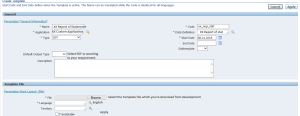
Create data definition and template as same as development

–> create data definition

Once Done Data definition,

–> create Template

Here you please upload that Template file which you’re downloaded from development.

Example :

Create Data Definition :


Create Template
 

Step 6:

Please check with your developer any Objects you need to migrate to production which is related to this report.

If yes, please migrate those objects also from development to production


Step 7: 

Add your report file to related request group


Unable to See the Legal Entity List of Values in the Bank Account Owner Field

A user was tried to select the legal entity list of values in the bank account, It does not appear in LOV.


Solution :

you can review the below support document

R12: CE: Unable to See the Legal Entity List of Values in the Bank Account Owner Field (Doc ID 415529.1)

Note:  I selected “Payable Role” instead of Cash Management