How to Access EM in windows 7 Outside of VMware(Database installed on solaris in vmware)
Step 1: Configure Bridge network on vmware.

Step 2: Login as root user .

Step 3:Login as Oracle user. Check Emctl status whether Enterprise Manager console is running or not, if its not running ,start dbconsole(emctl start dbconsole).You must check listner is running or not.
Lsnrctl>status ‘If its not start ,start listner.

Step 4: Note your solaris Ip address.
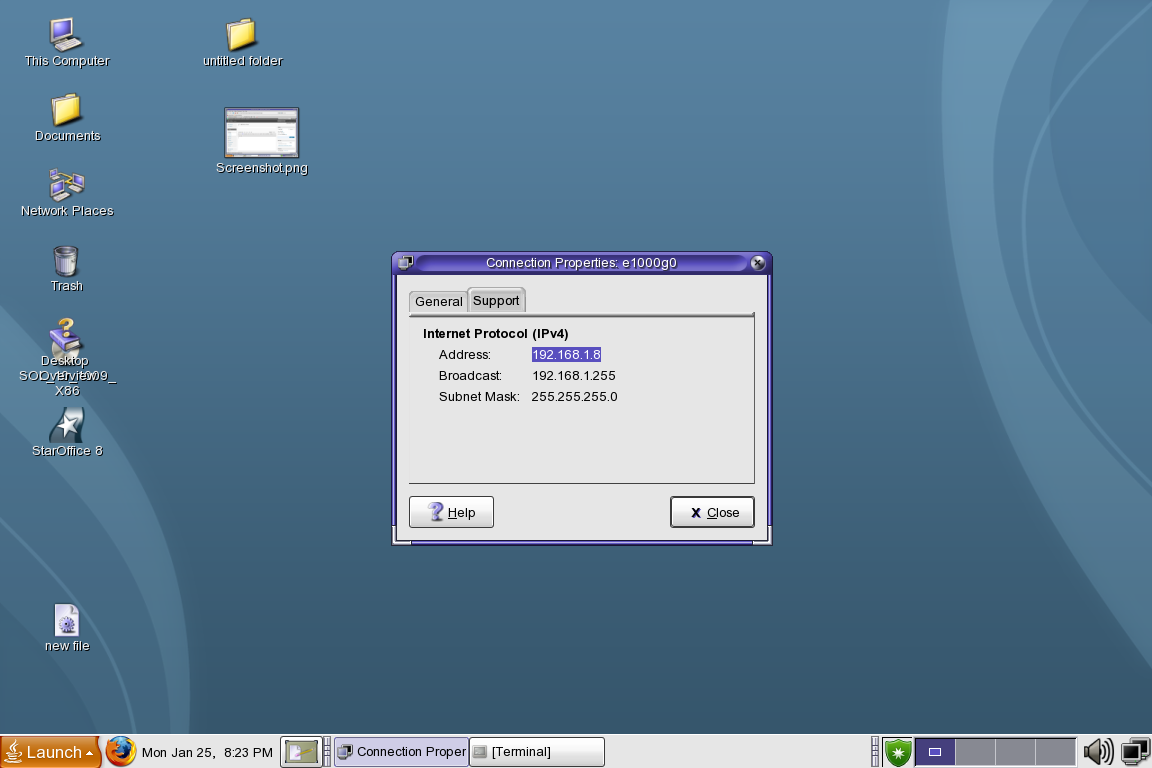 Step 5: Comeout from vmware and ping solaris ip address on windows command prompt.
Step 6 : After ping , open browser and type Enterprise manager URL in url address bar. Now you can easily access EM on windows 7.


 DBA
DBA 
Hi Mohammad
Could you show the code you’ve used in each step?
Thanks for your comment,Sir.
sure.i will publish again what steps i followed.
Azar can i install sqlplus on windows and to access a database running on VMware(linux) on same machine?
If yes can you suggest the steps
Khurana
Yes you must install Oracle client on windows or you can use isqlplus.
Well Done!
Thanks Sir.
hmm nice work…..
Welcome to my blog
Thanks Mr.Khurana
hi . i have installed teradata in vista and oracle10g in vmware in windows xp. how to access teradata from vmware which is outside of vmware
I feel so lucky to find out this great blog. Thank you very much for posting this helpful topic.I really appreciate your work
You’re Welcome 🙂