Skip to content

ORA-28003: password verification for the specified password failed

Hi I want to explain about why ORA-28003 errors occur when you are change the password. because Some of the Oracle users assigned profile for limit password function so in this case you couldnot change your Oracle user password.If you’re not assigned the password profile function, the users can able to change the password easily.

Example :-

SQL> conn sys/sys@azar as sysdba
Connected.
SQL> create user xxx identified by xxx;

User created.

SQL> grant connect to xxx;

Grant succeeded.

SQL> conn xxx/xxx;
Connected.
SQL> alter user xxx identified by test;

User altered.

SQL> conn xxx/test;
Connected.
SQL> conn xxx/xxx;
ERROR:
ORA-01017: invalid username/password; logon denied
Warning: You are no longer connected to ORACLE.

So you can change the password after login users account. The below steps shown How to setup limit password function and then you cannot change password.

Step 1: Create Function
  1  create or replace function pwd_change(
  2  username varchar2,
  3  password varchar2,
  4  old_password varchar2) return boolean is
  5  begin
  6  raise_application_error(-20009,’Error: You cannot change password’);
  7* end;
SQL> /

Function created.

Step 2: Create Profile. This profile will containg limit Password function and then you can apply this profile who are not allowed to change their password.

SQL> create profile testpwd limit password_verify_function pwd_change;

Profile created.

Step 3:  Create  User and assign profile.

SQL> CREATE USER TRIAL IDENTIFIED BY TRIAL DEFAULT TABLESPACE USERS TEMPORARY TABLESPACE TEMP ACCOUNT UNLOCK;

User created.

SQL> grant connect to trial;

Grant succeeded.

SQL> alter user trial profile testpwd;

User altered.

SQL> CONN TRIAL/TRIAL;
Connected.

SQL> alter user TRIAL identified by test replace TRIAL;
alter user TRIAL identified by test replace TRIAL
*
ERROR at line 1:
ORA-28003: password verification for the specified password failed
ORA-20009: Error: You cannot change password

and tried to change the password as sys user ,you cannot.

SQL> conn sys/sys@azar as sysdba
Connected.
SQL> alter user trial identified by test;
alter user trial identified by test
*
ERROR at line 1:
ORA-28003: password verification for the specified password failed
ORA-20009: Error: You cannot change password.

How to Fix this Error If you want to change the password.

Conn sys user.

SQL> conn sys/sys@azar as sysdba
Connected.
SQL> select profile from dba_users where username=’TRIAL’;

PROFILE
——————————
TESTPWD

SQL> select RESOURCE_NAME,RESOURCE_TYPE,LIMIT FROM DBA_PROFILES WHERE PROFILE=’TESTPWD’ AND RESOURCE_NAME=’PASSWORD_VERIFY_FUNCTION’;

RESOURCE_NAME                    RESOURCE
——————————– ——–
LIMIT
—————————————-
PASSWORD_VERIFY_FUNCTION         PASSWORD
PWD_CHANGE
SQL> ALTER PROFILE TESTPWD LIMIT PASSWORD_VERIFY_FUNCTION NULL;

Profile altered.

SQL> alter user trial identified by test;

User altered.

SQL> conn trial/test;
Connected.

Host Credentials Oracle EM

When you’re going to maintain your backup through Oracle Enterprise manager, it will ask Host Credentials username and Password.

Most of the Oracle users asked What is this one Either Database username  or anything else?

I simply Replied This is Your server OS username and password.

Ok.But when i put the Server OS administrator username and password , It shows Validataion Error, why its happen and How to fix it?

If Windows Server,

Step 1: Go to Start —> Run

Step 2:type secpol.msc /s        –> Local Security Policy window appear.

Step 3: here

Left Side panel ->Local Policies -> User Rights Assignment  <– Enter

Right Side Panel -> Log on as a batch job –> here Double Click and Add Administrator User.

Now you can access your backup maintainence  through Oracle Enterprise Manager.

Redo Transport Services Overview

I just want to share about redo transport services here…

Unable to determine local host from URL REPOSITORY_UR : Oracle EM

I tried to start my dbconsole ,its not working following message occur when i start a dbconsole…

Unable to determine local host from URL REPOSITORY_URL=http://ace-brokers.ace-in
s.com:%EM_UPLOAD_PORT%/em/upload/

So I fixed for these above problem here and then ,it’s working fine..

C:\Documents and Settings\Administrator>set oracle_home=d:\oracle\product\10.2.0\db_2

C:\Documents and Settings\Administrator>set oracle_sid=broker

C:\Documents and Settings\Administrator>emca -config dbcontrol db -repos recreate

STARTED EMCA at Apr 4, 2010 11:53:46 AM
EM Configuration Assistant, Version 10.2.0.1.0 Production
Copyright (c) 2003, 2005, Oracle.  All rights reserved.

Enter the following information:
Database SID: broker
Database Control is already configured for the database broker
You have chosen to configure Database Control for managing the database broker
This will remove the existing configuration and the default settings and perform
 a fresh configuration
Do you wish to continue? [yes(Y)/no(N)]: y
Listener port number: 1521
Password for SYS user:
Password for DBSNMP user:
Password for SYSMAN user:
Password for SYSMAN user: Email address for notifications (optional): mazar@ace
ins.com
Outgoing Mail (SMTP) server for notifications (optional): mazar@ace-ins.com
—————————————————————–

You have specified the following settings

Database ORACLE_HOME ……………. D:\oracle\product\10.2.0\db_2

Database hostname ……………. ace-brokers.ace-ins.com
Listener port number ……………. 1521
Database SID ……………. broker
Email address for notifications …………… mazar@ace-ins.com
Outgoing Mail (SMTP) server for notifications …………… mazar@ace-ins.com

—————————————————————–
Do you wish to continue? [yes(Y)/no(N)]: y
Apr 4, 2010 11:56:12 AM oracle.sysman.emcp.EMConfig perform
INFO: This operation is being logged at D:\oracle\product\10.2.0\db_2\cfgtoollog
s\emca\BROKER\emca_2010-04-04_11-53-46-AM.log.
Apr 4, 2010 11:56:21 AM oracle.sysman.emcp.util.DBControlUtil stopOMS
INFO: Stopping Database Control (this may take a while) …
Apr 4, 2010 11:56:23 AM oracle.sysman.emcp.EMReposConfig dropRepository
INFO: Dropping the EM repository (this may take a while) …
Apr 4, 2010 12:01:39 PM oracle.sysman.emcp.EMReposConfig invoke
INFO: Repository successfully dropped
Apr 4, 2010 12:01:40 PM oracle.sysman.emcp.EMReposConfig createRepository
INFO: Creating the EM repository (this may take a while) …
Apr 4, 2010 12:03:40 PM oracle.sysman.emcp.EMReposConfig invoke
INFO: Repository successfully created
Apr 4, 2010 12:03:46 PM oracle.sysman.emcp.util.DBControlUtil startOMS
INFO: Starting Database Control (this may take a while) …
Apr 4, 2010 12:04:26 PM oracle.sysman.emcp.EMDBPostConfig performConfiguration
INFO: Database Control started successfully
Apr 4, 2010 12:04:26 PM oracle.sysman.emcp.EMDBPostConfig performConfiguration
INFO: >>>>>>>>>>> The Database Control URL is http://ace-brokers.ace-ins.com:550
1/em <<<<<<<<<<<
Enterprise Manager configuration completed successfully
FINISHED EMCA at Apr 4, 2010 12:04:26 PM

C:\Documents and Settings\Administrator>emctl status dbconsole
Oracle Enterprise Manager 10g Database Control Release 10.2.0.1.0
Copyright (c) 1996, 2005 Oracle Corporation.  All rights reserved.
http://ace-brokers.ace-ins.com:5501/em/console/aboutApplication
Oracle Enterprise Manager 10g is running.
——————————————————————
Logs are generated in directory D:\oracle\product\10.2.0\db_2/ace-brokers.ace-in
s.com_broker/sysman/log

ORA-00119: invalid specification for system parameter LOCAL_LISTENER

Today morning, when i tried to startup our production database, it shows following errors

SQL> STARTUP
ORA-00119: invalid specification for system parameter LOCAL_LISTENER
ORA-00132: syntax error or unresolved network name ‘LISTENER_BROKER’

I was struggled with these erros and finally i was fixed this errors with help of Mr.Surachart opun http://surachartopun.com . He given solutions and fixed easily. Thanks Mr.Surachart.

How was i did it?

My tnsnames file :

BROKER =
  (DESCRIPTION =
    (ADDRESS_LIST =
      (ADDRESS = (PROTOCOL = TCP)(HOST = ipaddress)(PORT = 1521))
    )
    (CONNECT_DATA =
      (SERVICE_NAME = BROKER)
    )
  )

and My listener.ora file.

SID_LIST_LISTENER =
  (SID_LIST =
    (SID_DESC =
      (SID_NAME = PLSExtProc)
      (ORACLE_HOME = D:\oracle\product\10.2.0\db_2)
      (PROGRAM = extproc)
    )
  )

LISTENER =
  (DESCRIPTION_LIST =
    (DESCRIPTION =
      (ADDRESS = (PROTOCOL = TCP)(HOST = ipaddress )(PORT = 1521))
      (ADDRESS = (PROTOCOL = IPC)(KEY = EXTPROC0))
    )
  )

 and now i tired to startup my db, the below error shown.

SQL> STARTUP
ORA-00119: invalid specification for system parameter LOCAL_LISTENER
ORA-00132: syntax error or unresolved network name ‘LISTENER_BROKER’

So i fixed in tnsnames.ora file and then now its working.

LISTENER_BROKER =
  (DESCRIPTION =
    (ADDRESS_LIST =
      (ADDRESS = (PROTOCOL = TCP)(HOST = ipaddress )(PORT = 1521))
    )
    (CONNECT_DATA =
      (SERVICE_NAME = BROKER)
    )
  )

After i fixed this listener_broker in tnsnames.ora file, the database up sucessfully.

SQL> STARTUP
ORACLE instance started.

Total System Global Area 1912602624 bytes
Fixed Size                  2005192 bytes
Variable Size             369100600 bytes
Database Buffers         1526726656 bytes
Redo Buffers               14770176 bytes
Database mounted.
Database opened.

SQL> select name from v$database;

NAME
———
BROKER

RMAN-06059: expected archived log not found

When i try to take backup of archive log all using rman, it shows below error.

RMAN-00571: ========================================================
RMAN-00569: =============== ERROR MESSAGE STACK FOLLOWS ============
RMAN-00571: ========================================================
RMAN-03002: failure of backup command at 03/29/2010 12:20:05
RMAN-06059: expected archived log not found, lost of archived log co
coverability
ORA-19625: error identifying file D:\ORACLE\PRODUCT\10.2.0\FLASH_REC
ROKER\ARCHIVELOG\2010_03_25\O1_MF_1_257_5TQF22HV_.ARC
ORA-27041: unable to open file
OSD-04002: unable to open file
O/S-Error: (OS 2) The system cannot find the file specified.

Here what was the problem is, I was moved the archive log file using cut & paste when FRA location is fulled and then i changed the archive log destination also.In this case when i try to take backup of archive log ,the controlfile will search the oldest file on same location but it was missed, so that the system cannot find the file specified.

But i don’t want previous backup archive log.SO i try to fix following steps,Its ok now.

Step 1:

rman>crosscheck archivelog all;

Step 2:

rman>delete expired archivelog all;

Step 3:

rman>backup archivelog all;

input archive log thread=1 sequence=647 recid=400 stamp=714934627
channel ORA_DISK_1: starting piece 1 at 29-MAR-10
channel ORA_DISK_1: finished piece 1 at 29-MAR-10
piece handle=H:\RMAN\BROKER\BROKER714934764_S14_S1 tag=TAG20100329T165708 commen
t=NONE
channel ORA_DISK_1: backup set complete, elapsed time: 00:01:07
Finished backup at 29-MAR-10

Starting Control File and SPFILE Autobackup at 29-MAR-10
piece handle=D:\ORACLE\PRODUCT\FLASHRECOVERY\BROKER\AUTOBACKUP\2010_03_29\O1_MF_
S_714934832_5V1DN201_.BKP comment=NONE
Finished Control File and SPFILE Autobackup at 29-MAR-10.

Now backup finished.

Solaris installation on Vmware

Step 1 : open your vmware, click new virtual machine and then new window will be appear.Choose typical and click next.

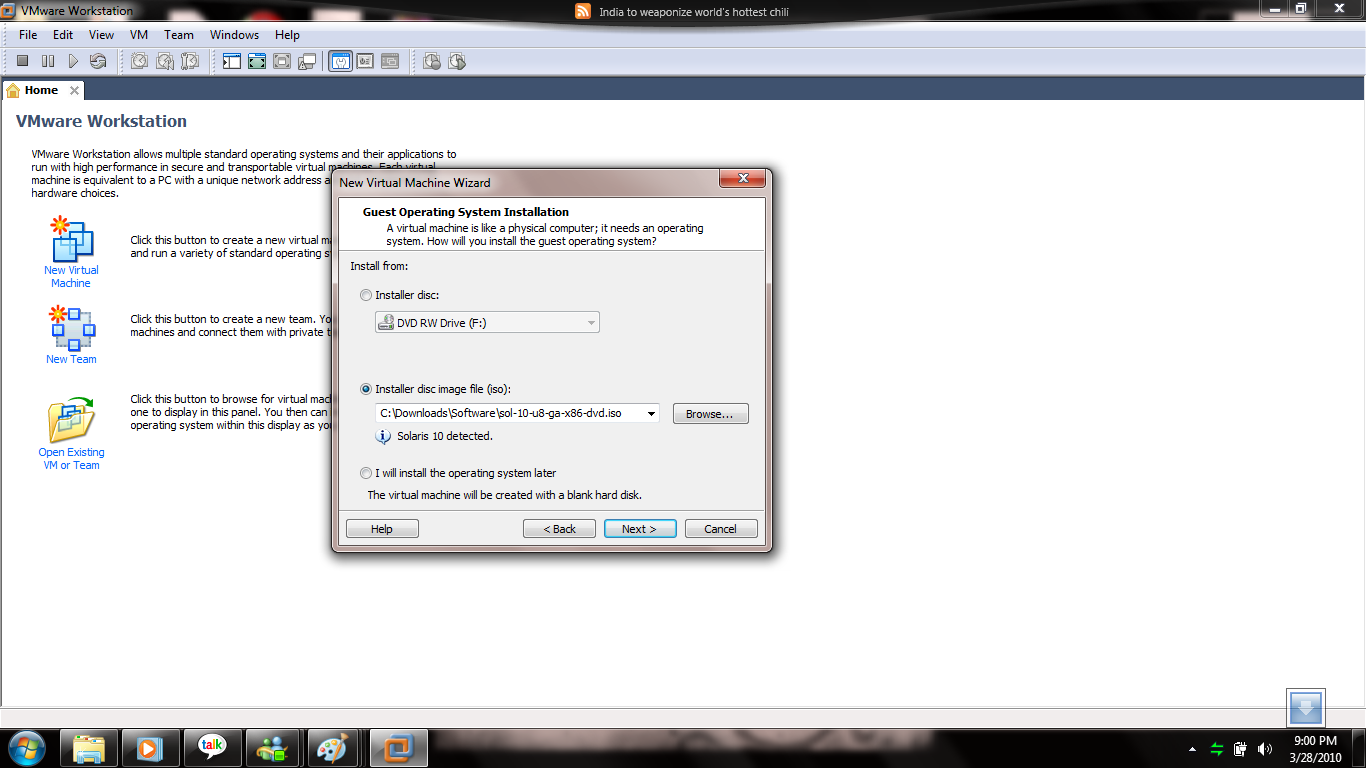
Step 2 : Here choose your operating system iso file.

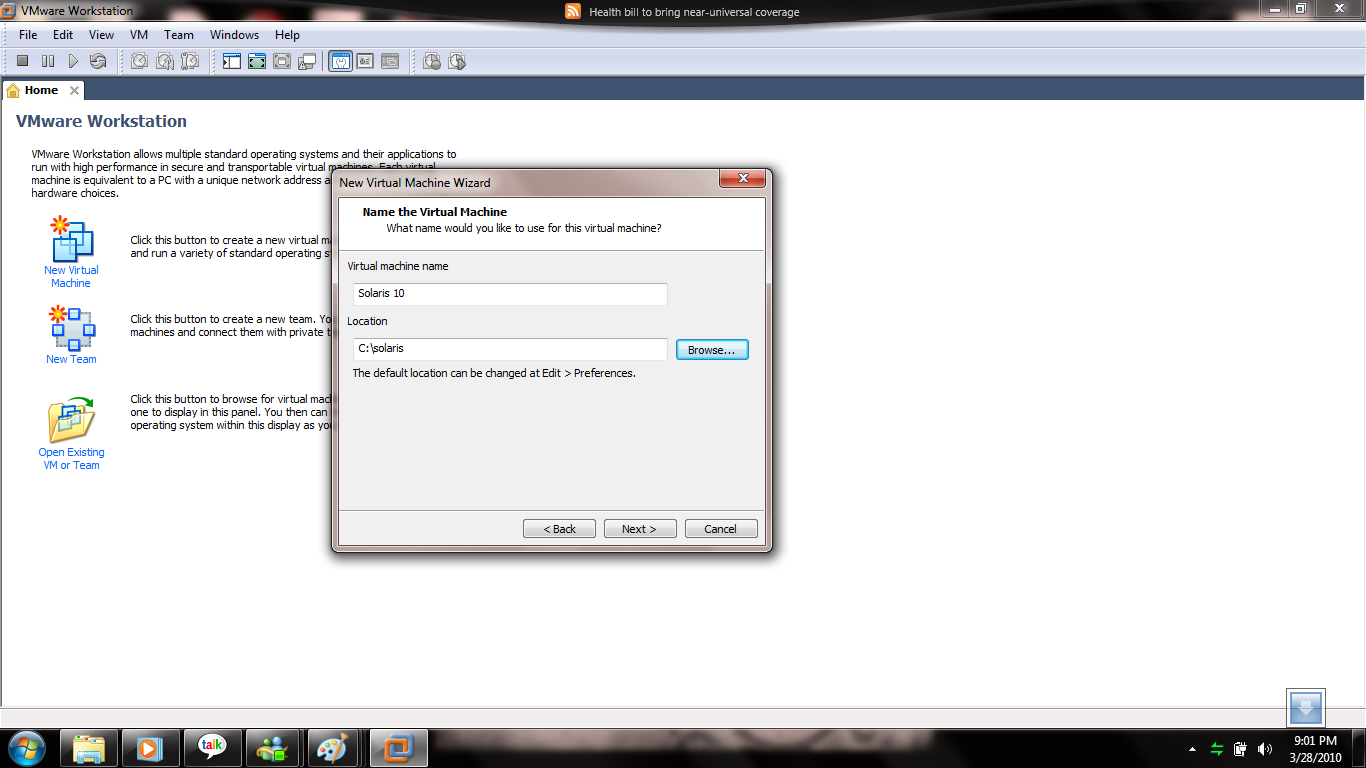
Step 3: Here choose your path where your OS files will be store .So you must create one folder for new OS and name it solaris.The particular folder disk minimum 10gb enough space is better.

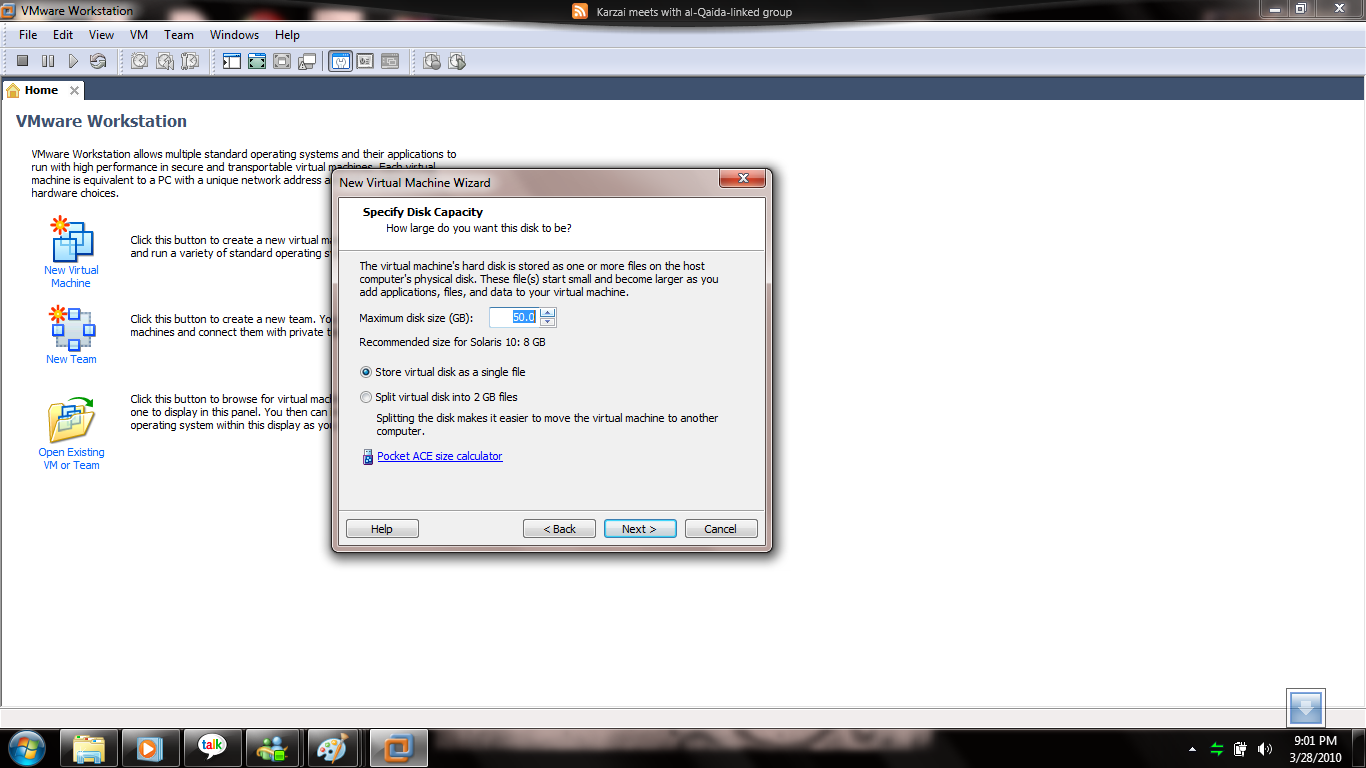
Step 4 : Here choose maximum disk space ,i choosed 50gb for solaris installation.

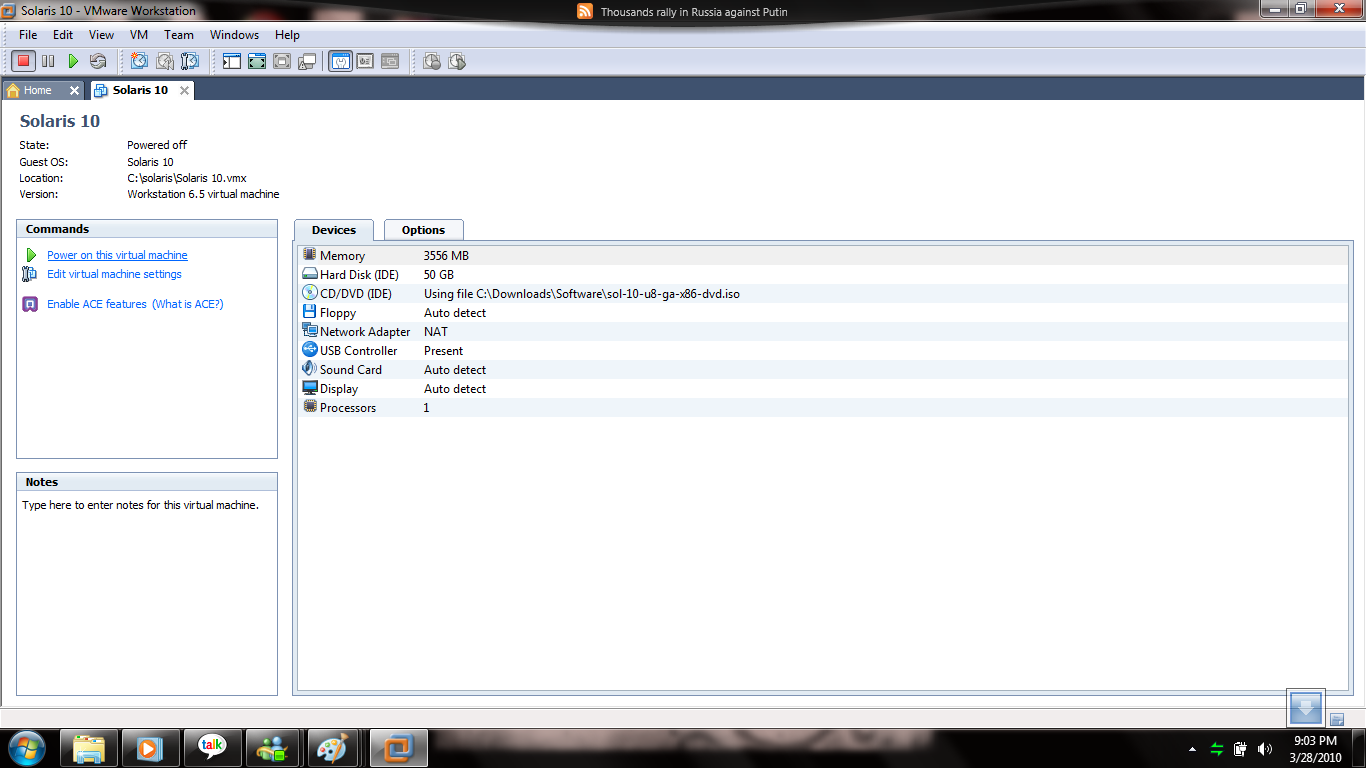
Step 5: Here Choose your hardware and memory size.

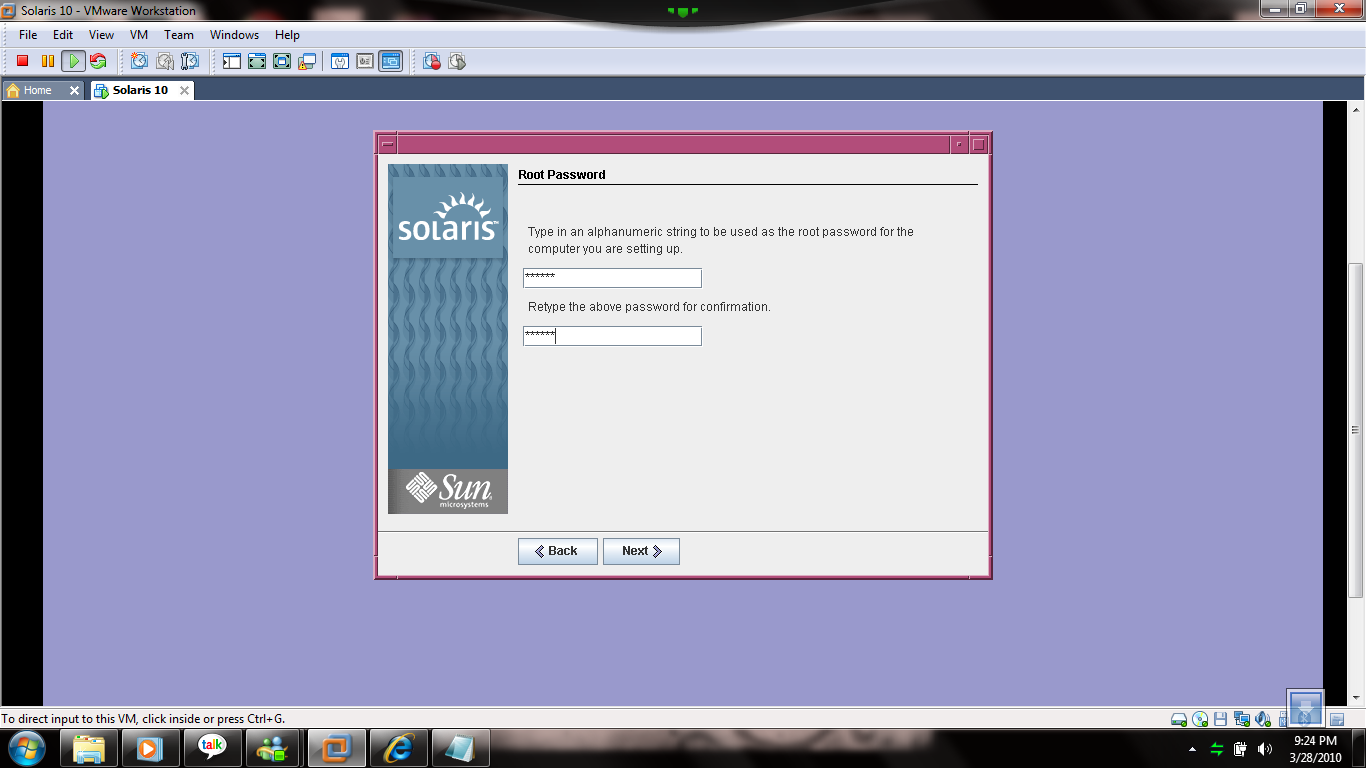
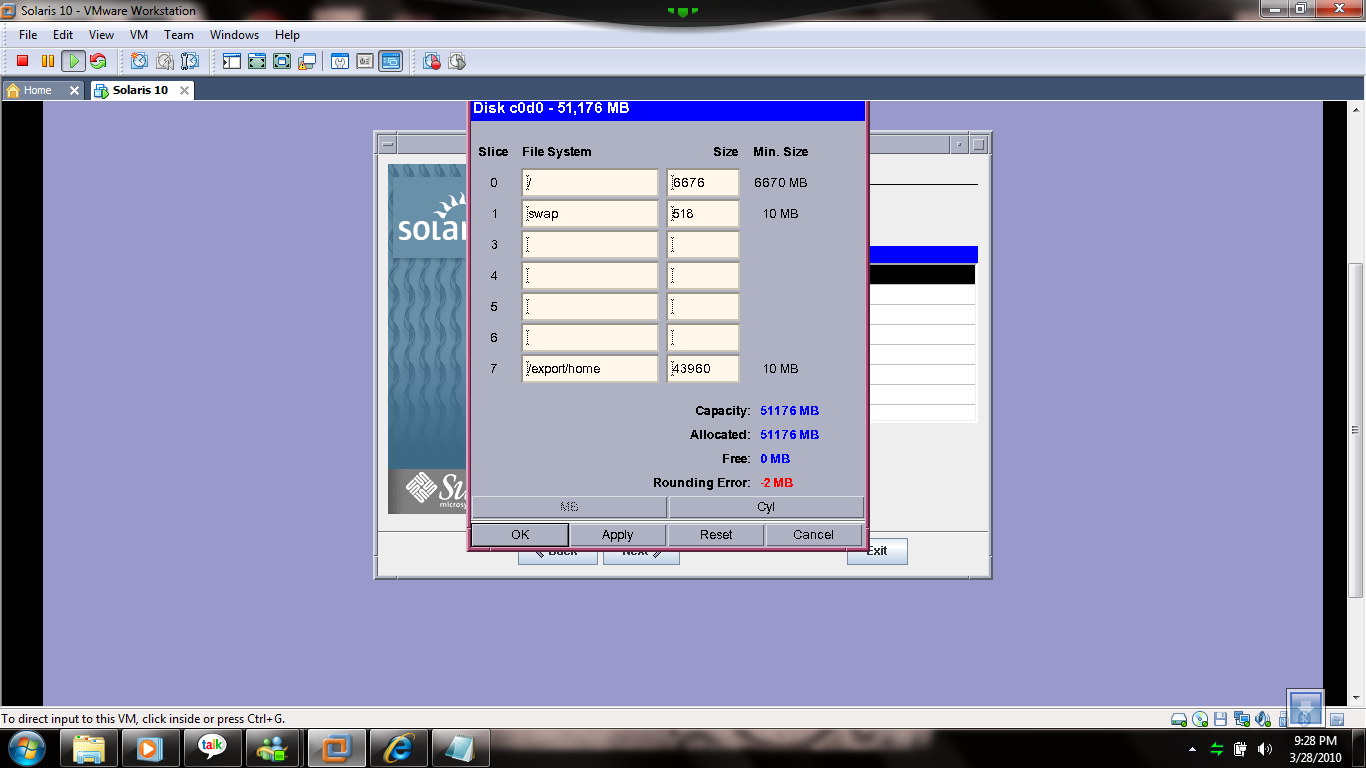
Step 6: After configuration, click power on this virtual machine , after clicked the solaris will be boot for installation, so you care fully do it your steps and most of the steps click default so i ignored some steps but you must choosed customized install for solaris because you should increase your swap space minimum 1024mb,it will be usefull for when you’re try to install Oracle on solaris and then your counting size will be equal.

Step 7 : hereafter some of the steps default select next what you want.

Step 8 : root password.

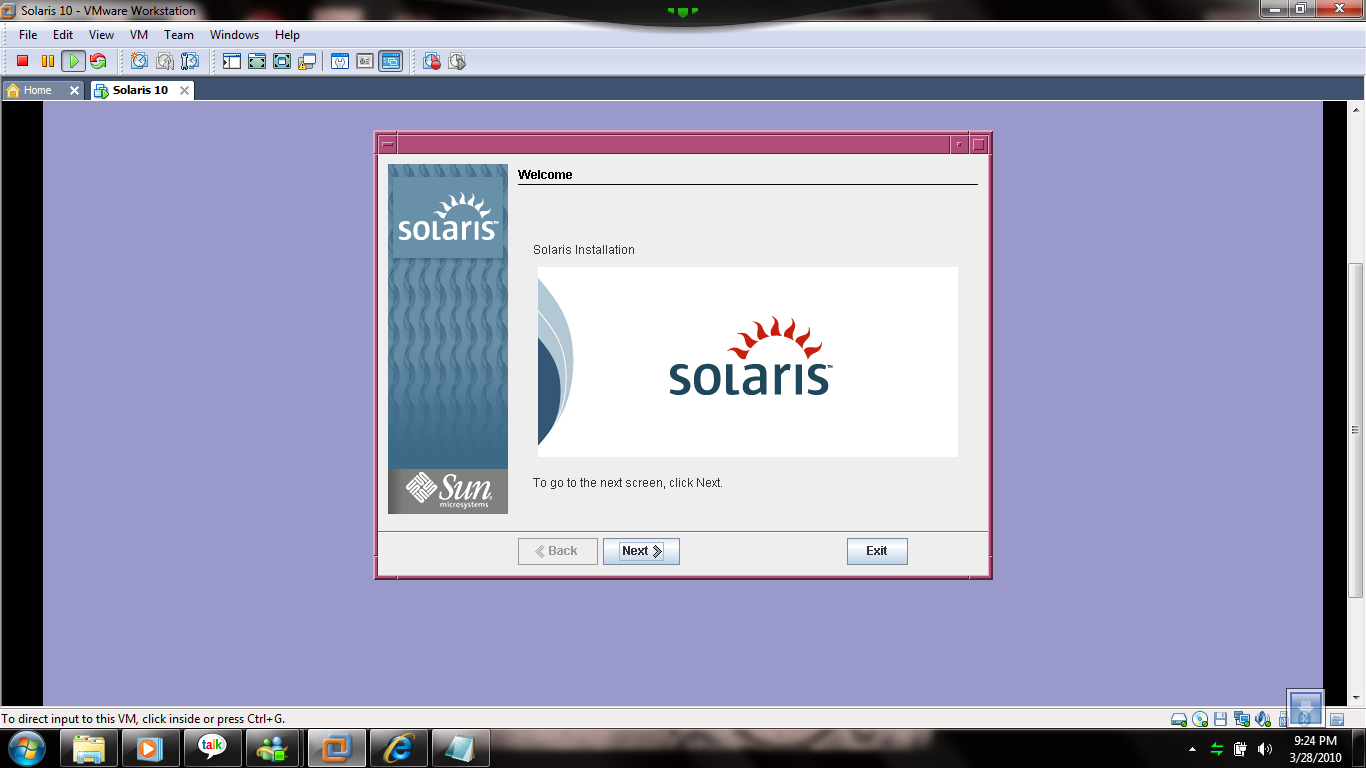
Step 9 : welcome screen

Step 10: Click default next but you  must choose customized install then only we can configure swap space and some space ,the spaces must be equal of your choosed disk space size.

Step 11 : Click Install Now.

Step 12: Solaris Installation will be progressing. It will take few minutes after installation,it automatically reboot and the welcome page will be appear.

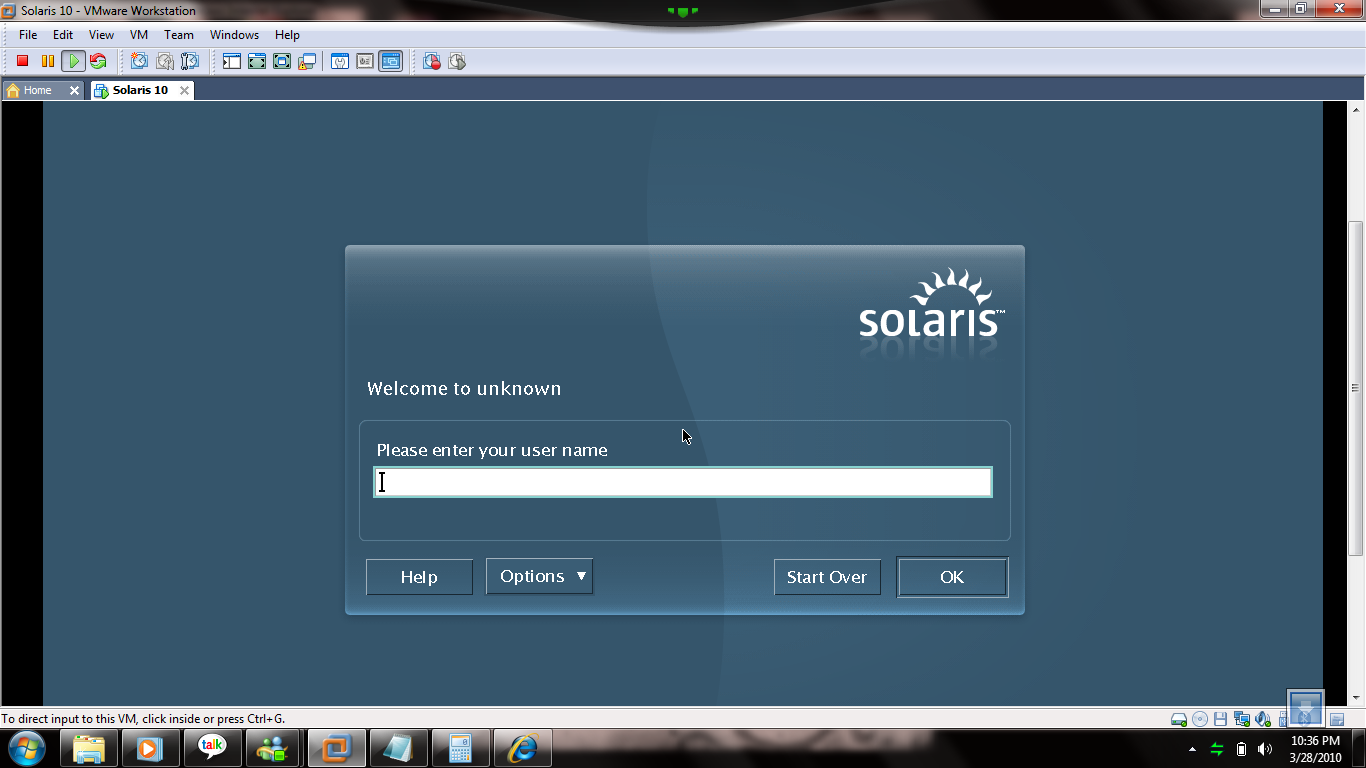
Step 13 : Welcome to Solaris World and login root username and password.

VMWARE Installation On Windows 7

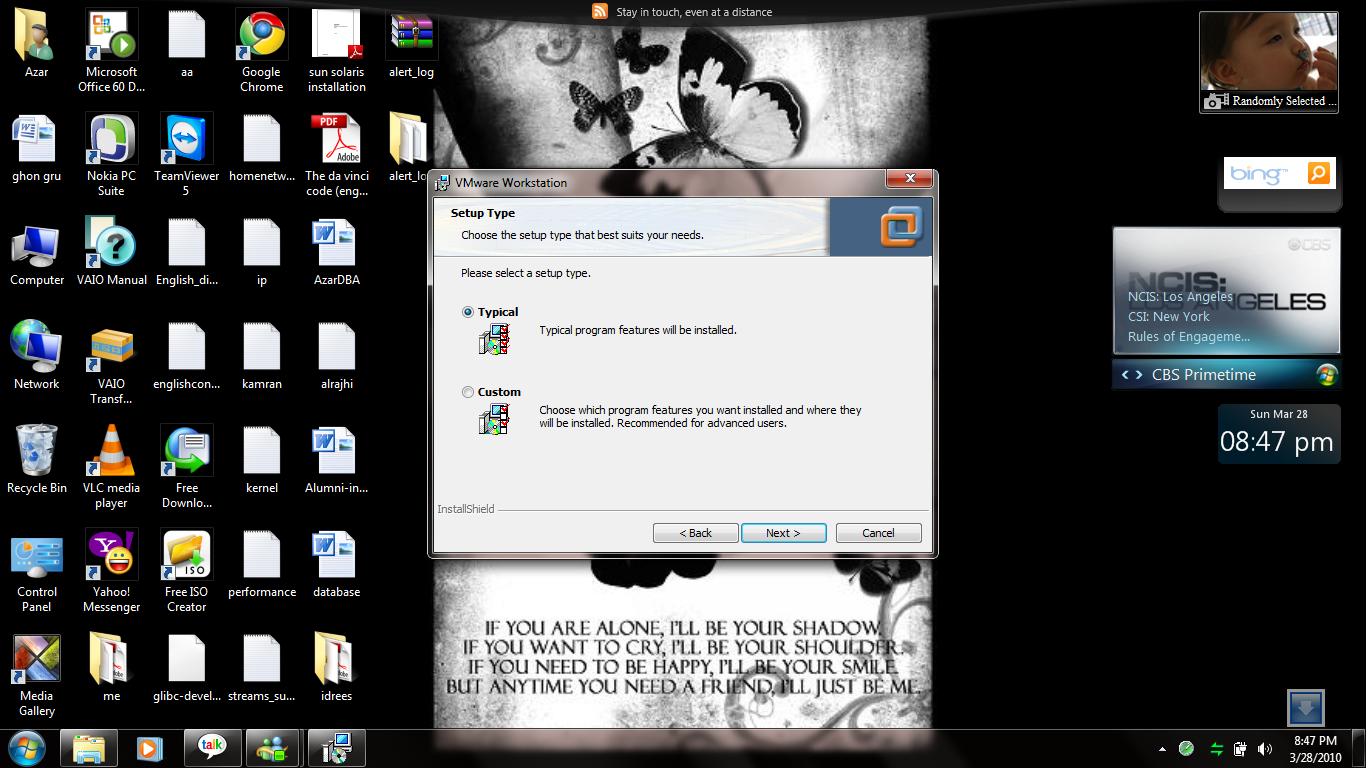
Step 1 :- Click vmware.exe setup file and then the vmware setup window will be appear.Click Next.

Step 2: Choose Typical and click Next.

Step 3:

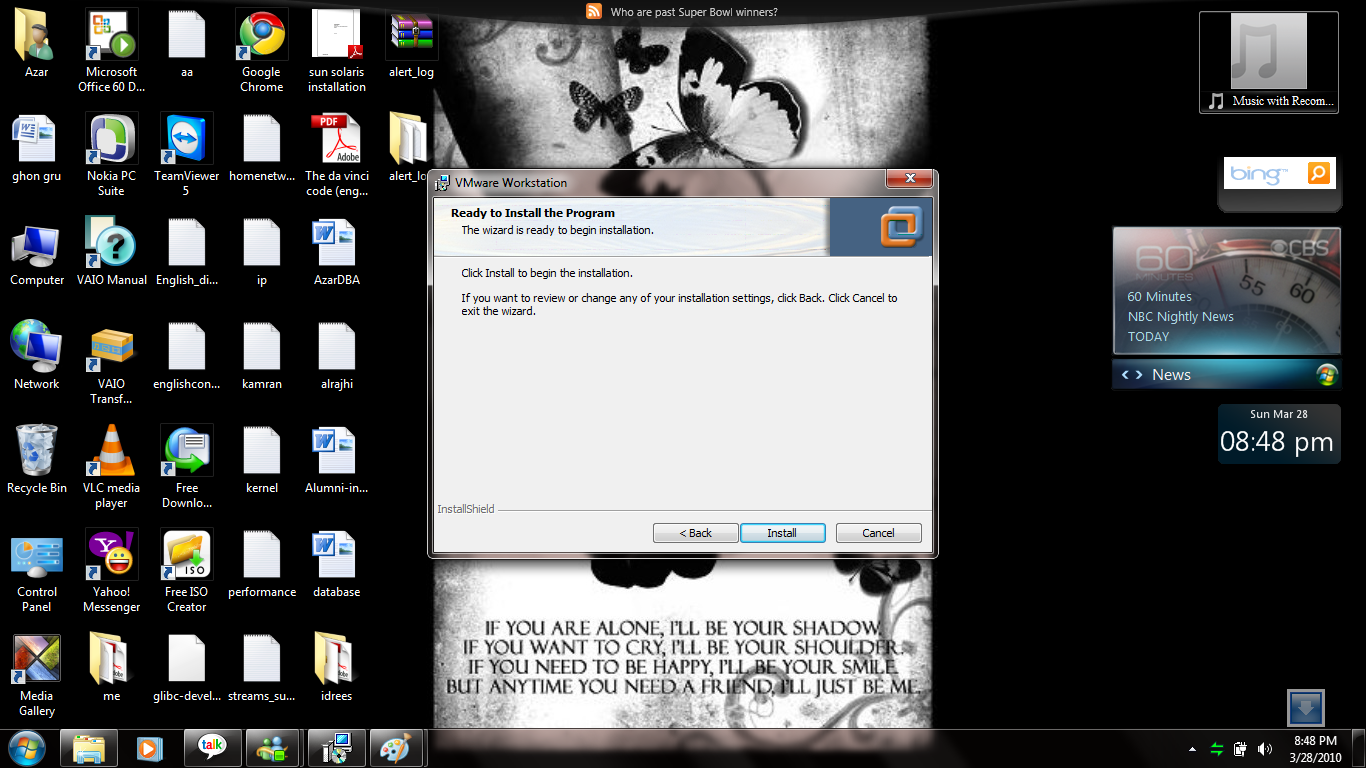
Step 4: Ready for Install Click Install.

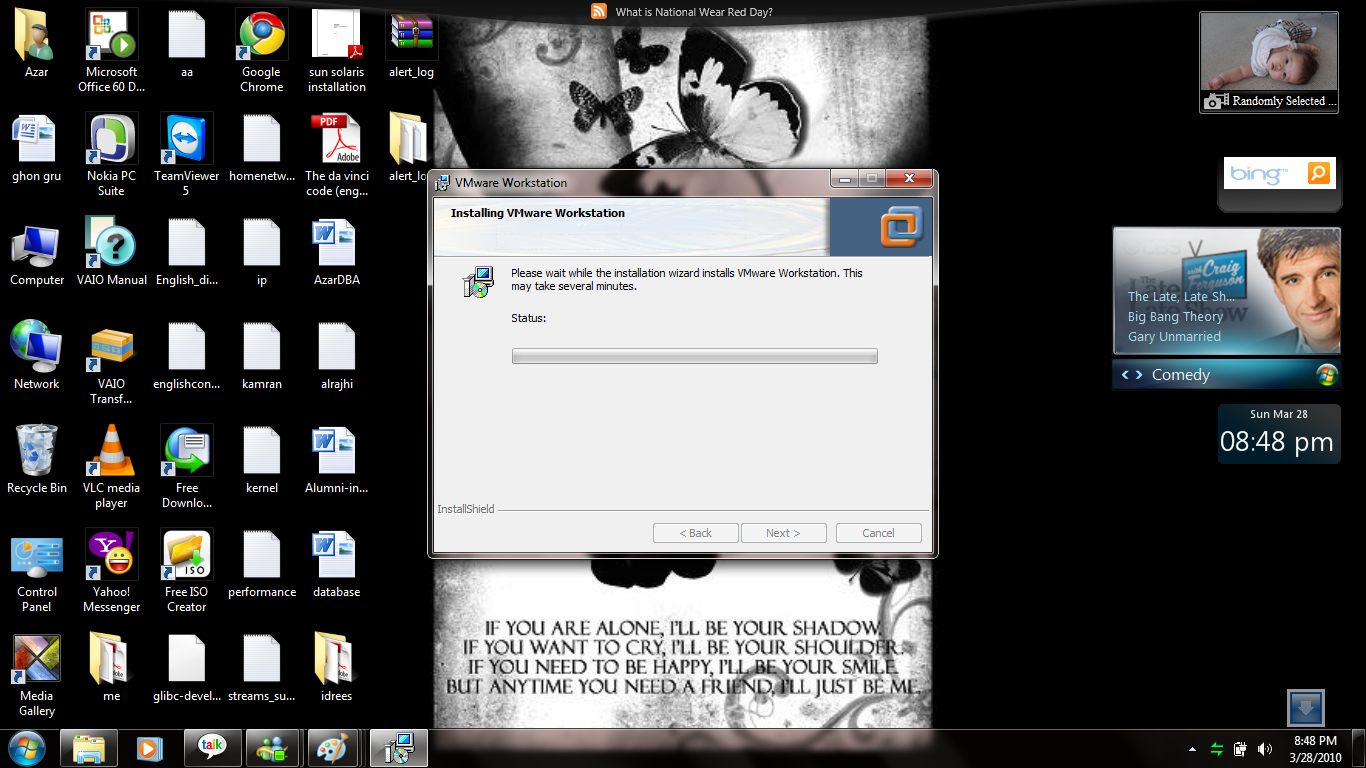
Step 5: Installation starting, it will take few minutes.

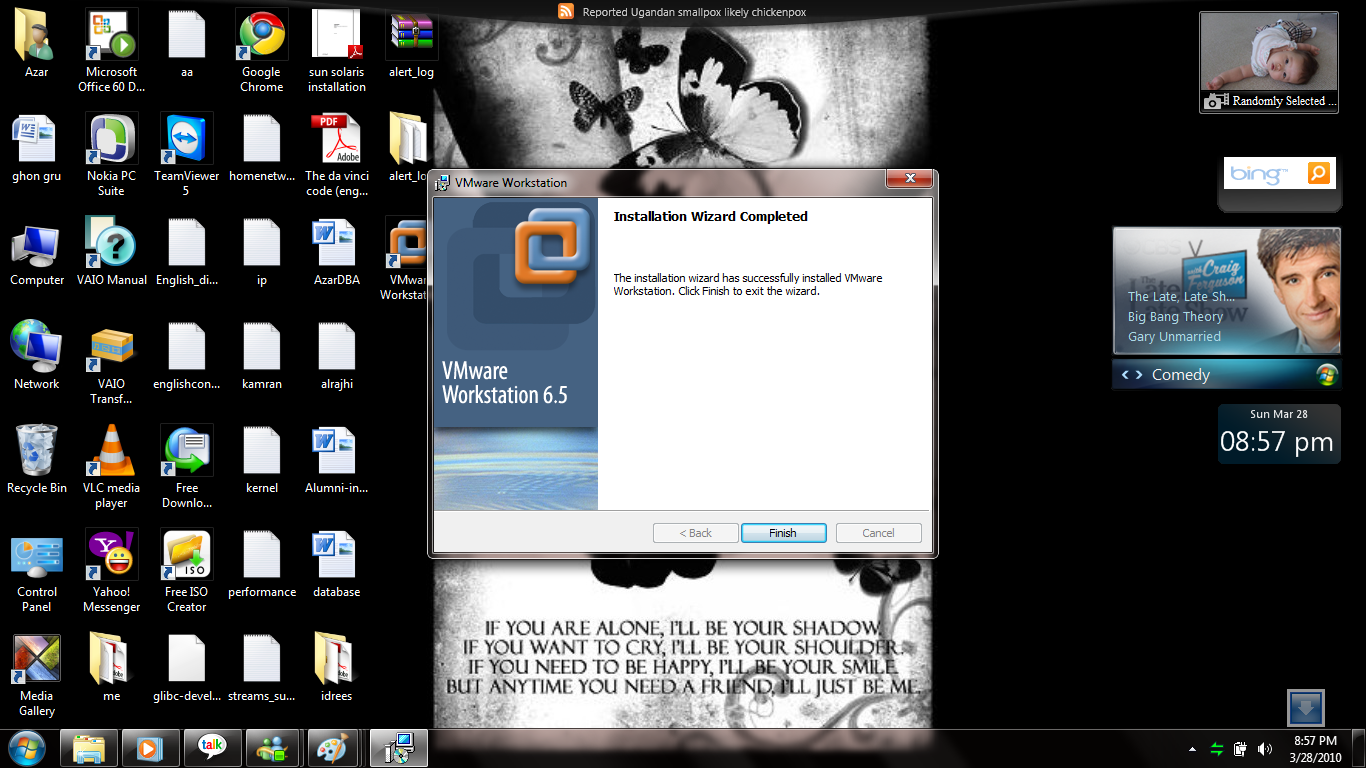
Step 6: VMWARE installation completed.

ORA-28365: wallet is not open

When i try to make export one table using datapump with encryption_password parameter , It shows following error.

ORA-39001: invalid argument value
ORA-39180: unable to encrypt ENCRYPTION_PASSWORD
ORA-28365: wallet is not open

So i try to fix this error,

Create folder for wallet in $ORACLE_BASE/admin/SID/wallet

and then go to add it this below statement to sqlnet.ora file.

WALLET_LOCATION = (SOURCE=
(METHOD = FILE)
(METHOD_DATA =
(DIRECTORY=D:\oracle\product\10.2.0\admin\ACE\wallet)
)))

then

SQL> alter system set key identified by test;

sytem altered.

Now you can able to using encryption_password parameter.

C:\Documents and Settings\Administrator>EXPDP SCOTT/TIGER@ace DIRECTORY=TEST ENC
RYPTION_PASSWORD=test tables=test

Export: Release 10.2.0.1.0 – 64bit Production on Sunday, 28 March, 2010 14:52:34
Copyright (c) 2003, 2005, Oracle.  All rights reserved.

Connected to: Oracle Database 10g Enterprise Edition Release 10.2.0.1.0 – 64bit
Production
With the Partitioning, OLAP and Data Mining options
Starting “SCOTT”.”SYS_EXPORT_TABLE_01″:  SCOTT/********@ace DIRECTORY=TEST ENCRY
PTION_PASSWORD=********* tables=*********
Estimate in progress using BLOCKS method…
Processing object type TABLE_EXPORT/TABLE/TABLE_DATA
Total estimation using BLOCKS method: 64 KB
Processing object type TABLE_EXPORT/TABLE/TABLE
. . exported “SCOTT”.”TEST”                              5.664 KB       4 rows
Master table “SCOTT”.”SYS_EXPORT_TABLE_01″ successfully loaded/unloaded
******************************************************************************
Dump file set for SCOTT.SYS_EXPORT_TABLE_01 is:
  H:\TEST\EXPDAT.DMP
Job “SCOTT”.”SYS_EXPORT_TABLE_01″ successfully completed at 14:52:47.

RMAN: Create Catalog

How to create catalog for rman backup.I just provided here for step by step create catalog.