Skip to content

Disaster Recovery:Restore database from one server to another server when different location

Here I just demonstrated How do we restore database from one server to another server when different location

Download PDF and Read It.

Right click this URL and Save as –> Location.

Disaster Recovery : Restore database from one Server to another Server when Different location

RMAN Configuring Tablespaces for Exclusion

In some cases you may want to exclude specified tablespace part of the regular backup schedule, as in these cases:

  •  A tablespace is easy to rebuild, so it is more cost-effective to rebuild it than back it up every day.
  • A tablespace contains temporary or test data that you do not need to back up.
  • A tablespace does not change often and therefore should be backed up on a different schedule from other backups.

Just a Example :

Step 1 : Create tablespace & User


SQL> create tablespace rman_ex datafile 'd:\backup\rman_ex01.dbf' size 50m;

Tablespace created.

SQL> create user rmanex identified by rmanex default tablespace rman_ex;

User created.

SQL> grant connect,resource to rmanex;

Grant succeeded.

SQL> conn rmanex/rmanex;
Connected.
SQL> create table a(empno number, city varchar2(20));

Table created.

SQL> insert into a values (001,'Riyadh');

1 row created.

SQL> insert into a values (002,'Mecca');

1 row created.

SQL> commit;

Commit complete.

Step 2: Configure tablespace Exclusion


SQL> $rman target /

Recovery Manager: Release 11.2.0.1.0 - Production on Tue Mar 8 09:30:17 2011

Copyright (c) 1982, 2009, Oracle and/or its affiliates.  All rights reserved.

connected to target database: ACEME (DBID=4060208819)

RMAN> configure  exclude for tablespace rman_ex;

using target database control file instead of recovery catalog
Tablespace RMAN_EX will be excluded from future whole database backups
new RMAN configuration parameters are successfully stored.

Step 3: Backup Database , We can check here Whether that tablespace Include or Exclude.


RMAN> backup database;

Starting backup at 08-MAR-11
allocated channel: ORA_DISK_1
channel ORA_DISK_1: SID=16 device type=DISK
file 5 is excluded from whole database backup
channel ORA_DISK_1: starting full datafile backup set
channel ORA_DISK_1: specifying datafile(s) in backup set
input datafile file number=00001 name=C:\APP\MAZAR\ORADATA\ACEME\SYSTEM01.DBF
input datafile file number=00003 name=C:\APP\MAZAR\ORADATA\ACEME\UNDOTBS01.DBF
input datafile file number=00002 name=C:\APP\MAZAR\ORADATA\ACEME\SYSAUX01.DBF
input datafile file number=00004 name=C:\APP\MAZAR\ORADATA\ACEME\USERS01.DBF
channel ORA_DISK_1: starting piece 1 at 08-MAR-11
channel ORA_DISK_1: finished piece 1 at 08-MAR-11
piece handle=C:\APP\MAZAR\FLASH_RECOVERY_AREA\ACEME\BACKUPSET\2011_03_08\O1_MF_NNNDF_TAG20
channel ORA_DISK_1: backup set complete, elapsed time: 00:00:56
channel ORA_DISK_1: starting full datafile backup set
channel ORA_DISK_1: specifying datafile(s) in backup set
including current control file in backup set
including current SPFILE in backup set
channel ORA_DISK_1: starting piece 1 at 08-MAR-11
channel ORA_DISK_1: finished piece 1 at 08-MAR-11
piece handle=C:\APP\MAZAR\FLASH_RECOVERY_AREA\ACEME\BACKUPSET\2011_03_08\O1_MF_NCSNF_TAG20
channel ORA_DISK_1: backup set complete, elapsed time: 00:00:01
Finished backup at 08-MAR-11.

Not Included Here.

Step 4: How do we take tablespace backup while configured exlcude option.


RMAN> backup database noexclude;

Starting backup at 08-MAR-11
using channel ORA_DISK_1
channel ORA_DISK_1: starting full datafile backup set
channel ORA_DISK_1: specifying datafile(s) in backup set
input datafile file number=00001 name=C:\APP\MAZAR\ORADATA\ACEME\SYSTEM01.DBF
input datafile file number=00003 name=C:\APP\MAZAR\ORADATA\ACEME\UNDOTBS01.DBF
input datafile file number=00002 name=C:\APP\MAZAR\ORADATA\ACEME\SYSAUX01.DBF
input datafile file number=00005 name=D:\BACKUP\RMAN_EX01.DBF
input datafile file number=00004 name=C:\APP\MAZAR\ORADATA\ACEME\USERS01.DBF
channel ORA_DISK_1: starting piece 1 at 08-MAR-11
channel ORA_DISK_1: finished piece 1 at 08-MAR-11
piece handle=C:\APP\MAZAR\FLASH_RECOVERY_AREA\ACEME\BACKUPSET\2011_03_08\O1_MF_NNNDF_TAG20
channel ORA_DISK_1: backup set complete, elapsed time: 00:00:55
channel ORA_DISK_1: starting full datafile backup set
channel ORA_DISK_1: specifying datafile(s) in backup set
including current control file in backup set
including current SPFILE in backup set
channel ORA_DISK_1: starting piece 1 at 08-MAR-11
channel ORA_DISK_1: finished piece 1 at 08-MAR-11
piece handle=C:\APP\MAZAR\FLASH_RECOVERY_AREA\ACEME\BACKUPSET\2011_03_08\O1_MF_NCSNF_TAG20
channel ORA_DISK_1: backup set complete, elapsed time: 00:00:01
Finished backup at 08-MAR-11

Step 5: Disable Configure Exclude method.


RMAN> configure exclude for tablespace rman_ex clear;

Tablespace RMAN_EX will be included in future whole database backups
old RMAN configuration parameters are successfully deleted

Ref : http://download.oracle.com/docs/cd/B28359_01/backup.111/b28270/rcmconfa.htm#i1015029

ORA-12203: TNS:unable to connect to destination

I just created one test db on my local PC (Windows 7) .This pc connected through Domain network.When I trying to connect this db one of the schema from application server. It shows
Enter user-name: prem_saico_auh/prem_saico_auh@azardb
ERROR:
ORA-12203: TNS:unable to connect to destination

This Error may be occur, your db server not reachable for client machine Either Ipaddress wrong or ping or Firewall Blocked.

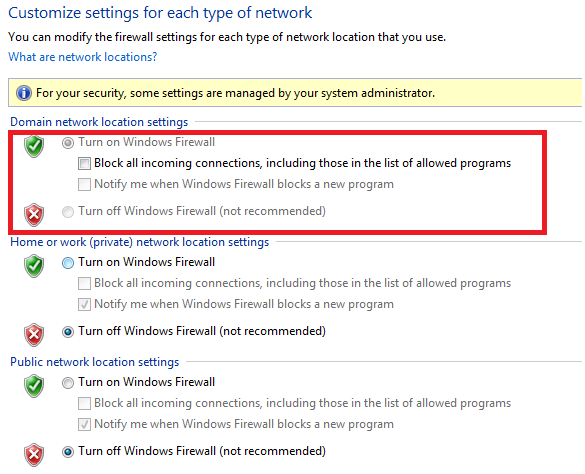
Firewall : This is the case for me. So I looked my firewall settings of my local PC, The Firewall is OFF. But the Domain network firewall is ON.

So I need to Switch OFF firewall for my domain network. But I cann’t without Network Administrator Advise. So I just decided , Atleast I want to Enable allow inbound connections, I just fixed and then I can easily connect my db from Appication Server.

How do We do?

Go –> Control Panel –> Adminisrative Tools –> Windows Firewal with Advanced Security

It shows like

So I need to change or allow Inbound connections for Domain network.

Click –> Windows Firewall Properties.

Choose Domain Profile

Choose Inbound connections –> Allow and then Apply.Now I just try to connect my db from client, Its works fine.

Enter user-name: prem_saico_auh/prem_saico_auh@azardb

Connected to:
Oracle Database 11g Enterprise Edition Release 11.2.0.1.0 – Production
With the Partitioning, OLAP, Data Mining and Real Application Testing options

SQL>

Can I Store Datapump dumpfiles in ASM diskgroup?

One of my friend asked me , Can I store Datapump dumpfile in asm diskgroup?. Yes you can. Now we can see How do we create directory and store dumpfile.

Step 1: Go To ASM Instance and Create New Directory.

C:\Documents and Settings\Administrator>set oracle_sid=+asm

C:\Documents and Settings\Administrator>sqlplus

SQL*Plus: Release 10.2.0.1.0 - Production on Tue Feb 22 15:27:13 2011

Copyright (c) 1982, 2005, Oracle.  All rights reserved.

Enter user-name: / as sysdba

Connected to:
Oracle Database 10g Enterprise Edition Release 10.2.0.1.0 - Production
With the Partitioning, OLAP and Data Mining options

SQL> alter diskgroup data add directory '+DATA/dumpset';

Diskgroup altered.

Step 2:  Go to DB Instance

 Create Directory for dumpfile and logfile


Dumpfile Directory (ASM Disk)

SQL> create or replace directory dp_asm as '+DATA/dumpset';

Directory created.

Log file Directory (Local File System).

SQL> create or replace directory logfile as 'C:\azar';

Directory created.

SQL> grant read,write on directory dp_asm to system;

Grant succeeded.

SQL> grant read,write on directory logfile to system;

Grant succeeded.

Step 3: Doing Export using datapump


SQL> $expdp system/Admin123 directory=dp_asm dumpfile=testasm.dmp schemas=scott
logfile=logfile:testasm.log

Export: Release 10.2.0.1.0 - Production on Tuesday, 22 February, 2011 15:35:00

Copyright (c) 2003, 2005, Oracle.  All rights reserved.

Connected to: Oracle Database 10g Enterprise Edition Release 10.2.0.1.0 - Produc
tion
With the Partitioning, OLAP and Data Mining options
Starting "SYSTEM"."SYS_EXPORT_SCHEMA_01":  system/******** directory=dp_asm dump
file=testasm.dmp schemas=scott logfile=logfile:testasm.log
Estimate in progress using BLOCKS method...
Processing object type SCHEMA_EXPORT/TABLE/TABLE_DATA
Total estimation using BLOCKS method: 192 KB
Processing object type SCHEMA_EXPORT/USER
Processing object type SCHEMA_EXPORT/SYSTEM_GRANT
Processing object type SCHEMA_EXPORT/ROLE_GRANT
Processing object type SCHEMA_EXPORT/DEFAULT_ROLE
Processing object type SCHEMA_EXPORT/PRE_SCHEMA/PROCACT_SCHEMA
Processing object type SCHEMA_EXPORT/TABLE/TABLE
Processing object type SCHEMA_EXPORT/TABLE/INDEX/INDEX
Processing object type SCHEMA_EXPORT/TABLE/CONSTRAINT/CONSTRAINT
Processing object type SCHEMA_EXPORT/TABLE/INDEX/STATISTICS/INDEX_STATISTICS
Processing object type SCHEMA_EXPORT/TABLE/CONSTRAINT/REF_CONSTRAINT
Processing object type SCHEMA_EXPORT/TABLE/STATISTICS/TABLE_STATISTICS
. . exported "SCOTT"."DEPT"                              5.656 KB       4 rows
. . exported "SCOTT"."EMP"                               7.820 KB      14 rows
. . exported "SCOTT"."SALGRADE"                          5.585 KB       5 rows
. . exported "SCOTT"."BONUS"                                 0 KB       0 rows
Master table "SYSTEM"."SYS_EXPORT_SCHEMA_01" successfully loaded/unloaded
******************************************************************************
Dump file set for SYSTEM.SYS_EXPORT_SCHEMA_01 is:
  +DATA/dumpset/testasm.dmp
Job "SYSTEM"."SYS_EXPORT_SCHEMA_01" successfully completed at 15:36:01
SQL>

Step 4: Go to ASM Instance and Check the file created in ASM


SQL> select file_number,creation_date,bytes from v$asm_file where type='DUMPSET';

FILE_NUMBER CREATION_      BYTES
----------- --------- ----------
        283 22-FEB-11     212992

SQL>

RMAN Recover database noredo commands

When our db running in noarchivelog mode, Online redolog file may failure occur during startup your db, how do you recover if you have a consistent cold backup avilable for your db ( No ArchiveLog Mode).

”  We can perform limited recovery of changes to a database running in NOARCHIVELOG mode by applying incremental backups. The incremental backups must be consistent, like all backups of a database run in NOARCHIVELOG mode, so you cannot back up the database when it is open.

Assume that you run database prod in NOARCHIVELOG mode with a recovery catalog. You shut down the database consistently and make a level 0 backup of database prod to tape on Sunday afternoon. You shut down the database consistently and make a level 1 differential incremental backup to tape at 3:00 a.m. on Wednesday and Friday.

On Saturday, a media failure destroys half of the datafiles as well as the online redo logs. Because the online logs are lost, you must specify the NOREDO option in the RECOVER command. Otherwise, RMAN searches for the redo logs after applying the Friday incremental backup and issues an error message when it does not find them. ”

Just a Example :

Step 1: Create user and table


Enter user-name: / as sysdba

Connected to:
Oracle Database 10g Enterprise Edition Release 10.2.0.1.0 - Production
With the Partitioning, OLAP and Data Mining options

SQL> create tablespace testfor datafile 'c:\oracle\testfor01.dbf' size 50m;

Tablespace created.

SQL> create user testme identified by testme default tablespace testfor;

User created.

SQL> grant connect,resource to testme;

Grant succeeded.

SQL> conn testme/testme;
Connected.
SQL> create table test(emp varchar2(20));

Table created.

SQL> insert into test values('azar');

1 row created.

SQL> commit;

Commit complete.

Step 2 : Shutdown and Startup mount


SQL> conn / as sysdba
Connected.

SQL> shutdown immediate
Database closed.
Database dismounted.
ORACLE instance shut down.
SQL> startup mount
ORACLE instance started.

Total System Global Area  167772160 bytes
Fixed Size                  1247900 bytes
Variable Size              75498852 bytes
Database Buffers           88080384 bytes
Redo Buffers                2945024 bytes
Database mounted.

Step 3: I took RMAN Backup

SQL> host
Microsoft Windows XP [Version 5.1.2600]
(C) Copyright 1985-2001 Microsoft Corp.

C:\Documents and Settings\Administrator>rman target /

Recovery Manager: Release 10.2.0.1.0 - Production on Sun Feb 13 12:52:14 2011

Copyright (c) 1982, 2005, Oracle.  All rights reserved.

connected to target database: TESTDB (DBID=2526327566, not open)
RMAN> backup incremental level 0 database;

Starting backup at 13-FEB-11
using channel ORA_DISK_1
channel ORA_DISK_1: starting incremental level 0 datafile backupset
channel ORA_DISK_1: specifying datafile(s) in backupset
input datafile fno=00001 name=C:\ORACLE\PRODUCT\10.2.0\ORADATA\TESTDB\SYSTEM01.D
BF
input datafile fno=00003 name=C:\ORACLE\PRODUCT\10.2.0\ORADATA\TESTDB\SYSAUX01.D
BF
input datafile fno=00005 name=C:\ORACLE\TESTFOR01.DBF
input datafile fno=00002 name=C:\ORACLE\PRODUCT\10.2.0\ORADATA\TESTDB\UNDOTBS01.
DBF
input datafile fno=00004 name=C:\ORACLE\PRODUCT\10.2.0\ORADATA\TESTDB\USERS01.DB
F
channel ORA_DISK_1: starting piece 1 at 13-FEB-11
channel ORA_DISK_1: finished piece 1 at 13-FEB-11
piece handle=C:\ORACLE\PRODUCT\10.2.0\FLASH_RECOVERY_AREA\TESTDB\BACKUPSET\2011_
02_13\O1_MF_NNND0_TAG20110213T125556_6OHBODSD_.BKP tag=TAG20110213T125556 commen
t=NONE
channel ORA_DISK_1: backup set complete, elapsed time: 00:00:45
Finished backup at 13-FEB-11

Starting Control File and SPFILE Autobackup at 13-FEB-11
piece handle=C:\ORACLE\PRODUCT\10.2.0\FLASH_RECOVERY_AREA\TESTDB\AUTOBACKUP\2011
_02_13\O1_MF_S_742999909_6OHBPTCT_.BKP comment=NONE
Finished Control File and SPFILE Autobackup at 13-FEB-11

RMAN> exit
Recovery Manager complete.

Step 4: I just added more rows for test table.

C:\Documents and Settings\Administrator>exit

SQL> alter database open;

Database altered.

SQL> conn testme/testme;
Connected.
SQL> insert into test values('kareem');

1 row created.

SQL> insert into test values('idrees');

1 row created.

SQL> insert into test values('jabar');

1 row created.

SQL> commit;

Commit complete.

SQL> conn / as sysdba
Connected.
SQL> shutdown immediate
Database closed.
Database dismounted.
ORACLE instance shut down.
SQL> startup mount
ORACLE instance started.

Total System Global Area  167772160 bytes
Fixed Size                  1247900 bytes
Variable Size              75498852 bytes
Database Buffers           88080384 bytes
Redo Buffers                2945024 bytes
Database mounted.
SQL> host
Microsoft Windows XP [Version 5.1.2600]
(C) Copyright 1985-2001 Microsoft Corp.

Step 5:  Now I just took Incremantal backup

C:\Documents and Settings\Administrator>rman target /

Recovery Manager: Release 10.2.0.1.0 - Production on Sun Feb 13 12:59:41 2011

Copyright (c) 1982, 2005, Oracle.  All rights reserved.

connected to target database: TESTDB (DBID=2526327566, not open)

RMAN> backup incremental level 1 database;

Starting backup at 13-FEB-11
using target database control file instead of recovery catalog
allocated channel: ORA_DISK_1
channel ORA_DISK_1: sid=155 devtype=DISK
channel ORA_DISK_1: starting incremental level 1 datafile backupset
channel ORA_DISK_1: specifying datafile(s) in backupset
input datafile fno=00001 name=C:\ORACLE\PRODUCT\10.2.0\ORADATA\TESTDB\SYSTEM01.D
BF
input datafile fno=00003 name=C:\ORACLE\PRODUCT\10.2.0\ORADATA\TESTDB\SYSAUX01.D
BF
input datafile fno=00005 name=C:\ORACLE\TESTFOR01.DBF
input datafile fno=00002 name=C:\ORACLE\PRODUCT\10.2.0\ORADATA\TESTDB\UNDOTBS01.
DBF
input datafile fno=00004 name=C:\ORACLE\PRODUCT\10.2.0\ORADATA\TESTDB\USERS01.DB
F
channel ORA_DISK_1: starting piece 1 at 13-FEB-11
channel ORA_DISK_1: finished piece 1 at 13-FEB-11
piece handle=C:\ORACLE\PRODUCT\10.2.0\FLASH_RECOVERY_AREA\TESTDB\BACKUPSET\2011_
02_13\O1_MF_NNND1_TAG20110213T125954_6OHBWTRJ_.BKP tag=TAG20110213T125954 commen
t=NONE
channel ORA_DISK_1: backup set complete, elapsed time: 00:00:15
Finished backup at 13-FEB-11

Starting Control File and SPFILE Autobackup at 13-FEB-11
piece handle=C:\ORACLE\PRODUCT\10.2.0\FLASH_RECOVERY_AREA\TESTDB\AUTOBACKUP\2011
_02_13\O1_MF_S_743000354_6OHBXFQT_.BKP comment=NONE
Finished Control File and SPFILE Autobackup at 13-FEB-11

RMAN>

Step 6: Again I just added one row for TEST table


SQL> alter database open;

Database altered.

SQL> conn testme/testme;
Connected.
SQL> insert into test values('norecover');

1 row created.

SQL> commit;

Commit complete.

Step 7: Log group status


SQL> conn / as sysdba
Connected.
SQL> select group#,status,thread#,sequence#,first_change# from v$log;

    GROUP# STATUS              THREAD#  SEQUENCE# FIRST_CHANGE#
---------- ---------------- ---------- ---------- -------------
         1 CURRENT                   1          2        545486
         2 UNUSED                    1          0             0
         3 INACTIVE                  1          1        534907

Step 8: I just moved logile to another location


SQL> shutdown immediate
Database closed.
Database dismounted.
ORACLE instance shut down. 

C:\oracle\product\10.2.0\oradata\testdb>move redo01.log c:\oracle\

SQL> startup mount
ORACLE instance started.

Total System Global Area  167772160 bytes
Fixed Size                  1247900 bytes
Variable Size              75498852 bytes
Database Buffers           88080384 bytes
Redo Buffers                2945024 bytes
Database mounted.
SQL> alter database open;
alter database open
*
ERROR at line 1:
ORA-00313: open failed for members of log group 1 of thread 1
ORA-00312: online log 1 thread 1:
'C:\ORACLE\PRODUCT\10.2.0\ORADATA\TESTDB\REDO01.LOG'

SQL> shutdown immediate
Database closed.
Database dismounted.
ORACLE instance shut down.

Step 9: Now Time to recover using recover database NOREDO command.


RMAN> startup nomount

connected to target database (not started)
Oracle instance started

Total System Global Area     167772160 bytes

Fixed Size                     1247900 bytes
Variable Size                 75498852 bytes
Database Buffers              88080384 bytes
Redo Buffers                   2945024 bytes

RMAN> restore controlfile from autobackup;

Starting restore at 13-FEB-11
using channel ORA_DISK_1

recovery area destination: C:\oracle\product\10.2.0/flash_recovery_area
database name (or database unique name) used for search: TESTDB
channel ORA_DISK_1: autobackup found in the recovery area
channel ORA_DISK_1: autobackup found: C:\ORACLE\PRODUCT\10.2.0\FLASH_RECOVERY_AR
EA\TESTDB\AUTOBACKUP\2011_02_13\O1_MF_S_743000354_6OHBXFQT_.BKP
channel ORA_DISK_1: control file restore from autobackup complete
output filename=C:\ORACLE\PRODUCT\10.2.0\ORADATA\TESTDB\CONTROL01.CTL
output filename=C:\ORACLE\PRODUCT\10.2.0\ORADATA\TESTDB\CONTROL02.CTL
output filename=C:\ORACLE\PRODUCT\10.2.0\ORADATA\TESTDB\CONTROL03.CTL
Finished restore at 13-FEB-11

RMAN> alter database mount;

database mounted
released channel: ORA_DISK_1

RMAN> restore database;

Starting restore at 13-FEB-11
Starting implicit crosscheck backup at 13-FEB-11
allocated channel: ORA_DISK_1
channel ORA_DISK_1: sid=156 devtype=DISK
Crosschecked 3 objects
Finished implicit crosscheck backup at 13-FEB-11

Starting implicit crosscheck copy at 13-FEB-11
using channel ORA_DISK_1
Finished implicit crosscheck copy at 13-FEB-11

searching for all files in the recovery area
cataloging files...
cataloging done

List of Cataloged Files
=======================
File Name: C:\ORACLE\PRODUCT\10.2.0\FLASH_RECOVERY_AREA\TESTDB\AUTOBACKUP\2011_0
2_13\O1_MF_S_743000354_6OHBXFQT_.BKP

using channel ORA_DISK_1

channel ORA_DISK_1: starting datafile backupset restore
channel ORA_DISK_1: specifying datafile(s) to restore from backup set
restoring datafile 00001 to C:\ORACLE\PRODUCT\10.2.0\ORADATA\TESTDB\SYSTEM01.DBF

restoring datafile 00002 to C:\ORACLE\PRODUCT\10.2.0\ORADATA\TESTDB\UNDOTBS01.DB
F
restoring datafile 00003 to C:\ORACLE\PRODUCT\10.2.0\ORADATA\TESTDB\SYSAUX01.DBF

restoring datafile 00004 to C:\ORACLE\PRODUCT\10.2.0\ORADATA\TESTDB\USERS01.DBF
restoring datafile 00005 to C:\ORACLE\TESTFOR01.DBF
channel ORA_DISK_1: reading from backup piece C:\ORACLE\PRODUCT\10.2.0\FLASH_REC
OVERY_AREA\TESTDB\BACKUPSET\2011_02_13\O1_MF_NNND0_TAG20110213T125556_6OHBODSD_.
BKP
channel ORA_DISK_1: restored backup piece 1
piece handle=C:\ORACLE\PRODUCT\10.2.0\FLASH_RECOVERY_AREA\TESTDB\BACKUPSET\2011_
02_13\O1_MF_NNND0_TAG20110213T125556_6OHBODSD_.BKP tag=TAG20110213T125556
channel ORA_DISK_1: restore complete, elapsed time: 00:01:16
Finished restore at 13-FEB-11

RMAN> recover database;

Starting recover at 13-FEB-11
using channel ORA_DISK_1
channel ORA_DISK_1: starting incremental datafile backupset restore
channel ORA_DISK_1: specifying datafile(s) to restore from backup set
destination for restore of datafile 00001: C:\ORACLE\PRODUCT\10.2.0\ORADATA\TEST
DB\SYSTEM01.DBF
destination for restore of datafile 00002: C:\ORACLE\PRODUCT\10.2.0\ORADATA\TEST
DB\UNDOTBS01.DBF
destination for restore of datafile 00003: C:\ORACLE\PRODUCT\10.2.0\ORADATA\TEST
DB\SYSAUX01.DBF
destination for restore of datafile 00004: C:\ORACLE\PRODUCT\10.2.0\ORADATA\TEST
DB\USERS01.DBF
destination for restore of datafile 00005: C:\ORACLE\TESTFOR01.DBF
channel ORA_DISK_1: reading from backup piece C:\ORACLE\PRODUCT\10.2.0\FLASH_REC
OVERY_AREA\TESTDB\BACKUPSET\2011_02_13\O1_MF_NNND1_TAG20110213T125954_6OHBWTRJ_.
BKP
channel ORA_DISK_1: restored backup piece 1
piece handle=C:\ORACLE\PRODUCT\10.2.0\FLASH_RECOVERY_AREA\TESTDB\BACKUPSET\2011_
02_13\O1_MF_NNND1_TAG20110213T125954_6OHBWTRJ_.BKP tag=TAG20110213T125954
channel ORA_DISK_1: restore complete, elapsed time: 00:00:02

starting media recovery

unable to find archive log
archive log thread=1 sequence=2
RMAN-00571: ===========================================================
RMAN-00569: =============== ERROR MESSAGE STACK FOLLOWS ===============
RMAN-00571: ===========================================================
RMAN-03002: failure of recover command at 02/13/2011 14:51:58
RMAN-06054: media recovery requesting unknown log: thread 1 seq 2 lowscn 547146

RMAN> recover database noredo;

Starting recover at 13-FEB-11
using channel ORA_DISK_1
Finished recover at 13-FEB-11

RMAN> alter database open resetlogs;

database opened

RMAN>

Now database Opened, I’m going to check Wheter my last added row avilable  (Step 6) or not because It added after taken incremental backup.


SQL> conn testme/testme;
Connected.
SQL> select * from test;

EMP
--------------------
azar
kareem
idrees
jabar

SQL>

Now There is no last added row avilable, because ” The recovered database reflects only changes up through the time of the Friday incremental backup. Because there are no archived redo logs, there is no way to recover changes made after the incremental backup ”

Ref :-

http://www.comp.dit.ie/btierney/oracle11gdoc/backup.111/b28273/rcmsynta030.htm#CHDHFBFI

How to export from oracle 11.2 and import into 10.2 version

I think many OTN users asked repeately this question How do i export from higher version and import into lower version.I just show here How do we do.

First : Using Datapump from Oralce 11.2 and import into 10.2 version

Source DB 11.2 Version :

Step 1: Create Directory

SQL> create or replace directory test_dir as 'D:\backupnew\dump';

Directory created.

SQL> grant read,write on directory test_dir to scott;

Grant succeeded.

SQL> conn scott/tiger@azardb
Connected.
SQL> create table testversion(version varchar2(20));

Table created.

SQL> insert into testversion values('oralce11gr2');

1 row created.

SQL> commit;

Commit complete.

Step 2: Export Table using Datapump

C:\Users\mazar>expdp scott/tiger@azardb directory=test_dir dumpfile=testver.dmp tables=testversion

Export: Release 11.2.0.1.0 - Production on Sun Jan 23 15:54:13 2011

Copyright (c) 1982, 2009, Oracle and/or its affiliates.  All rights reserved.

Connected to: Oracle Database 11g Enterprise Edition Release 11.2.0.1.0 - Production
With the Partitioning, OLAP, Data Mining and Real Application Testing options
Starting "SCOTT"."SYS_EXPORT_TABLE_01":  scott/********@azardb directory=test_dir dumpfile=testver.dmp tables=testversion
Estimate in progress using BLOCKS method...
Processing object type TABLE_EXPORT/TABLE/TABLE_DATA
Total estimation using BLOCKS method: 64 KB
Processing object type TABLE_EXPORT/TABLE/TABLE
. . exported "SCOTT"."TESTVERSION"                       5.031 KB       1 rows
Master table "SCOTT"."SYS_EXPORT_TABLE_01" successfully loaded/unloaded
******************************************************************************
Dump file set for SCOTT.SYS_EXPORT_TABLE_01 is:
  D:\BACKUPNEW\DUMP\TESTVER.DMP
Job "SCOTT"."SYS_EXPORT_TABLE_01" successfully completed at 15:54:40

 Now Go to Target DB 10.2 Version

Step 3: Create Directory for Scott  User.

SQL> create or replace directory test_dir as 'd:\newdump';

Directory created.

SQL> grant read,write on directory test_dir to scott;

Grant succeeded.

Step 3: I just Copied this TESTVER.DMP file into target DB 10.2 Directory and import it

D:\oracle\product\10.2.0\db_2\BIN>impdp scott/tiger@ace directory=test_dir dumpf
ile=testversion.dmp tables=testversion

Import: Release 10.2.0.1.0 - 64bit Production on Sunday, 23 January, 2011 16:04:
31

Copyright (c) 2003, 2005, Oracle.  All rights reserved.

Connected to: Oracle Database 10g Enterprise Edition Release 10.2.0.1.0 - 64bit
Production
With the Partitioning, OLAP and Data Mining options
ORA-39001: invalid argument value
ORA-39000: bad dump file specification
ORA-39143: dump file "d:\newdump\testversion.dmp" may be an original export dump
 file

It showing error, So you need to export Data in source db 11.2 using Version parameter

Step 4:

C:\Users\mazar>expdp scott/tiger@azardb directory=test_dir dumpfile=testver.dmp tables=testversion
 version=10.2 reuse_dumpfiles=yes

Export: Release 11.2.0.1.0 - Production on Sun Jan 23 16:06:47 2011

Copyright (c) 1982, 2009, Oracle and/or its affiliates.  All rights reserved.

Connected to: Oracle Database 11g Enterprise Edition Release 11.2.0.1.0 - Production
With the Partitioning, OLAP, Data Mining and Real Application Testing options
Starting "SCOTT"."SYS_EXPORT_TABLE_01":  scott/********@azardb directory=test_dir dumpfile=testver.dmp tables=testversion 
version=10.2 reuse_dumpfiles=yes
Estimate in progress using BLOCKS method...
Processing object type TABLE_EXPORT/TABLE/TABLE_DATA
Total estimation using BLOCKS method: 64 KB
Processing object type TABLE_EXPORT/TABLE/TABLE
. . exported "SCOTT"."TESTVERSION"                       4.968 KB       1 rows
Master table "SCOTT"."SYS_EXPORT_TABLE_01" successfully loaded/unloaded
******************************************************************************
Dump file set for SCOTT.SYS_EXPORT_TABLE_01 is:
  D:\BACKUPNEW\DUMP\TESTVER.DMP
Job "SCOTT"."SYS_EXPORT_TABLE_01" successfully completed at 16:06:54

Step 5: Again I copied this dump file to target DB 10.2 directory and import it.

D:\oracle\product\10.2.0\db_2\BIN>impdp scott/tiger@ace directory=test_dir dumpf
ile=testver.dmp tables=testversion remap_tablespace=users_tbs:users

Import: Release 10.2.0.1.0 - 64bit Production on Sunday, 23 January, 2011 16:08:
37

Copyright (c) 2003, 2005, Oracle.  All rights reserved.

Connected to: Oracle Database 10g Enterprise Edition Release 10.2.0.1.0 - 64bit
Production
With the Partitioning, OLAP and Data Mining options
Master table "SCOTT"."SYS_IMPORT_TABLE_01" successfully loaded/unloaded
Starting "SCOTT"."SYS_IMPORT_TABLE_01":  scott/********@ace directory=test_dir d
umpfile=testver.dmp tables=testversion remap_tablespace=users_tbs:users
Processing object type TABLE_EXPORT/TABLE/TABLE
Processing object type TABLE_EXPORT/TABLE/TABLE_DATA
. . imported "SCOTT"."TESTVERSION"                       4.968 KB       1 rows
Job "SCOTT"."SYS_IMPORT_TABLE_01" successfully completed at 16:08:39
D:\oracle\product\10.2.0\db_2\BIN>

Now I successfully import it.

Same Like If you want Import oracle 9i version from export taking of 10g version dumpfile, you just use to export 9.2 export client of Source DB 10.2 data and then import it.

Sourcedb : azardb , Version :11.2

Unfortunately I don’t have Oracle 9i software.So i jsut used 11.2 and 10.2

D:\oracle\product\10.2.0\db_2\BIN>exp scott/tiger@azardb file=d:\newdump\testver
sion.dmp tables=test

Export: Release 10.2.0.1.0 - Production on Sun Jan 23 15:10:32 2011

Copyright (c) 1982, 2005, Oracle.  All rights reserved.
Connected to: Oracle Database 11g Enterprise Edition Release 11.2.0.1.0 - Produc
tion
With the Partitioning, OLAP, Data Mining and Real Application Testing options
Export done in AR8MSWIN1256 character set and AL16UTF16 NCHAR character set

About to export specified tables via Conventional Path ...
. . exporting table                           TEST          1 rows exported
Export terminated successfully without warnings.

Target DB : ACE Version :10.2

D:\oracle\product\10.2.0\db_2\BIN>set oracle_sid=ace

D:\oracle\product\10.2.0\db_2\BIN>imp scott/tiger@ace file=d:\newdump\testversio
n.dmp tables=test

Import: Release 10.2.0.1.0 - Production on Sun Jan 23 15:11:03 2011

Copyright (c) 1982, 2005, Oracle.  All rights reserved.
Connected to: Oracle Database 10g Enterprise Edition Release 10.2.0.1.0 - 64bit
Production
With the Partitioning, OLAP and Data Mining options

Export file created by EXPORT:V10.02.01 via conventional path
import done in AR8MSWIN1256 character set and AL16UTF16 NCHAR character set
. importing SCOTT's objects into SCOTT
. . importing table                         "TEST"          1 rows imported
Import terminated successfully without warnings.

Grid infrastructure installation standalone server for windows video guide

Here I just demonstrate for grid infrastructure installation standalone server for windows and also include How do we create asmdisk for windows 7.

Watch Now:

Just a Good quality watch from here also

http://www.youtube.com/watch?v=1aKPY0Zi_rc

For Grid infrastructure installation standalone server for Linux

https://mohamedazar.wordpress.com/2010/11/29/grid-infrastructure-installation-guide-for-standalone-server/

Recover missing datafile using RMAN Data Recoveray advisor

This is one Oracle 11g New feature. Here I’m go to show How to recover missing datafile using RMAN data recovery advisor without taking previous backup.

SQL> create tablespace datarec datafile 'd:\backupnew\datarec01.dbf' size 50m;

Tablespace created.

SQL> create user datarec identified by datarec default tablespace datarec;

User created.

SQL> grant connect,resource to datarec;

Grant succeeded.

SQL> conn datarec/datarec;
Connected.
SQL> create table test(empno number,name varchar2(20));

Table created.

SQL> insert into test values(001,'azar');

1 row created.

SQL> insert into test values(002,'kareem');

1 row created.

SQL> commit;

Commit complete.
SQL> conn datarec/datarec;
Connected.
SQL> select * from test;

     EMPNO NAME
---------- --------------------
         1 azar
         2 kareem

SQL>

Shutdown Database

SQL> conn / as sysdba
Connected.
SQL> shutdown immediate
Database closed.
Database dismounted.
ORACLE instance shut down.

Delete particular DBF file using OS command manualy.

d:\backupnew>dir
Volume in drive D has no label.
Volume Serial Number is 3861-730C

Directory of d:\backupnew

08-Jan-11 11:35 AM .
08-Jan-11 11:35 AM ..
08-Jan-11 11:33 AM 2,002,329,600 ACE01.DBF
08-Jan-11 10:13 AM 130,838 archive.txt
08-Jan-11 10:12 AM 148,590 archivelog.txt
01-Jan-11 04:50 PM AZARDB
08-Jan-11 11:35 AM 52,436,992 DATAREC01.DBF
03-Jan-11 10:06 AM 1,116 initazar.ora
03-Jan-11 10:19 AM 1,115 initazardb.ora
03-Jan-11 09:11 AM New folder
03-Jan-11 09:16 AM 104,865,792 TESTTBS01.DBF
01-Jan-11 05:12 PM 86,016 TSPITR_EINS_53941.DMP
01-Jan-11 05:57 PM 86,016 TSPITR_LBFD_89576.DMP
9 File(s) 2,160,086,075 bytes
4 Dir(s) 106,103,545,856 bytes free

d:\backupnew>del datarec01.dbf

Startup database

SQL> startup
ORACLE instance started.

Total System Global Area 535662592 bytes
Fixed Size 1375792 bytes
Variable Size 335544784 bytes
Database Buffers 192937984 bytes
Redo Buffers 5804032 bytes
Database mounted.
ORA-01157: cannot identify/lock data file 15 - see DBWR trace file
ORA-01110: data file 15: 'D:\BACKUPNEW\DATAREC01.DBF'

Recover missing datafile using RMAN Data Recovery Advisor

C:\Users\mazar>set oracle_sid=azardb

C:\Users\mazar>rman target sys/Admin123

Recovery Manager: Release 11.2.0.1.0 - Production on Sat Jan 8 11:40:07 2011

Copyright (c) 1982, 2009, Oracle and/or its affiliates. All rights reserved.

connected to target database: AZARDB (DBID=1652383192, not open)

RMAN> list failure;

using target database control file instead of recovery catalog
List of Database Failures
=========================

Failure ID Priority Status Time Detected Summary
---------- -------- --------- ------------- -------
67468 HIGH OPEN 08-JAN-11 One or more non-system datafiles are missing

RMAN> advise failure;

List of Database Failures
=========================

Failure ID Priority Status Time Detected Summary
---------- -------- --------- ------------- -------
67468 HIGH OPEN 08-JAN-11 One or more non-system datafiles are missing

analyzing automatic repair options; this may take some time
allocated channel: ORA_DISK_1
channel ORA_DISK_1: SID=136 device type=DISK
analyzing automatic repair options complete

Mandatory Manual Actions
========================
no manual actions available

Optional Manual Actions
=======================
1. If file D:\BACKUPNEW\DATAREC01.DBF was unintentionally renamed or moved, restore it

Automated Repair Options
========================
Option Repair Description
------ ------------------
1 Restore and recover datafile 15
Strategy: The repair includes complete media recovery with no data loss
Repair script: c:\app\oracle\mazar\diag\rdbms\azardb\azardb\hm\reco_3190867713.hm

RMAN> repair failure;

Strategy: The repair includes complete media recovery with no data loss
Repair script: c:\app\oracle\mazar\diag\rdbms\azardb\azardb\hm\reco_3190867713.hm

contents of repair script:
# restore and recover datafile
restore datafile 15;
recover datafile 15;

Do you really want to execute the above repair (enter YES or NO)? y
executing repair script

Starting restore at 08-JAN-11
using channel ORA_DISK_1

creating datafile file number=15 name=D:\BACKUPNEW\DATAREC01.DBF
restore not done; all files read only, offline, or already restored
Finished restore at 08-JAN-11

Starting recover at 08-JAN-11
using channel ORA_DISK_1

starting media recovery
media recovery complete, elapsed time: 00:00:01

Finished recover at 08-JAN-11
repair failure complete
RMAN>SQL> alter database open;

Database altered.

SQL> select name,status from v$datafile where file#=15;

NAME
--------------------------------------------------------------------------------
STATUS
-------
D:\BACKUPNEW\DATAREC01.DBF
ONLINE

SQL>SQL> conn datarec/datarec;
Connected.
SQL> select * from test;

EMPNO NAME
---------- --------------------
1 azar
2 kareem

SQL>

Controfile Recover :

And also Checking For Control File. I just moved controlfile and startup database ,It shows error,
then i just recovered Controlfile using RMAN data Recovery Advisor.

SQL> select name from v$controlfile;

NAME
--------------------------------------------------------------------------------
C:\APP\ORACLE\MAZAR\ORADATA\AZARDB\CONTROL01.CTL
C:\APP\ORACLE\MAZAR\FLASH_RECOVERY_AREA\AZARDB\CONTROL02.CTL

SQL> shutdown immediate
Database closed.
Database dismounted.
ORACLE instance shut down.
C:\app\oracle\mazar\oradata\azardb>move control01.ctl C:\APP\ORACLE\MAZAR\ORADATA\
        1 file(s) moved. 
SQL> startup
ORACLE instance started.

Total System Global Area  535662592 bytes
Fixed Size                  1375792 bytes
Variable Size             335544784 bytes
Database Buffers          192937984 bytes
Redo Buffers                5804032 bytes
ORA-00205: error in identifying control file, check alert log for more info


RMAN> list failure;

using target database control file instead of recovery catalog
List of Database Failures
=========================

Failure ID Priority Status    Time Detected Summary
---------- -------- --------- ------------- -------
75867      CRITICAL OPEN      08-JAN-11     Control file C:\APP\ORACLE\MAZAR\ORADATA\AZARDB\CONTROL01.CTL is missing

RMAN> advise failure;

List of Database Failures
=========================

Failure ID Priority Status    Time Detected Summary
---------- -------- --------- ------------- -------
75867      CRITICAL OPEN      08-JAN-11     Control file C:\APP\ORACLE\MAZAR\ORADATA\AZARDB\CONTROL01.CTL is missing

analyzing automatic repair options; this may take some time
allocated channel: ORA_DISK_1
channel ORA_DISK_1: SID=9 device type=DISK
analyzing automatic repair options complete

Mandatory Manual Actions
========================
no manual actions available

Optional Manual Actions
=======================
no manual actions available

Automated Repair Options
========================
Option Repair Description
------ ------------------
1      Use a multiplexed copy to restore control file C:\APP\ORACLE\MAZAR\ORADATA\AZARDB\CONTROL01.CTL
  Strategy: The repair includes complete media recovery with no data loss
  Repair script: c:\app\oracle\mazar\diag\rdbms\azardb\azardb\hm\reco_2373618729.hm

RMAN> repair failure;

Strategy: The repair includes complete media recovery with no data loss
Repair script: c:\app\oracle\mazar\diag\rdbms\azardb\azardb\hm\reco_2373618729.hm

contents of repair script:
   # restore control file using multiplexed copy
   restore controlfile from 'C:\APP\ORACLE\MAZAR\FLASH_RECOVERY_AREA\AZARDB\CONTROL02.CTL';
   sql 'alter database mount';

Do you really want to execute the above repair (enter YES or NO)? y
executing repair script

Starting restore at 08-JAN-11
using channel ORA_DISK_1

channel ORA_DISK_1: copied control file copy
output file name=C:\APP\ORACLE\MAZAR\ORADATA\AZARDB\CONTROL01.CTL
output file name=C:\APP\ORACLE\MAZAR\FLASH_RECOVERY_AREA\AZARDB\CONTROL02.CTL
Finished restore at 08-JAN-11

sql statement: alter database mount
released channel: ORA_DISK_1
repair failure complete

RMAN>
SQL> select status from v$instance;

STATUS
------------
MOUNTED

SQL> alter database open;

Database altered.

SQL> select name from v$controlfile;

NAME
--------------------------------------------------------------------------------
C:\APP\ORACLE\MAZAR\ORADATA\AZARDB\CONTROL01.CTL
C:\APP\ORACLE\MAZAR\FLASH_RECOVERY_AREA\AZARDB\CONTROL02.CTL

SQL>
Just for My understanding
http://forums.oracle.com/forums/thread.jspa?threadID=2155786&tstart=0

How do i connect remotely Linux desktop through windows using NX machine

Very bore when i connect linux terminal session  through telnet. I need to see linux desktop also , so I just configured and Here i’m go to show How can we connect remotely linux desktop through by windows usins NX machine.

Requirements :

Download NX machine software

Check your Linux x86 or x86_64, Mine x86 So I just downloaded linux NX server edition from here

http://www.nomachine.com/download-package.php?Prod_Id=2248

You need to download  ” Client, Node, Server ”

& then if you want linux desktop from Windows, you must install ‘Client NX Software for Windows ”

http://www.nomachine.com/download-client-windows.php

Now Let’s Start Installation Process.

Go Linux Machine

Copied RPM packages from USB Drive or where downloaded rpm copy avilable.

Install RPM copy like below


[root@azardb tmp]# ls
gconfd-root            nxclient-3.4.0-7.i386.rpm   ssh-TxRrrm2695
gedit.root.1943051511  nxnode-3.4.0-14.i386.rpm    VBoxLinuxAdditions-x86.run
keyring-hSXRFi         nxserver-3.4.0-14.i386.rpm  virtual-root.wx4sy5
mapping-root           orbit-root
[root@azardb tmp]# rpm -Uvh nxclient-3.4.0-7.i386.rpm
Preparing...                ########################################### [100%]
   1:nxclient               ########################################### [100%]
Showing file: /usr/NX/share/documents/client/cups-info

 CUPS Printing Backend

 The NX Client set-up procedure detected that your "IPP CUPS" printing
 backend doesn't allow printing from the NX session. In order to have
 printing support in your NX system, you need to set proper permissions
 on the IPP backend. Please execute:

   chmod 755 /usr/lib/cups/backend/ipp
[root@azardb tmp]# chmod 755 /usr/lib/cups/backend/ipp
[root@azardb tmp]# rpm -Uvh nxnode-3.4.0-14.i386.rpm
Preparing...                ########################################### [100%]
   1:nxnode                 ########################################### [100%]
NX> 700 Starting: install node operation at: Tue Jan 04 03:57:35 2011.
NX> 700 Autodetected system 'redhat'.
NX> 700 Install log is '/usr/NX/var/log/install'.
NX> 700 Creating configuration in /usr/NX/etc/node.cfg.
NX> 700 Inspecting local CUPS environment.
NX> 700 Generating CUPS entries in: /usr/NX/etc/node.cfg.
NX> 700 Installation of version: 3.4.0-14 completed.
NX> 700 Bye.

[root@azardb tmp]# rpm -Uvh nxserver-3.4.0-14.i386.rpm
Preparing...                ########################################### [100%]
   1:nxserver               ########################################### [100%]
NX> 700 Installing: server at: Tue Jan 04 03:57:57 2011.
NX> 700 Autodetected system: redhat.
NX> 700 Install log is: /usr/NX/var/log/install.
NX> 700 Creating configuration file: /usr/NX/etc/server.cfg.
NX> 723 Cannot start NX statistics:
NX> 709 NX statistics are disabled for this server.
NX> 700 Version '3.4.0-14' installation completed.
NX> 700 Showing file: /usr/NX/share/documents/server/install-notices

Server keys

The initial login between client and server happens through a DSA key
pair, i.e. a couple of specially generated cryptographic keys, called
the private key and the public key, which allow you to establish a
secure connection, by means of SSL encryption, between NX client and
NX server.

..... Blah Blah blah

Documentation

For further information on how to manage the configuration of your
NX system, please refer to the System Administrator's Guide available
on the NoMachine Web site at:

http://www.nomachine.com/documentation/admin-guide.php

The NoMachine Team.
NX> 700 Bye.

After Installed

We need to check SSH Key generation .


http://www.nomachine.com/ar/view.php?ar_id=AR01C00126

 [root@azardb ~]# cat  /usr/NX/home/nx/.ssh/default.id_dsa.pub
no-port-forwarding,no-agent-forwarding,command="/usr/NX/bin/nxserver --login" ssh-dss AAAAB3NzaC1kc3MAAACBAJe/0DNBePG9dYLWq7cJ0SqyRf1iiZN/IbzrmBvgPTZnBa5FT/0Lcj39sRYt1paAlhchwUmwwIiSZaON5JnJOZ6jKkjWIuJ9MdTGfdvtY1aLwDMpxUVoGwEaKWOyin02IPWYSkDQb6cceuG9NfPulS9iuytdx0zIzqvGqfvudtufAAAAFQCwosRXR2QA8OSgFWSO6+kGrRJKiwAAAIEAjgvVNAYWSrnFD+cghyJbyx60AAjKtxZ0r/Pn9k94Qt2rvQoMnGgt/zU0v/y4hzg+g3JNEmO1PdHh/wDPVOxlZ6Hb5F4IQnENaAZ9uTZiFGqhBO1c8Wwjiq/MFZy3jZaidarLJvVs8EeT4mZcWxwm7nIVD4lRU2wQ2lj4aTPcepMAAACANlgcCuA4wrC+3Cic9CFkqiwO/Rn1vk8dvGuEQqFJ6f6LVfPfRTfaQU7TGVLk2CzY4dasrwxJ1f6FsT8DHTNGnxELPKRuLstGrFY/PR7KeafeFZDf+fJ3mbX5nxrld3wi5titTnX+8s4IKv29HJguPvOK/SI7cjzA+SqNfD7qEo8=
[root@azardb ~]#

And also Give NX permission for this file.


[root@azardb ~]# chown nx:root /usr/NX/home/nx/.ssh/authorized_keys2
[root@azardb ~]# chmod 0644 /usr/NX/home/nx/.ssh/authorized_keys2

[root@azardb ~]# chown nx:root /usr/NX/home/nx/.ssh/default.id_dsa.pub
[root@azardb ~]# chmod 0644 /usr/NX/home/nx/.ssh/default.id_dsa.pub

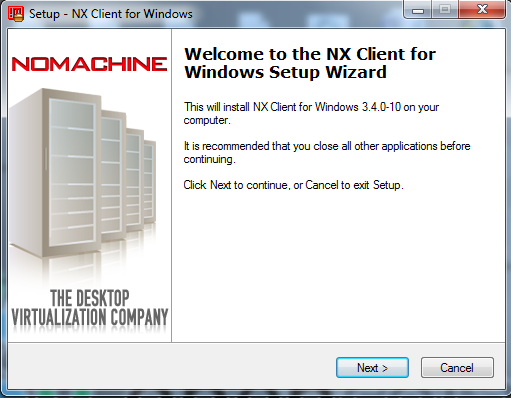
Now Install NX Windows client for Windows

Double Click *.exe file, I just showing some screenshots here

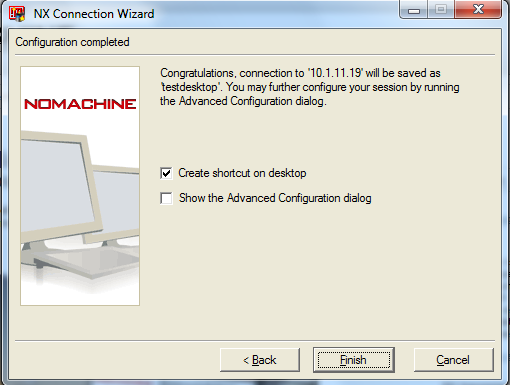
After Installed , Go to Start –> NX client for Windows –> Click NX Connection Wizard

 Session Name : Put any name

Hostname : linux machine hostname or ipaddress. Default port 22

Select Internet connection type also Like LAN, WAN


 Now Client software also successfully installed, But if you’re trying to login, It should show error.

You must copy SSH generation key from linux machine to Windows machine


[root@azardb ~]# cat  /usr/NX/home/nx/.ssh/default.id_dsa.pub

no-port-forwarding,no-agent-forwarding,command="/usr/NX/bin/nxserver --login" ssh-dss AAAAB3NzaC1kc3MAAACBAJe/0DNBePG9dYLWq7cJ0SqyRf1iiZN/IbzrmBvgPTZnBa5FT/0Lcj39sRYt1paAlhchwUmwwIiSZaON5JnJOZ6jKkjWIuJ9MdTGfdvtY1aLwDMpxUVoGwEaKWOyin02IPWYSkDQb6cceuG9NfPulS9iuytdx0zIzqvGqfvudtufAAAAFQCwosRXR2QA8OSgFWSO6+kGrRJKiwAAAIEAjgvVNAYWSrnFD+cghyJbyx60AAjKtxZ0r/Pn9k94Qt2rvQoMnGgt/zU0v/y4hzg+g3JNEmO1PdHh/wDPVOxlZ6Hb5F4IQnENaAZ9uTZiFGqhBO1c8Wwjiq/MFZy3jZaidarLJvVs8EeT4mZcWxwm7nIVD4lRU2wQ2lj4aTPcepMAAACANlgcCuA4wrC+3Cic9CFkqiwO/Rn1vk8dvGuEQqFJ6f6LVfPfRTfaQU7TGVLk2CzY4dasrwxJ1f6FsT8DHTNGnxELPKRuLstGrFY/PR7KeafeFZDf+fJ3mbX5nxrld3wi5titTnX+8s4IKv29HJguPvOK/SI7cjzA+SqNfD7qEo8=

Copy this Key, and paste it in your windows machine, Where ?


C:\Program Files\NX Client for Windows\share\keys\server.id_dsa

Replace old key Adn save with new key.
 

Now You can go to login As Root user & password but before login as Root user, you need to add some lines in linux machine, Otherwise you can get error like  “User ‘root’ cannot be used as an NX user”


[root@azardb ~]# gedit /usr/NX/etc/server.cfg

EnableAdministratorLogin = "1"

And restart Nxserver[root@azardb ~]# /etc/init.d/nxserver restart
Trying to restart NX server:
NX> 123 Service stopped.
NX> 153 Stopping NX server monitor.
NX> 153 NX server monitor already stopped.
NX> 122 Service started.
NX> 999 Bye.
Trying to restart NX statistics:
NX> 723 Cannot start NX statistics:
NX> 709 NX statistics are disabled for this server.
NX> 999 Bye.
[root@azardb ~]#

Now You can Successully login as a Root user through windows and Linux Desktop should be appear in your windows Desktop.

How to recover datafile not backed up

Recently i just added one datafile for a tablespace and later, had a media failure occur before I backuped recently datafile.In this case , How do we recover.

We have previous Good Database backup.

Redo files needed upto Datafiles created.

If you have a current control file, we can restore , recover datafile & tablespace or database level.

Now See Below Example :

before I just backuped database with archivelogs.

Now I’m go to Add datafile to a existing tablespace.

SQL> alter tablespace testtbs add datafile 'D:\BACKUP\RESTORENEW\TESTTBS02.dbf' SIZE 50M;

Tablespace altered. 

SQL> select file_name from dba_data_files where tablespace_name='TESTTBS';

FILE_NAME
--------------------------------------------------------------------------------
D:\BACKUP\RESTORENEW\TESTTBS01.DBF
D:\BACKUP\RESTORENEW\TESTTBS02.DBF

Now I moved Recently added DBF file to other location

d:\backup\restorenew>move testtbs02.dbf d:\backup
        1 file(s) moved.

d:\backup\restorenew>

Shutdown Database & Startup

SQL> shutdown immediate
Database closed.
Database dismounted.
ORACLE instance shut down.
SQL> startup
ORACLE instance started.

Total System Global Area  535662592 bytes
Fixed Size                  1375792 bytes
Variable Size             331350480 bytes
Database Buffers          197132288 bytes
Redo Buffers                5804032 bytes
Database mounted.
ORA-01157: cannot identify/lock data file 12 - see DBWR trace file
ORA-01110: data file 12: 'D:\BACKUP\RESTORENEW\TESTTBS02.DBF'

Now Recover tablespace using RMAN

RMAN> restore tablespace testtbs;

Starting restore at 03-JAN-11
using target database control file instead of recovery catalog
allocated channel: ORA_DISK_1
channel ORA_DISK_1: SID=135 device type=DISK

creating datafile file number=12 name=D:\BACKUP\RESTORENEW\TESTTBS02.DBF
channel ORA_DISK_1: starting datafile backup set restore
channel ORA_DISK_1: specifying datafile(s) to restore from backup set
channel ORA_DISK_1: restoring datafile 00009 to D:\BACKUP\RESTORENEW\TESTTBS01.DBF
channel ORA_DISK_1: reading from backup piece C:\APP\ORACLE\MAZAR\FLASH_RECOVERY_AREA\AZARDB\BACKUPSET\2011_01_03\O1_MF_NNNDF_TAG20110103T122037_6L357C6K_.BKP
channel ORA_DISK_1: piece handle=C:\APP\ORACLE\MAZAR\FLASH_RECOVERY_AREA\AZARDB\BACKUPSET\2011_01_03\O1_MF_NNNDF_TAG20110103T122037_6L357C6K_.BKP tag=TAG201101
03T122037
channel ORA_DISK_1: restored backup piece 1
channel ORA_DISK_1: restore complete, elapsed time: 00:00:03
Finished restore at 03-JAN-11

RMAN> recover tablespace testtbs;

Starting recover at 03-JAN-11
using channel ORA_DISK_1

starting media recovery
media recovery complete, elapsed time: 00:00:01

Finished recover at 03-JAN-11

RMAN> alter database open;

database opened

Let me check datafile

SQL> select file_name from dba_data_files where tablespace_name='TESTTBS';

FILE_NAME
--------------------------------------------------------------------------------
D:\BACKUP\RESTORENEW\TESTTBS01.DBF
D:\BACKUP\RESTORENEW\TESTTBS02.DBF

Using A backup Control file

If we’re using a backup control file that has no information about the datafile, then we must restore and recover at the database level.

I just added another datafile also.

SQL> alter tablespace testtbs add datafile 'D:\BACKUP\RESTORENEW\TESTTBS03.dbf' SIZE 50M;

Tablespace altered.

RMAN> startup nomount;

connected to target database (not started)
Oracle instance started

Total System Global Area     535662592 bytes

Fixed Size                     1375792 bytes
Variable Size                331350480 bytes
Database Buffers             197132288 bytes
Redo Buffers                   5804032 bytes

RMAN> restore controlfile from autobackup;

Starting restore at 03-JAN-11
allocated channel: ORA_DISK_1
channel ORA_DISK_1: SID=133 device type=DISK

recovery area destination: C:\app\oracle\mazar\flash_recovery_area
database name (or database unique name) used for search: AZARDB
channel ORA_DISK_1: AUTOBACKUP C:\APP\ORACLE\MAZAR\FLASH_RECOVERY_AREA\AZARDB\AUTOBACKUP\2011_01_03\O1_MF_S_739455960_6L35KBTC_.BKP found in the recovery area
channel ORA_DISK_1: looking for AUTOBACKUP on day: 20110103
channel ORA_DISK_1: restoring control file from AUTOBACKUP C:\APP\ORACLE\MAZAR\FLASH_RECOVERY_AREA\AZARDB\AUTOBACKUP\2011_01_03\O1_MF_S_739455960_6L35KBTC_.BKP

channel ORA_DISK_1: control file restore from AUTOBACKUP complete
output file name=C:\APP\ORACLE\MAZAR\ORADATA\AZARDB\CONTROL01.CTL
output file name=C:\APP\ORACLE\MAZAR\FLASH_RECOVERY_AREA\AZARDB\CONTROL02.CTL
Finished restore at 03-JAN-11

RMAN> alter database mount;

database mounted

RMAN> restore database;

Starting restore at 03-JAN-11
Starting implicit crosscheck backup at 03-JAN-11
allocated channel: ORA_DISK_1
channel ORA_DISK_1: SID=136 device type=DISK
Crosschecked 6 objects
Finished implicit crosscheck backup at 03-JAN-11

Starting implicit crosscheck copy at 03-JAN-11
using channel ORA_DISK_1
Crosschecked 17 objects
Finished implicit crosscheck copy at 03-JAN-11

searching for all files in the recovery area
cataloging files...
cataloging done

List of Cataloged Files
=======================
File Name: C:\APP\ORACLE\MAZAR\FLASH_RECOVERY_AREA\AZARDB\ARCHIVELOG\2011_01_03\O1_MF_1_29_6L2X3V22_.ARC
File Name: C:\APP\ORACLE\MAZAR\FLASH_RECOVERY_AREA\AZARDB\ARCHIVELOG\2011_01_03\O1_MF_1_29_6L2XL3M4_.ARC
File Name: C:\APP\ORACLE\MAZAR\FLASH_RECOVERY_AREA\AZARDB\AUTOBACKUP\2010_12_26\O1_MF_S_738773797_6KGCCPPK_.BKP
File Name: C:\APP\ORACLE\MAZAR\FLASH_RECOVERY_AREA\AZARDB\AUTOBACKUP\2010_12_26\O1_MF_S_738777392_6KGGW2R7_.BKP
File Name: C:\APP\ORACLE\MAZAR\FLASH_RECOVERY_AREA\AZARDB\AUTOBACKUP\2010_12_27\O1_MF_N_738851503_6KJQ80HG_.BKP
File Name: C:\APP\ORACLE\MAZAR\FLASH_RECOVERY_AREA\AZARDB\AUTOBACKUP\2010_12_27\O1_MF_N_738851640_6KJY64RH_.BKP
File Name: C:\APP\ORACLE\MAZAR\FLASH_RECOVERY_AREA\AZARDB\AUTOBACKUP\2010_12_27\O1_MF_S_738813797_6KHLFP6B_.BKP
File Name: C:\APP\ORACLE\MAZAR\FLASH_RECOVERY_AREA\AZARDB\AUTOBACKUP\2011_01_03\O1_MF_S_739455960_6L35KBTC_.BKP

using channel ORA_DISK_1

channel ORA_DISK_1: starting datafile backup set restore
channel ORA_DISK_1: specifying datafile(s) to restore from backup set
channel ORA_DISK_1: restoring datafile 00001 to C:\APP\ORACLE\MAZAR\ORADATA\AZARDB\SYSTEM01.DBF
channel ORA_DISK_1: restoring datafile 00002 to C:\APP\ORACLE\MAZAR\ORADATA\AZARDB\SYSAUX01.DBF
channel ORA_DISK_1: restoring datafile 00003 to D:\BACKUP\ADDME01.DBF
channel ORA_DISK_1: restoring datafile 00004 to C:\APP\ORACLE\MAZAR\ORADATA\AZARDB\USERS01.DBF
channel ORA_DISK_1: restoring datafile 00005 to C:\APP\ORACLE\MAZAR\ORADATA\AZARDB\EXAMPLE01.DBF
channel ORA_DISK_1: restoring datafile 00006 to D:\BACKUP\RCRMAN01.DBF
channel ORA_DISK_1: restoring datafile 00007 to D:\BACKUP\USERSTBS01.DBF
channel ORA_DISK_1: restoring datafile 00008 to D:\BACKUP\UNDOTBS02.DBF
channel ORA_DISK_1: restoring datafile 00009 to D:\BACKUP\RESTORENEW\TESTTBS01.DBF
channel ORA_DISK_1: restoring datafile 00010 to D:\BACKUP\TESTDB001.DBF
channel ORA_DISK_1: restoring datafile 00011 to D:\BACKUP\TESTTB1.DBF
channel ORA_DISK_1: reading from backup piece C:\APP\ORACLE\MAZAR\FLASH_RECOVERY_AREA\AZARDB\BACKUPSET\2011_01_03\O1_MF_NNNDF_TAG20110103T122037_6L357C6K_.BKP
channel ORA_DISK_1: piece handle=C:\APP\ORACLE\MAZAR\FLASH_RECOVERY_AREA\AZARDB\BACKUPSET\2011_01_03\O1_MF_NNNDF_TAG20110103T122037_6L357C6K_.BKP tag=TAG201101
03T122037
channel ORA_DISK_1: restored backup piece 1
channel ORA_DISK_1: restore complete, elapsed time: 00:03:05
Finished restore at 03-JAN-11

RMAN> recover database;

Starting recover at 03-JAN-11
using channel ORA_DISK_1

starting media recovery

archived log for thread 1 with sequence 34 is already on disk as file C:\APP\ORACLE\MAZAR\FLASH_RECOVERY_AREA\AZARDB\ARCHIVELOG\2011_01_03\O1_MF_1_34_6L35K2PO_
.ARC
archived log for thread 1 with sequence 35 is already on disk as file C:\APP\ORACLE\MAZAR\ORADATA\AZARDB\REDO03.LOG
archived log file name=C:\APP\ORACLE\MAZAR\FLASH_RECOVERY_AREA\AZARDB\ARCHIVELOG\2011_01_03\O1_MF_1_34_6L35K2PO_.ARC thread=1 sequence=34
archived log file name=C:\APP\ORACLE\MAZAR\ORADATA\AZARDB\REDO03.LOG thread=1 sequence=35
creating datafile file number=12 name=D:\BACKUP\RESTORENEW\TESTTBS02.DBF
archived log file name=C:\APP\ORACLE\MAZAR\ORADATA\AZARDB\REDO03.LOG thread=1 sequence=35
creating datafile file number=13 name=D:\BACKUP\RESTORENEW\TESTTBS03.DBF
archived log file name=C:\APP\ORACLE\MAZAR\ORADATA\AZARDB\REDO03.LOG thread=1 sequence=35
media recovery complete, elapsed time: 00:00:06
Finished recover at 03-JAN-11

RMAN> alter database open resetlogs;

database opened
SQL> select file_name from dba_data_files where tablespace_name='TESTTBS';

FILE_NAME
--------------------------------------------------------------------------------
D:\BACKUP\RESTORENEW\TESTTBS02.DBF
D:\BACKUP\RESTORENEW\TESTTBS03.DBF
D:\BACKUP\RESTORENEW\TESTTBS01.DBF