Oracle Database 11g R2 Certification on Oracle Linux 6
Oracle Announces the Certification of the Oracle Database on Oracle Linux 6 and Red Hat Enterprise Linux 6
Please see Oracle press report from here
Mar 24
Oracle Announces the Certification of the Oracle Database on Oracle Linux 6 and Red Hat Enterprise Linux 6
Please see Oracle press report from here
Here I just showed how do we create new wallet using orapki utility or OWM ( Oracle Wallet Manager).
Step 1 : Login as oracle user, set the oracle_home path and make new directory for wallet stored.
[oracle@netbackuptest ~]$ export ORACLE_SID=testdb
[oracle@netbackuptest ~]$cd $ORACLE_HOME
[oracle@netbackuptest dbhome_2]$ mkdir -p wallets
Step 2: Create Wallete using orapki
[oracle@netbackuptest dbhome_2]$ orapki wallet create -wallet $ORACLE_HOME/wallets
Oracle PKI Tool : Version 11.2.0.2.0 - Production
Copyright (c) 2004, 2010, Oracle and/or its affiliates. All rights reserved.

Enter password:
Enter password again:

Note :  PASSWORD_POLICY : Passwords must have minimum length of eight characters and contain alphabetic
characters combined with numbers or special characters.

[oracle@netbackuptest dbhome_2]$ ls -l wallets/
total 4
-rw------- 1 oracle oinstall 3512 Mar 20 04:07 ewallet.p12

to display the contents of a wallet

[oracle@netbackuptest dbhome_2]$ orapki wallet display -wallet $ORACLE_HOME/wallets
Oracle PKI Tool : Version 11.2.0.2.0 - Production
Copyright (c) 2004, 2010, Oracle and/or its affiliates. All rights reserved.

Enter wallet password:
Requested Certificates:
User Certificates:
Trusted Certificates:
Subject: OU=Class 1 Public Primary Certification Authority,O=VeriSign\, Inc.,C=US
Subject: OU=Class 3 Public Primary Certification Authority,O=VeriSign\, Inc.,C=US
Subject: OU=Class 2 Public Primary Certification Authority,O=VeriSign\, Inc.,C=US
Subject: OU=Secure Server Certification Authority,O=RSA Data Security\, Inc.,C=US
Subject: CN=GTE CyberTrust Global Root,OU=GTE CyberTrust Solutions\, Inc.,O=GTE Corporation,C=US
Using OWM :
Set Oracle home path and execute owm command


Open a existing wallet
Choose open and select a directory and put it a existing wallet password and then you can see the wallet information.


If you want to create a new wallet using OWM, you can choose new panel from left side panel and start to create wallet

Listener local os authentication parameter control the start or stop listener services through remotely.
Let see example,
Step 1: Source Host Listener status, here local os authentication is ON.

Step 2: set the new password for listener and save configuration

Step 3: look listener.ora file whether password file is stored or not.
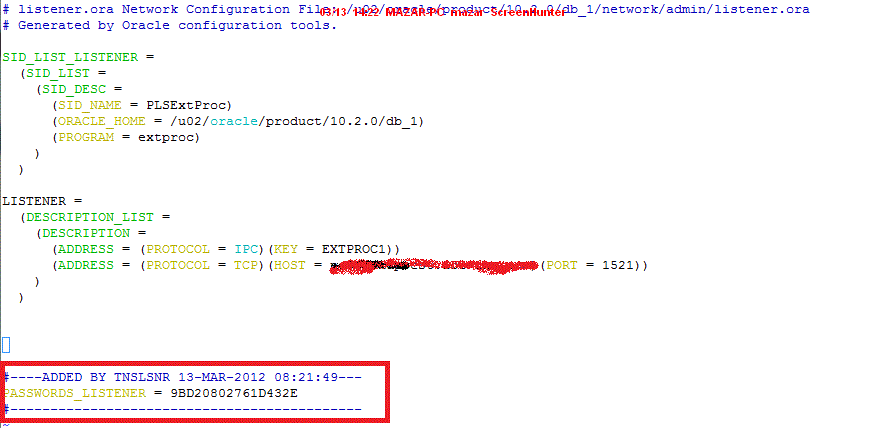
Step 4: Go to remote server, remote Host :
Add following entries in tnsnames.ora file in target host
/u01/app/oracle/product/11.2.0/dbhome_1/network/admin/tnsnames.ora

Step 5: reload the source listener from remote host

Set the password at remote host and then reload listener

Step 6: Go to source host, If I OFF the local os autentication, Can I able to reload/stop/start from remote host? No
go to listener.ora file and add the following entires

LSNRCTL> reload
Connecting to (DESCRIPTION=(ADDRESS=(PROTOCOL=TCP)(HOST=netbackuptest.ace-ins.com)(PORT=1521)))
The command completed successfully
Step 7 : Go to remote host, reload/stop/start source listener

Step 8 : How do i remove password protection from listener.ora
remove the password listener entries from listener.ora file, though If you don’t want to protect local os authentication also, you set local_os_authentication_listenername=off
and after go to listener utility , reload the listener

Check the status of security off

PRODUCT_USER_PROFILE table to provide product level security that supplements the user-level security provided by the SQL GRANT andREVOKE commands and user roles.
This table in System account. We can insert the product based data here which user roles, grant and revoke command you want to restrict.
This table does not apply for SYSDBA or SYSOPER privileges.
The PUP table applies only to the local database. If accessing objects on a remote database through a database link, the PUP table for the remote database does not apply. The remote database cannot extract the username and password from the database link in order to determine that user’s profile and privileges.
More Detail from here : Oracle Document
Here I’m going to create user, roles and create table for this user.
SQL> conn / as sysdba
Connected.
SQL> create user fsmith identified by fsmith;
User created.

SQL> grant create session to fsmith;

Grant succeeded.

SQL> create role role2;

Role created.

SQL> grant create table to role2;

Grant succeeded.

SQL> grant role2 to fsmith;

Grant succeeded.

SQL> conn fsmith/fsmith
Connected.
SQL> create table emp(empno number,empname varchar2(20));

Table created.

Now I insert into product_user_profile table for product level security like roles and after create table for
this user, It has no privileges for create table because of the roles has disabled in product_user_profile table.

SQL> conn system/Admin123
Connected.

SQL> desc product_user_profile;
Name Null? Type
----------------------------------------- -------- ----------------------------
PRODUCT NOT NULL VARCHAR2(30)
USERID VARCHAR2(30)
ATTRIBUTE VARCHAR2(240)
SCOPE VARCHAR2(240)
NUMERIC_VALUE NUMBER(15,2)
CHAR_VALUE VARCHAR2(240)
DATE_VALUE DATE
LONG_VALUE LONG

SQL> insert into product_user_profile values('SQL*Plus','FSMITH','ROLES',NULL,NULL,'ROLE2',NULL,NULL);

1 row created.

SQL> commit;

Commit complete.

SQL> conn fsmith/fsmith
Connected.

SQL> create table role(role_name varchar2(20));
create table role(role_name varchar2(20))
*
ERROR at line 1:
ORA-01031: insufficient privileges
After I read it from here , I just would like to share this information “Oracle linux 5.8 has been released”.
You can read more detail from here.
“If you’re granted select any table to a user when O7_DICTIONARY_ACCESSIBILITY is set to TRUE, the particular user can able to see the data dictionary tables.”
O7_DICTIONARY_ACCESSIBILITY controls restrictions on SYSTEM privileges. If the parameter is set to true, access to objects in the SYS schema is allowed (Oracle7 behavior). The default setting of false ensures that system privileges that allow access to objects in “any schema” do not allow access to objects in the SYS schema.
For example, if O7_DICTIONARY_ACCESSIBILITY is set to false, then the SELECT ANY TABLE privilege allows access to views or tables in any schema except the SYS schema (data dictionary tables cannot be accessed). The system privilege EXECUTE ANY PROCEDURE allows access on the procedures in any schema except the SYS schema.
If this parameter is set to false and you need to access objects in the SYS schema, then you must be granted explicit object privileges. The following roles, which can be granted to the database administrator, also allow access to dictionary objects:
SELECT_CATALOG_ROLEEXECUTE_CATALOG_ROLEDELETE_CATALOG_ROLEExample :
SQL> grant select any table to scott;

Grant succeeded.

SQL> show parameter O7_DICTIONARY_ACCESSIBILITY;

NAME                                 TYPE        VALUE

------------------------------------ ----------- ------------------------------

O7_DICTIONARY_ACCESSIBILITY          boolean     FALSE

SQL> conn scott/tiger

Connected.

SQL> select * from dba_users;

select * from dba_users               *

ERROR at line 1: ORA-00942: table or view does not exist

SQL> alter system set O7_DICTIONARY_ACCESSIBILITY=TRUE scope=spfile;

System altered.

SQL> shutdown immediate

Database closed.

Database dismounted.

ORACLE instance shut down.

SQL> startup

ORACLE instance started.

Total System Global Area 1603411968 bytes

Fixed Size                  2226912 bytes

Variable Size             687867168 bytes

Database Buffers          905969664 bytes

Redo Buffers                7348224 bytes

Database mounted. Database opened.

SQL> show parameter O7_DICTIONARY_ACCESSIBILITY;

NAME                                 TYPE        VALUE

------------------------------------ ----------- ------------------------------

O7_DICTIONARY_ACCESSIBILITY          boolean     TRUE

SQL> conn scott/tiger
 Connected.

SQL> select count(username) from dba_users;

COUNT(USERNAME)

---------------

45
Ref : Oracle Document
Packt Publishing prepares for COLLABORATE 12 with discounts on Oracle titles all month
As a leading publisher of Oracle books/eBooks, Packt Publishing is inviting their readers to celebrate the upcoming COLLABORATE 12 conference being held in Las Vegas from 22nd-26th April.
The COLLABORATE 12 conference covers a wide array of topics across all Oracle technologies and applications, including everything from OBIEE and Siebel, to Hyperion and E-Business Suite R12. Over 6,000 attendees are expected in Las Vegas this April for an exciting week of sessions and networking, and Packt’s offer will help any Oracle professionals make the most of the conference, whether they’re attending or just taking an interest from afar.
Packt is offering a range of exciting discounts on their 60+ titles across all areas of Oracle technology including Applications, Database and Fusion Middleware:
To lend a helping hand to those in attendance or professionals who are simply excited about the buzz that the glamorous Las Vegas event will bring, Packt’s discounts apply to all of their Oracle titles and formats.
For further information on Packt’s “Oracle PacktPot” offers in March, visit: Hit the Oracle packtpot 2012
Recent Oracle publications include:
Upcoming titles due in 2012:
Throughout 2012, Packt will continue to build-upon the success of their vast number of Oracle titles venturing further into not only books on even more topics, but also exciting new formats and series’ like Cheat Sheets and Video.
Feb 28
The SQL92 standards specify that security administrators should be able to require that users have SELECT privilege on a table when executing an UPDATE or DELETE statement that references table column values in a WHERE or SET clause. SQL92_SECURITY specifies whether users must have been granted the SELECT object privilege in order to execute such UPDATE or DELETE statements.
Example :

SQL> create user employees identified by employees;

User created.

SQL> grant connect,resource to employees;

Grant succeeded.

SQL> conn employees/employees;
Connected.
SQL> create table empl_object as select * from all_objects;

Table created.

SQL> select count(*) from empl_object;

COUNT(*)
----------
55877

SQL> conn / as sysdba
Connected.
SQL> create user usera identified by usera;

User created.

SQL> grant connect to usera;

Grant succeeded.

SQL> create user userb identified by userb;

User created.

SQL> grant connect to userb;

Grant succeeded.

SQL> conn employees/employees;
Connected.
SQL> grant update,select on empl_object to usera;

Grant succeeded.

SQL> conn usera/usera
Connected.

SQL> update employees.empl_object set owner='test' where owner='SYS';

23687 rows updated.

SQL> COMMIT;

Commit complete.

SQL> conn userb/userb
Connected.
SQL> update employees.empl_object set owner='SYS' where owner='test';

23687 rows updated.

SQL> commit;

Commit complete.

Enable sql92_security parameter.

SQL> show parameter sql92_security;

NAME TYPE VALUE
------------------------------------ ----------- ------------------------------
sql92_security boolean FALSE

SQL> alter system set sql92_security=TRUE scope=SPFILE;

System altered.

SQL> show parameter sql92_security;

NAME TYPE VALUE
------------------------------------ ----------- ------------------------------
sql92_security boolean FALSE
SQL> shutdown immediate
Database closed.
Database dismounted.
ORACLE instance shut down.
SQL> startup
ORACLE instance started.

Total System Global Area 1603411968 bytes
Fixed Size 2226912 bytes
Variable Size 687867168 bytes
Database Buffers 905969664 bytes
Redo Buffers 7348224 bytes
Database mounted.
Database opened.
SQL> show parameter sql92_security;

NAME TYPE VALUE
------------------------------------ ----------- ------------------------------
sql92_security boolean TRUE

SQL> conn usera/usera
Connected.
SQL> update employees.empl_object set owner='test' where owner='SYS';

23687 rows updated.

SQL> commit;

Commit complete.

Now you can not update the table.
SQL> conn userb/userb Connected. SQL> update employees.empl_object set owner='SYS' where owner='test'; update employees.empl_object set owner='test' where owner='SYS' * ERROR at line 1: ORA-01031: insufficient privilegesSQL>
Just read more detail from This blog
Feb 27
When you configuring the password for a user in database, it automatically calculating the password hash normally or bypassing the hash process and writing a value to the PASSWORD column of sys.user$.
Just a exmple :
SQL> create user imppassword identified by imppassword;

User created.

SQL> select name,password from sys.user$ where name='IMPPASSWORD';

NAME                           PASSWORD

------------------------------ ------------------------------

IMPPASSWORD                    27D780816A86DC5C
When this user provides their credentials to Oracle to log in, Oracle will take the credentials, create the password hash, and then compare it with the value stored in SYS.USER$, find a match, and allow the user to connect.
SQL> grant connect,resource to imppassword;

Grant succeeded.

SQL> conn imppassword/imppassword;

Connected.
If we created the user and explicitly set the password value, things would be different.
SQL> create user password identified by values 'password';

User created.

SQL> grant connect,resource to password;

Grant succeeded.

SQL> select name,password from sys.user$ where name = 'PASSWORD';

NAME                           PASSWORD

------------------------------ ------------------------------

PASSWORD                       password
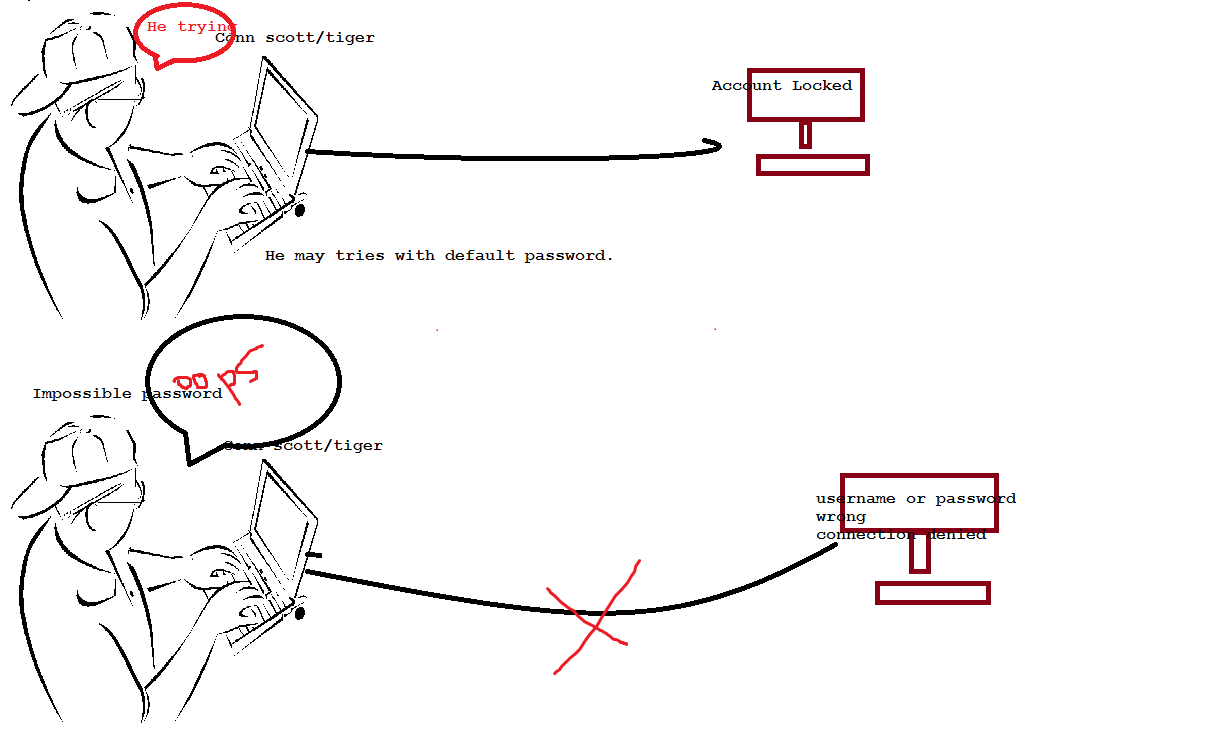
This time the value stored is the text string PASSWORD.This is an impossible password, because regardless of the input, the Oracle password hashing algorithm could never produce output that matches. Now you can not able to log in this user. Its called impossible password.
Why it need for implement?
If you would like to lock the user account, The attacker tries to login the these user account it shows the user account is locked , they may get a good information from this error. Locking default accounts tells an attacker what schemas and therefore what features are installed on a given database.This allows them to create a plan of attack before they ever penetrate the database, building a list of potential exploits with the benefit of knowing which potentially vulnerable features are installed.
SQL> conn scott/tiger

ERROR: ORA-28000: the account is locked

Warning: You are no longer connected to '

ORACLE. SQL>
Furthermore, the attacker now knows the password for each account is set to the default value! Setting an impossible password and unlocking the accounts prevents an attacker from logging in, but also provides no information about the existence of each account/schema or their password.
SQL> conn password/password

ERROR: ORA-01017: invalid username/password; logon denied

Warning: You are no longer connected to ORACLE.
With impossible passwords, an attacker gets no information from an attempt to log in to the database with each default account and password. Less information is always better and it’s our responsibility to make a hacker’s job as difficult as possible.
Valid node checking is the one of the listener secuirty feature. I thought may be very lesser known this feature. What purpose of this feature use, this feature uses If you configuring the the set of invited or exluded nodes, you can take control of which hosts are allowed to connect your database. You can add it hostnames or ip address in sqlnet.ora file.
In other cases it can be more complex, particularly when a single database is hosting several applications.There will be some cases where a database must accept connections from a large number of hosts, when the list of hosts that connect is constantly hanging, or even some organizations that change both IP addresses and hostnames for their machines on a somewhat random basis. For these systems,Valid Node Checking is not a viable feature.
If you think your database may connect few client hosts, you can add this feature in sqlnet.ora file. this feature restricted to connect the database from other client hosts.
Let’s See ,
Database Server , I just configured following entries in sqlnet.ora file.
tcp.validnode_checking = yes
tcp.invited_nodes = (siebelpoc)
Reload listener
lsnrctl>reload
From client host :
[oracle@siebelpoc ~]$ export ORACLE_SID=testdb
[oracle@siebelpoc ~]$ sqlplus system/Admin123@testdb

SQL*Plus: Release 11.2.0.1.0 Production on Sun Feb 26 11:02:48 2012

Copyright (c) 1982, 2009, Oracle.  All rights reserved.

Connected to: Oracle Database 11g Enterprise Edition Release 11.2.0.2.0 - 64bit Production With the Partitioning, OLAP, Data Mining and Real Application Testing options

SQL> select name from v$database;

NAME --------- TESTDB
I can able to connect.
Again I just edited invited nodes in database server sqlnet.ora file
tcp.validnode_checking = yes
tcp.invited_nodes = (siebel)
Reload listener
lsnrctl>reload
From client machine,
[oracle@siebelpoc ~]$ sqlplus system/Admin123@testdb

SQL*Plus: Release 11.2.0.1.0 Production on Sun Feb 26 11:05:36 2012

Copyright (c) 1982, 2009, Oracle.  All rights reserved.

ERROR: ORA-12537: TNS:connection closed
Now I can not able to connect the database from client hosts because of i changed invited node in sqlnet.ora file.


Database Administrator, Blogger, Contributor


 DBA
DBA 