Checkpoint Tuning and Troubleshooting Guide
The below note id will helpful for you if you want to know how do i do checkpoint tuning.
Checkpoint Tuning and Troubleshooting Guide [ID 147468.1]
Jun 25
The below note id will helpful for you if you want to know how do i do checkpoint tuning.
Checkpoint Tuning and Troubleshooting Guide [ID 147468.1]
May 22
If you are working database on putty terminal at your pc host, you are thinking like to do configure new database use dbca or any other graphical user method. you may jump into GUI linux machine and do your work like vncviewer. Do you know you can able to do from your putty termianl. How? Just download Xmanager software and install on your pc host and set display on putty terminal. The display should be on your pc host ipaddress and also check both side Firewall is turn off.
Download Xmanager
Check Firewall turn off on both machine ( Linux and pc host ).
Install Xmanager on your host
start Xmanager
now go to putty terminal and set display (ipaddres of pc host not linux machine).
[root@testser ~]# su – oracle
[oracle@testser ~]$ export DISPLAY=10.x.xx.xx:0.0
[oracle@testser ~]$ dbca

When i try to increase the size primary volume group , it show following error.
[root@testser dev]# pvscan

Couldn't find device with uuid '6fq50M-M4b8-mV4b-10ff-UKHA-CgDE-ojFbn0'.
PV /dev/sda2 VG VolGroup00 lvm2 [24.88 GB / 0 free]
PV unknown device VG VolGroup00 lvm2 [4.97 GB / 4.97 GB free]
PV /dev/sde1 lvm2 [4.99 GB]
Total: 3 [34.84 GB] / in use: 2 [29.84 GB] / in no VG: 1 [4.99 GB]

User --removemissing command to resolve this issues.

root@testser dev]# vgreduce --removemissing VolGroup00
Couldn't find device with uuid '6fq50M-M4b8-mV4b-10ff-UKHA-CgDE-ojFbn0'.
Couldn't find device with uuid '6fq50M-M4b8-mV4b-10ff-UKHA-CgDE-ojFbn0'.
Wrote out consistent volume group VolGroup00
[root@testser dev]# pvdisplay
Oracle Database provides data dictionary views and PL/SQL packages that allow you to display information about the space usage of schema objects.
DBMS_SPACE : refer here
Just a example :
SQL> VARIABLE total_blocks NUMBER
SQL> VARIABLE total_bytes NUMBER
SQL> VARIABLE unused_blocks NUMBER
SQL> VARIABLE unused_bytes NUMBER
SQL> VARIABLE lastextf NUMBER
SQL> VARIABLE last_extb NUMBER
SQL> VARIABLE lastusedblock NUMBER

SQL> exec DBMS_SPACE.UNUSED_SPACE('SCOTT', 'EMP', 'TABLE', :total_blocks,:total_ bytes,:unused_blocks,:unused_bytes, :lastextf,:last_extb, :lastusedblock);

PL/SQL procedure successfully completed.

SQL> print

TOTAL_BLOCKS
------------
8
TOTAL_BYTES
-----------
65536
UNUSED_BLOCKS
-------------
4
UNUSED_BYTES
------------
32768
LASTEXTF
----------
4
LAST_EXTB
----------
144
LASTUSEDBLOCK
-------------
4

SQL>
I would like to share this information
If you want to connect map network using command prompt in windows , you can use pushd command.
C:\Users\mazar>pushd \\10.1.xx.xxx\export
Z:\>dir
Volume in drive Z has no label.
Volume Serial Number is 3CF7-C48C
Directory of Z:\
05/14/2012 02:55 PM <DIR> .
05/14/2012 02:55 PM <DIR> ..
01/23/2012 11:43 AM 866,799 itsupport-db_2012-01-23.sql
01/29/2012 04:15 PM 1,094,435 itsupport-db_2012-01-29.sql
01/31/2012 11:57 AM 1,144,597 itsupport-db_2012-01-31.sql
02/04/2012 04:18 PM 1,267,529 itsupport-db_2012-02-04.sql
02/05/2012 03:23 PM 1,305,221 itsupport-db_2012-02-05.sql
popd command use to disconnect mapped network.
Z:\>popd
C:\Users\mazar>
More Detail :
If you have two diskgroup, you want to multiplex redo in different diskgroup, you just add redo log desitnation
diskgroup.
sql>alter system set db_create_online_log_dest_1='+RED01' scope=spfile;

System altered.

sql>alter system set db_create_online_log_dest_2='+REDO2' scope=spfile;

System altered

SQL> create pfile='/u01/initcrmprod.ora' from spfile;

File created.

SQL> shutdown immediate
Database closed.
Database dismounted.
ORACLE instance shut down.
SQL> exit
Disconnected from Oracle Database 11g Enterprise Edition Release 11.2.0.1.0 - 64bit Production
With the Partitioning, Automatic Storage Management, OLAP, Data Mining
and Real Application Testing options
[oracle@siebeldb ~]$ vi /u01/initcrmprod.ora
[oracle@siebeldb ~]$ sqlplus / as sysdba

SQL*Plus: Release 11.2.0.1.0 Production on Sat Apr 28 18:12:42 2012

Copyright (c) 1982, 2009, Oracle. All rights reserved.

Connected to an idle instance.

SQL> create spfile from pfile='/u01/initcrmprod.ora';

File created.

SQL> startup
ORACLE instance started.

Total System Global Area 6747725824 bytes
Fixed Size 2213976 bytes
Variable Size 3623880616 bytes
Database Buffers 3087007744 bytes
Redo Buffers 34623488 bytes
Database mounted.
Database opened.

SQL> select l.group# , l.bytes , l.status , lf.member from v$logfile lf , v$log l where lf.group# = l.group#;

GROUP# BYTES STATUS
---------- ---------- ----------------
MEMBER
--------------------------------------------------------------------------------
3 52428800 INACTIVE
+DATA/crmprod/onlinelog/group_3.263.781072923

3 52428800 INACTIVE
+FRA/crmprod/onlinelog/group_3.259.781072923

2 52428800 INACTIVE
+DATA/crmprod/onlinelog/group_2.262.781072911
GROUP# BYTES STATUS
---------- ---------- ----------------
MEMBER
--------------------------------------------------------------------------------
2 52428800 INACTIVE
+FRA/crmprod/onlinelog/group_2.258.781072913

1 52428800 CURRENT
+DATA/crmprod/onlinelog/group_1.261.781072891

1 52428800 CURRENT
+FRA/crmprod/onlinelog/group_1.257.781072891
6 rows selected.

QL> show parameter db_create_online_log_dest;

NAME TYPE VALUE
------------------------------------ ----------- ------------------------------
db_create_online_log_dest_1 string +REDO1
db_create_online_log_dest_2 string +REDO2
db_create_online_log_dest_3 string
db_create_online_log_dest_4 string
db_create_online_log_dest_5 string

SQL> alter database drop logfile group 3;

Database altered.

SQL> alter database add logfile group 3 size 52428800;

Database altered.

SQL> alter database drop logfile group 2;

Database altered.

SQL> alter database add logfile group 2 size 52428800;

Database altered.

SQL> alter database drop logfile group 1;
alter database drop logfile group 1
*
ERROR at line 1:
ORA-01623: log 1 is current log for instance crmprod (thread 1) - cannot drop
ORA-00312: online log 1 thread 1:
'+DATA/crmprod/onlinelog/group_1.261.781072891'
ORA-00312: online log 1 thread 1:
'+FRA/crmprod/onlinelog/group_1.257.781072891'

SQL> alter system switch logfile;

System altered.

SQL> alter database drop logfile group 1;
alter database drop logfile group 1
*
ERROR at line 1:
ORA-01624: log 1 needed for crash recovery of instance crmprod (thread 1)
ORA-00312: online log 1 thread 1:
'+DATA/crmprod/onlinelog/group_1.261.781072891'
ORA-00312: online log 1 thread 1:
'+FRA/crmprod/onlinelog/group_1.257.781072891'

SQL> alter system switch logfile;

System altered.

SQL> alter database drop logfile group 1;
alter database drop logfile group 1
*
ERROR at line 1:
ORA-01624: log 1 needed for crash recovery of instance crmprod (thread 1)
ORA-00312: online log 1 thread 1:
'+DATA/crmprod/onlinelog/group_1.261.781072891'
ORA-00312: online log 1 thread 1:
'+FRA/crmprod/onlinelog/group_1.257.781072891'
SQL> select l.group# , l.bytes , l.status , lf.member from v$logfile lf , v$log l where lf.group# = l.group#;

GROUP# BYTES STATUS
---------- ---------- ----------------
MEMBER
--------------------------------------------------------------------------------
3 52428800 CURRENT
+REDO1/crmprod/onlinelog/group_3.256.781812953

3 52428800 CURRENT
+REDO2/crmprod/onlinelog/group_3.256.781812953

2 52428800 ACTIVE
+REDO1/crmprod/onlinelog/group_2.257.781812977
GROUP# BYTES STATUS
---------- ---------- ----------------
MEMBER
--------------------------------------------------------------------------------
2 52428800 ACTIVE
+REDO2/crmprod/onlinelog/group_2.257.781812977

1 52428800 ACTIVE
+DATA/crmprod/onlinelog/group_1.261.781072891

1 52428800 ACTIVE
+FRA/crmprod/onlinelog/group_1.257.781072891
6 rows selected.

SQL> alter system checkpoint global;

System altered.

SQL> select l.group# , l.bytes , l.status , lf.member from v$logfile lf , v$log l where lf.group# = l.group#;

GROUP# BYTES STATUS
---------- ---------- ----------------
MEMBER
--------------------------------------------------------------------------------
3 52428800 CURRENT
+REDO1/crmprod/onlinelog/group_3.256.781812953

3 52428800 CURRENT
+REDO2/crmprod/onlinelog/group_3.256.781812953

2 52428800 INACTIVE
+REDO1/crmprod/onlinelog/group_2.257.781812977
GROUP# BYTES STATUS
---------- ---------- ----------------
MEMBER
--------------------------------------------------------------------------------
2 52428800 INACTIVE
+REDO2/crmprod/onlinelog/group_2.257.781812977

1 52428800 INACTIVE
+DATA/crmprod/onlinelog/group_1.261.781072891

1 52428800 INACTIVE
+FRA/crmprod/onlinelog/group_1.257.781072891
6 rows selected.

SQL> alter database drop logfile group 1;

Database altered.

SQL> alter database add logfile group 1 size 52428800;

Database altered.

SQL> select l.group# , l.bytes , l.status , lf.member from v$logfile lf , v$log l where lf.group# = l.group#;

GROUP# BYTES STATUS
---------- ---------- ----------------
MEMBER
--------------------------------------------------------------------------------
3 52428800 CURRENT
+REDO1/crmprod/onlinelog/group_3.256.781812953

3 52428800 CURRENT
+REDO2/crmprod/onlinelog/group_3.256.781812953

2 52428800 INACTIVE
+REDO1/crmprod/onlinelog/group_2.257.781812977
GROUP# BYTES STATUS
---------- ---------- ----------------
MEMBER
--------------------------------------------------------------------------------
2 52428800 INACTIVE
+REDO2/crmprod/onlinelog/group_2.257.781812977

1 52428800 UNUSED
+REDO1/crmprod/onlinelog/group_1.258.781813125

1 52428800 UNUSED
+REDO2/crmprod/onlinelog/group_1.258.781813125
6 rows selected.

SQL>
Apr 10
Just a example for export tablespace and import tablespace on the same database when the tablespace existing
Step1 :

Step 2: export tabespace

Step 3: import tablespace but errors shown when it ends because of already existing objects there

Step 4: use table_exists_action=replace

This is the simple method to configure
Step 1:
open remote desktop, click options –> local resources
click more

Step 2:
Choose your local directory
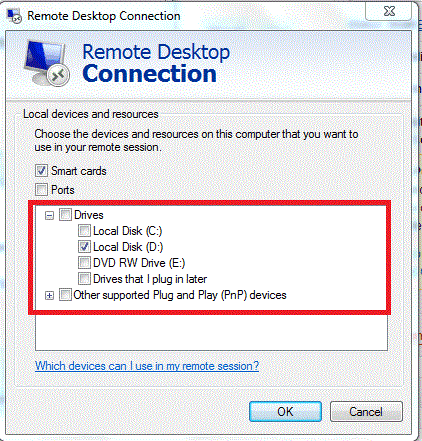
Step 3:
Now login remote desktop
Step 4:
you can see your local directory at remote desktop, now you can able to copy server data to your local directory

Normal export exp does not support if table column encrypted using TDE method. However datapump is support.
Lets see example
Step 1:

Step 2:

Step 3:
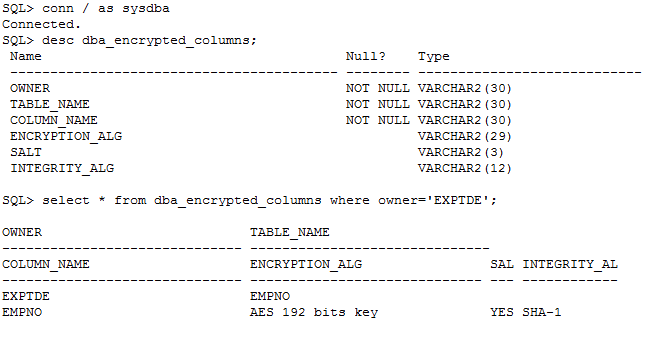
Step 4:

Mar 25
This is another security method, you can able to connect the particular user data from client side without supplying password using wallet.
“Password credentials for connecting to databases can now be stored in a client-side Oracle wallet, a secure software container used to store authentication and signing credentials.
This wallet usage can simplify large-scale deployments that rely on password credentials for connecting to databases. When this feature is configured, application code, batch jobs, and scripts no longer need embedded user names and passwords. Risk is reduced because such passwords are no longer exposed in the clear, and password management policies are more easily enforced without changing application code whenever user names or passwords change.”
Let See Example :
Source Host :
Step 1:
SQL> grant dba to scott;

Grant succeeded.

SQL> conn scott/tiger
Connected.
SQL> select * from tab;

TNAME TABTYPE CLUSTERID
------------------------------ ------- ----------
BONUS TABLE
DEPT TABLE
EMP TABLE
SALGRADE TABLE
TEST TABLE

SQL> select name from v$database;

NAME
---------
TESTDB

SQL> select host_name from v$instance;

HOST_NAME
----------------------------------------------------------------
netbackuptest

SQL>
Client Host :
Step 2:
Create a wallet on the client using following syntex
[oracle@vcdb01 ~]$ mkdir -p /u01/app/oracle/product/wallet
[oracle@vcdb01 ~]$ mkstore -wrl /u01/app/oracle/product/wallet/ -create
Oracle Secret Store Tool : Version 11.2.0.1.0 - Production
Copyright (c) 2004, 2009, Oracle and/or its affiliates. All rights reserved.

Enter password:

Enter password again:
Step 3: Add source tns entries in client tnsnames.ora file
testdb =
(DESCRIPTION =
(ADDRESS = (PROTOCOL = TCP)(HOST =netbackuptest)(PORT = 1521))
(CONNECT_DATA =
(SERVER = DEDICATED)
(SERVICE_NAME = testdb)
)
)
Step 4: Create database connection credentials in the wallet by using the following syntax at the command line
[oracle@vcdb01 ~]$ mkstore -wrl /u01/app/oracle/product/wallet/ -createCredential testdb scott tiger
Oracle Secret Store Tool : Version 11.2.0.1.0 - Production
Copyright (c) 2004, 2009, Oracle and/or its affiliates. All rights reserved.

Enter wallet password:

Here :

testdb --> tns alias name

scott  --> user name

tiger   --> password
Step 5:
[oracle@vcdb01 ~]$ mkstore -wrl /u01/app/oracle/product/wallet/ -listCredential
Oracle Secret Store Tool : Version 11.2.0.1.0 - Production
Copyright (c) 2004, 2009, Oracle and/or its affiliates. All rights reserved.

Enter wallet password:

List credential (index: connect_string username)
1: testdb scott
Step 6: Add the following entries in sqlnet.ora
WALLET_LOCATION=(SOURCE=(METHOD=FILE) (METHOD_DATA = (DIRECTORY =/u01/app/oracle/product/wallet)))

SQLNET.WALLET_OVERRIDE = TRUE
Note: For clients not using such authentication methods or wanting to override them for database authentication, a new parameter (SQLNET.WALLET_OVERRIDE) in sqlnet.ora can be set to TRUE. The default value forSQLNET.WALLET_OVERRIDE is FALSE, allowing standard use of authentication credentials as before.
Step 7: connect scott using without supplying password from client machine using wallet
[oracle@vcdb01 ~]$ sqlplus /@testdb

SQL*Plus: Release 11.2.0.1.0 Production on Sun Mar 25 10:27:36 2012

Copyright (c) 1982, 2009, Oracle. All rights reserved.
Connected to:
Oracle Database 11g Enterprise Edition Release 11.2.0.2.0 - 64bit Production
With the Partitioning, OLAP, Data Mining and Real Application Testing options

SQL> select name from v$database;

NAME
---------
TESTDB

SQL> select host_name from v$instance;

HOST_NAME
----------------------------------------------------------------
netbackuptest

SQL> select * from tab;

TNAME TABTYPE CLUSTERID
------------------------------ ------- ----------
BONUS TABLE
DEPT TABLE
EMP TABLE
SALGRADE TABLE
TEST TABLE

SQL>
Step 8: Modify credential
Suppose to be, If DBA changed the password of scott user, can i able to connect from client machine using same wallet credential stored? No, you need to modify using the command line.
[oracle@vcdb01 ~]$ sqlplus /@testdb

SQL*Plus: Release 11.2.0.1.0 Production on Sun Mar 25 10:29:35 2012

Copyright (c) 1982, 2009, Oracle. All rights reserved.

ERROR:
ORA-01017: invalid username/password; logon denied

[oracle@vcdb01 ~]$ mkstore -wrl /u01/app/oracle/product/wallet/ -modifyCredential testdb scott test
Oracle Secret Store Tool : Version 11.2.0.1.0 - Production
Copyright (c) 2004, 2009, Oracle and/or its affiliates. All rights reserved.

Enter wallet password:

Modify credential
Modify 1
[oracle@vcdb01 ~]$ sqlplus /@testdb

SQL*Plus: Release 11.2.0.1.0 Production on Sun Mar 25 10:31:46 2012

Copyright (c) 1982, 2009, Oracle. All rights reserved.
Connected to:
Oracle Database 11g Enterprise Edition Release 11.2.0.2.0 - 64bit Production
With the Partitioning, OLAP, Data Mining and Real Application Testing options

SQL>
Ref :Oracle Document


Database Administrator, Blogger, Contributor


 DBA
DBA 