Skip to content

ORA-12154: TNS:could not resolve the connect identifier specified

When you‘re try to connect user with wrong tns alias name, it shows error

My tnsnames.ora

[oracle@cignadev ~]$ cat /u01/oracle/product/10.2.0/db_1/network/admin/tnsnames.ora
# tnsnames.ora Network Configuration File: /u01/oracle/product/10.2.0/db_1/network/admin/tnsnames.ora
# Generated by Oracle configuration tools.

test =
(DESCRIPTION =
(ADDRESS = (PROTOCOL = TCP)(HOST = 10.1.xx.xx)(PORT = 1521))
(CONNECT_DATA =
(SERVER = DEDICATED)
(SERVICE_NAME = acedb)
)
)

[oracle@cignadev ~]$ tnsping test

TNS Ping Utility for Linux: Version 10.2.0.1.0 – Production on 22-JAN-2013 10:42:22

Copyright (c) 1997, 2005, Oracle. All rights reserved.

Used parameter files:
/u01/oracle/product/10.2.0/db_1/network/admin/sqlnet.ora
Used TNSNAMES adapter to resolve the alias
Attempting to contact (DESCRIPTION = (ADDRESS = (PROTOCOL = TCP)(HOST = 10.1.xx.xx)(PORT = 1521)) (CONNECT_DATA = (SERVER = DEDICATED) (SERVICE_NAME = acedb)))
OK (10 msec)
[oracle@cignadev ~]$

my tns alias is “test” but If Itry to connect other names, I can face this error

[oracle@cignadev ~]$ sqlplus prem_saico_leb/prem_saico_leb@testme

SQL*Plus: Release 10.2.0.1.0 – Production on Tue Jan 22 10:43:50 2013

Copyright (c) 1982, 2005, Oracle. All rights reserved.

ERROR:
ORA-12154: TNS:could not resolve the connect identifier specified

So connect with correct tns alias name.

[oracle@cignadev ~]$ sqlplus prem_saico_leb/prem_saico_leb@test

SQL*Plus: Release 10.2.0.1.0 – Production on Tue Jan 22 10:44:34 2013

Copyright (c) 1982, 2005, Oracle. All rights reserved.
Connected to:
Oracle Database 10g Enterprise Edition Release 10.2.0.1.0 – 64bit Production
With the Partitioning, OLAP and Data Mining options

SQL>

vi editor basic

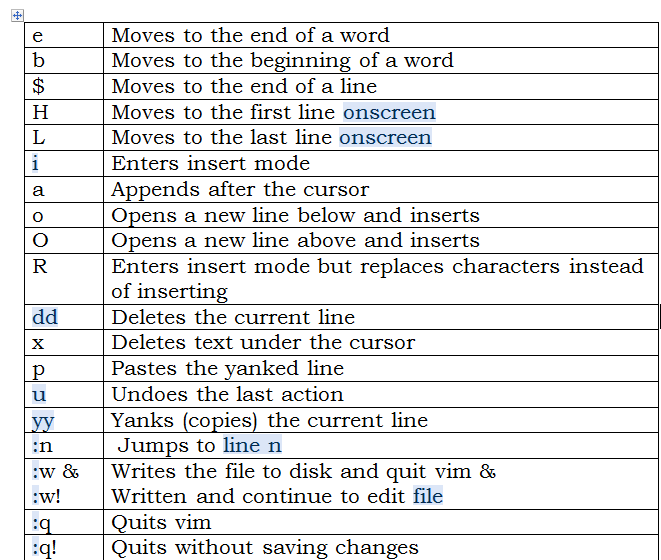
Spend few minutes here, then you can learn about vi editor basics

vi editor

Is siebel 8.1.1.5 support for IE9

Is siebel 8.1.1.5 support for IE9?

No.

Internet explorer version IE 9 is not supported for Siebel version 8.1.1.5

for more detail, Doc Id 1307383.1 – “Siebel Support for Internet Explorer 9 (IE9)”

Oracle Open UI will be supported on IE9 with Siebel maintenance release version 8.1.1.9 onwards. For more details, please see published document: Siebel Support News – Current Edition – Volume 6 (Doc ID 1341153.1)

find the siebel crm version

If you want to find out siebel crm version, you can get the information from S_APP_VER table.


SQL> select app_ver from siebel.S_APP_VER;

APP_VER
——————————
V8.1


If you want to know applied patch version, go to siebel installed server under the directory of

/u01/siebelprod/siebent/siebsrvr/enterprises/ACEPRD81/siebsrvr01/upgrade/base.txt

[root@siebelapps upgrade]# cat base.txt
8.1.1.5 SIA [21229] LANG_INDEPENDENT patch applied.
HOTFIX

Deleted file in linux but don’t get reclaim space in filesystem

that’s a good idea here

Deleted file in Linux but didn’t reclaim space in filesystem

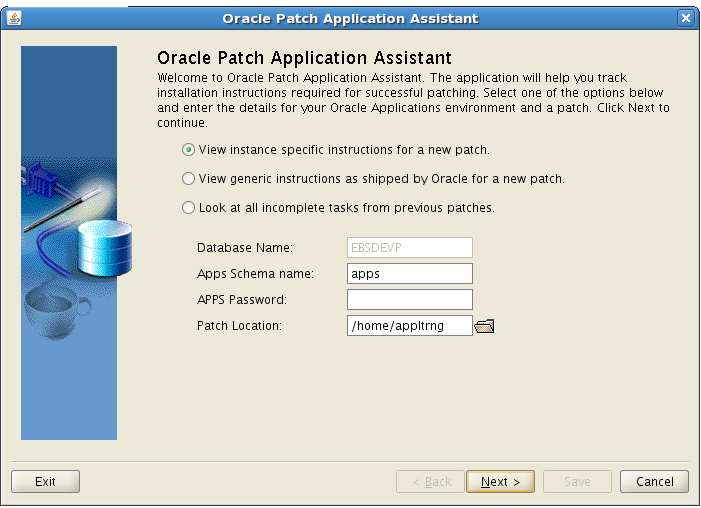
Exception in thread “main” java.lang.InternalError: Can’t connect to X11 window server using ‘xx.x.x.xxx:0.0″

[root@ebsdev ~]# suappltrng
[appltrng@ebsdev ~]$ /u01/EBSTRNG/apps/apps_st/appl/ad/12.0.0/bin/admsi.pl
Invoking Oracle Patch Application Assistant….
Please set the DISPLAY variable and re-run this script

[appltrng@ebsdev ~]$ export DISPLAY=xx.x.x.xxx:0.0
[appltrng@ebsdev ~]$ /u01/EBSTRNG/apps/apps_st/appl/ad/12.0.0/bin/admsi.pl
Invoking Oracle Patch Application Assistant….
Exception in thread “main” java.lang.InternalError: Can’t connect to X11 window server using ‘xx.x.x.x:0.0′ as the value of the DISPLAY variable.
at sun.awt.X11GraphicsEnvironment.initDisplay(Native Method)
at sun.awt.X11GraphicsEnvironment.access$100(X11GraphicsEnvironment.java :52)
at sun.awt.X11GraphicsEnvironment$1.run(X11GraphicsEnvironment.java:155)
at java.security.AccessController.doPrivileged(Native Method)
at sun.awt.X11GraphicsEnvironment.<clinit>(X11GraphicsEnvironment.java:1 31)
at java.lang.Class.forName0(Native Method)
at java.lang.Class.forName(Class.java:169)
at java.awt.GraphicsEnvironment.getLocalGraphicsEnvironment(GraphicsEnvi ronment.java:68)
at sun.awt.X11.XToolkit.<clinit>(XToolkit.java:89)
at java.lang.Class.forName0(Native Method)
at java.lang.Class.forName(Class.java:169)
at java.awt.Toolkit$2.run(Toolkit.java:834)
at java.security.AccessController.doPrivileged(Native Method)
at java.awt.Toolkit.getDefaultToolkit(Toolkit.java:826)
at com.jgoodies.looks.LookUtils.isLowResolution(LookUtils.java:436)
at com.jgoodies.looks.LookUtils.<clinit>(LookUtils.java:180)
at com.jgoodies.looks.plastic.PlasticLookAndFeel.<clinit>(PlasticLookAnd Feel.java:122)
at oracle.apps.ad.msi.LaunchUI._useOracleLookAndFeel(LaunchUI.java:84)
at oracle.apps.ad.msi.LaunchUI.<clinit>(LaunchUI.java:30)
Could not find the main class: oracle.apps.ad.msi.LaunchUI. Program will exit.

Solution :

[root@ebsdev ~]# xhost +
access control disabled, clients can connect from any host
[root@ebsdev ~]# su - appltrng
[appltrng@ebsdev ~]$ export DISPLAY=:0

[appltrng@ebsdev ~]$ /u01/EBSTRNG/apps/apps_st/appl/ad/12.0.0/bin/admsi.pl

How do i set linux file permissions using symbolic mode

If you want to set the file permissions in Linux, you can get a two options to set the appropriate permissions of files. One is Symbolic method and Numeric method. Here you can read about symbolic method examples.

The chmod (change mode) command will useful to change your file permissions. First of all I want to explain about how do i set appropriate file permissions for user, groups and others. Here others means Everybody (users) can able to view the files or ability to change the file contents if you give permissions.

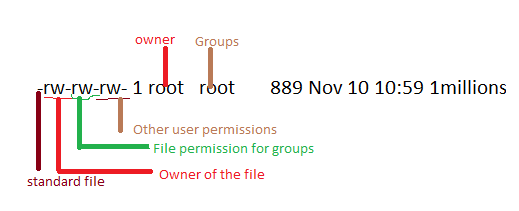
The basically Linux file is 9 rightmost bits in 10bits permissions block.

Example :

rw-rw-rw- 1 root   root       889 Nov 10 10:59 1millions.txt
Which user :

u  --> user

g  --> groups

o  --> others

a   --> all

What to do ?

+   --> add this permission

-  --> remove this permission

= --> set exactly this permission

Which permissions :

r  --> read

w   --> write

x  ---> execute

Let’s see some examples :
Example 1: Set read write permission of this files for all

[root@siebelts u01]# chmod a=rw 1millions.txt

[root@siebelts u01]# ls -l 1millions.txt
-rw-rw-rw- 1 root root 889 Nov 10 10:59 1millions.txt

Example 2: Want to remove write permission for all users

[root@siebelts u01]# chmod a-w 1millions.txt
[root@siebelts u01]# ls -l 1millions.txt
-r--r--r-- 1 root root 889 Nov 10 10:59 1millions.txt
[root@siebelts u01]#

Example 3: Set the write permission for owner of this file

[root@siebelts u01]# chmod u+w 1millions.txt
[root@siebelts u01]# ls -l 1millions.txt
-rw-r--r-- 1 root root 889 Nov 10 10:59 1millions.txt

Example 4: set write and execute permission for groups

[root@siebelts u01]# chmod g+wx 1millions.txt
[root@siebelts u01]# ls -l 1millions.txt
-rw-rwxr-- 1 root root 889 Nov 10 10:59 1millions.txt
[root@siebelts u01]#

Example 5: set read and write  permission for other user also

[root@siebelts u01]# chmod o+rw 1millions.txt
[root@siebelts u01]# ls -l 1millions.txt
-rw-rwxrw- 1 root root 889 Nov 10 10:59 1millions.txt
[root@siebelts u01]#

Example 6 : remove the write, execute permission of  groups and others

[root@siebelts u01]# chmod g-rw 1millions.txt && chmod o-rw 1millions.txt
[root@siebelts u01]# ls -l 1millions.txt
-rw---x--- 1 root root 889 Nov 10 10:59 1millions.txt

Example 7: Let’s see i change the groups of this file and try to write on this file.

[root@siebelts u01]# chown :oinstall 1millions.txt
[root@siebelts u01]# ls -l 1millions.txt
-rw---x--- 1 root oinstall 889 Nov 10 10:59 1millions.txt
[root@siebelts u01]# su - oracle
[oracle@siebelts ~]$ vi /u01/1millions.txt

"/u01/1millions.txt" [Permission Denied]
[oracle@siebelts ~]$

Example 8: set write permission of this file and try to write using member of the oinstall group

[root@siebelts u01]# chmod g+rw 1millions.txt
[root@siebelts u01]# ls -l 1millions.txt
-rw-rw---- 1 root oinstall 32 Nov 11 04:25 1millions.txt

[root@siebelts u01]# cat 1millions.txt
File permission symbolic test
[root@siebelts u01]# su - oracle

[oracle@siebelts ~]$ cd /u01
[oracle@siebelts u01]$ vi 1millions.txt
[oracle@siebelts u01]$ cat 1millions.txt
File permission symbolic test
File can be write and read by member of oinstall
[oracle@siebelts u01]$

Reference : Tuxfiles Linux File permissions
Linux How do i view top two lines of files


[oracle@siebelts ~]$ head -n 2 /u01/app/oracle/diag/rdbms/crmtest/crmtest/trace/alert_crmtest.log
Wed Dec 07 04:46:19 2011
Starting ORACLE instance (normal)

Linux common classification of files

Classification of files :

rw-r–r– 1 oracle oinstall 4626849792 Sep  9 02:56 sibel090912.dmp

‘-‘   –> standard file

drwxrwxr-x 4 oracle oinstall  4096 Dec  7  2011 app

d‘  –> directory

crw——- 1 vcsa tty      7, 131 Nov  5 07:30 vcsa3

c‘  –> Character device

lrwxrwxrwx 1 root root         13 Nov  5 07:28 MAKEDEV -> /sbin/MAKEDEV

l‘  –> Symbloic link

brw-r—– 1 root disk     7,   0 Nov  5 07:28 loop0

b‘ –>  block stoarge device i.e. hard disk


SIEBEL Changing sadmin password difficulties

This post contents may helpful for whom a changing sadmin password through database server. But this post totally what I face while during changing the password.

First Unfortunely browser showing this below error ““The server you are accessing is either busy or experiencing difficulties. Please close the web browser, start a new one and try logging in again.”

I went to the server and delete the *.shm and osdf file and then I restarted the siebel and gateway services, But it still shows Local process is not running and later I realized the *.shm files also not created.

I checked in my database sadmin status, It shows the password expired, so I just changed the password through sqlpromt and then I executed the both services, but still siebel services not running.

So I checked in my Namesrvr.log in gateway server, It showing the below error

[siebel@siebelgw log]$ vi NameSrvr.log
2021 2012-11-06 20:36:19 0000-00-00 00:00:00 +0300 00000000 001 003f 0001 09 GtwyNS 5870 1439066880 /u02/acegtw/gtwysrvr/log/NameSrvr.log 8.1.1.5 [21229] ENU
DBCLog DBCLogError 1 00000002509916ee:0 2012-11-06 20:36:19 523 80
GenericLog GenericError 1 00000002509916ee:0 2012-11-06 20:36:19 (secmgr.cpp (2679) err=4597538 sys=0) SBL-SEC-10018: 523 80
GenericLog GenericError 1 00000002509916ee:0 2012-11-06 20:36:19 (secmgr.cpp (2735) err=4597527 sys=0) SBL-SEC-10007: The password you have entered is not correct. Please enter your password again.
GenericLog GenericError 1 00000002509916ee:0 2012-11-06 20:36:19 (client.cpp (313) err=4597527 sys=0) SBL-SEC-10007: The password you have entered is not correct. Please enter your password again.

And later only I realized the sadmin changing password procedure is totally different.

changing sadmin password procedure

Okay. Now I tried to connect srvrmgr, it shows “SBL-SCM-00018: Could not open connection to Siebel Gateway configuration store”

hmmmmm

So we need to recreate svc file in siebel server.

Step 1:

Stop Siebel server

Step 2:

delete the exising siebel service. before delete, just take backup of svc file in siebel server.

siebctl -d -S siebsrvr -i "enterprisename:siebelservername"

Example: $siebctl -d -S siebsrvr -i "ace:siebserver01"

Step 3:

Restart the machine

Step 4:

Recreate siebel service :

siebctl -r "$Siebsrvr" -S siebsrvr -i enterprisename:siebelservername  -a -g "-g siebel gateway name:port -e enterprisename -s siebel server name -u sadmin"  -e newpassword -L ENU

siebctl -r "/u03/aceapp/siebsrvr" -S siebsrvr -i ACE:siebsrvr01 -a -g "-g siebelgw:2320 -e ACE -s siebsrvr01 -u sadmin" -e sadmin -L ENU

Step 5:

Restart the machine

Step 6:

Go to the gateway server, stop gateway service

stop_ns

Move some siebns.dat.001 like files to another location except siebns.dat

start_ns

Step 7:

start siebel service

start_server ALL

Now you can see *.shm file will be created.

Step 8:

Start webserver

Step 9:

Siebel application server

srvrmgr -g siebelgw -e ACE -s siebsrvr01 -u sadmin -p sadmin
Siebel Enterprise Applications Siebel Server Manager, Version 8.1.1.5 [21229] LANG_INDEPENDENT
Copyright (c) 1990-2008, Oracle. All rights reserved.

The Programs (which include both the software and documentation) contain
proprietary information; they are provided under a license agreement containing
restrictions on use and disclosure and are also protected by copyright, patent,
and other intellectual and industrial property laws. Reverse engineering,
disassembly, or decompilation of the Programs, except to the extent required to
obtain interoperability with other independently created software or as specified
by law, is prohibited.

Oracle, JD Edwards, PeopleSoft, and Siebel are registered trademarks of
Oracle Corporation and/or its affiliates. Other names may be trademarks
of their respective owners.

If you have received this software in error, please notify Oracle Corporation
immediately at 1.800.ORACLE1.

Type "help" for list of commands, "help <topic>" for detailed help

Connected to 1 server(s) out of a total of 1 server(s) in the enterprise

srvrmgr:siebsrvr01>

Step 10: 
very important relax :-)