Skip to content

Posts from the ‘Administration’ Category

Deinstall Oracle 11gR2 windows

Somebody thinking This is simple one How do we deinstall Oracle Software. Then Why this post need? Yes. the previous release oracle software version like 10g  or less than, you can click on Oracle Universal Installer Page and then choose deinstall product and clicked what you want remove, you can easily. But now you cannot deinstall using Oracle universal Installer, It something different , See below when i try remove Oracle 11g product using OUI.


Okay.Now I’m going to deinstall the oracle product at using the picture mentioned path,

 C:\app\mazar\product\11.2.0\dbhome_1\deinstall\deinstall        Enter

But it showing some permissions issues and also It’s recommand, you should go to download Oracle Deinstall software from OTN.

Now I have plan to download this product from OTN, from here

http://www.oracle.com/technetwork/database/enterprise-edition/downloads/112010-win32soft-098987.html

After downloaded it, I just unzip this file ,After extracted I go to deinstall folder and then again I run it deinstall, but it shows following message,

C:\Users\mazar>cd C:\software\oracle11gr2\win32_11gR2_deinstall\deinstall

C:\software\oracle11gr2\win32_11gR2_deinstall\deinstall>deinstall

C:\softwarbat -home <Complete path of Oracle home>
               [ -silent ]
               [ -checkonly ]
               [ -local ]
               [ -paramfile <complete path of input parameter properties file> ]
               [ -params <name1=value[ name2=value name3=value …]> ]
               [ -o <complete path of directory for saving files> ]
               [ -help | -h: Type -h or -help to get more information on each of the above options. ]

Tool is being run outside the Oracle Home, -home needs to be set.

C:\software\oracle11gr2\win32_11gR2_deinstall\deinstall>

So We need to set Oracle 11g home path here ,and then you can deinstall easily

C:\software\oracle11gr2\win32_11gR2_deinstall\deinstall>deinstall -home C:\app\mazar\product\11.2.0\dbhome_1
Location of logs C:\Program Files\Oracle\Inventory\logs\

############ ORACLE DEINSTALL & DECONFIG TOOL START ############
######################## CHECK OPERATION START ########################
Install check configuration START
Checking for existence of the Oracle home location C:\app\mazar\product\11.2.0\dbhome_1
Oracle Home type selected for de-install is: SIDB
Oracle Base selected for de-install is: C:\app\mazar
Checking for existence of central inventory location C:\Program Files\Oracle\Inventory

Install check configuration END

Checking Windows and .NET products configuration START
The following Windows and .NET products will be deconfigured from the Oracle home : asp.net,ode.net,odp.net,ntoledb,oramts,oo4o

Checking Windows and .NET products configuration END
Network Configuration check config START

Network de-configuration trace file location: C:\Program Files\Oracle\Inventory\logs\netdc_check62985.log

Specify all Single Instance listeners that are to be de-configured [LISTENER]:
“”””””””””””””””””””””””””””””””””””””””””””””””””””””””

Here it will ask something , you need to give like dbname.

“”””””””””””””””””””””””””””””””””””””””””””””””””””””””””””””
“”””””””””””””””””””””””””””””””””””””””””””””””””””””””””””

Oracle Universal Installer cleanup completed with errors.

Oracle install successfully cleaned up the temporary directories.
#######################################################################
############# ORACLE DEINSTALL & DECONFIG TOOL END #############

Now deinstallations Completed,  sometimes the services doesnot removed, so you need to remove using REGEDIT.

create basic task scheduler windows 7

When I arrived on today morning,  A one of the User asked me, How do i run schedule batch file for Oracle Export command for  windows 7 ?…I just showed How do we do? As a mind,I want to sharing with you also who don’t know how to schedule batch files.

Step 1:

I opened notepad, and wrote simple export command for a schema user like

exp test/test file=d:\test\dbtest.dmp log=d:\test\dblog.log consistent=y direct=y statistics=’none’

And save as a testdb.bat file.

Step 2:

Start –> All Programs –> Accessories –> Sytem Tools –> Task Scheduler

Task Scheduler Windows Appear, Hear Go to –> Actions –> Create Basic Task

Step 3:

Put your schdule Name like below

Step 4:

Choose Your schduler Action

Step 5:

Choose  Start a Program

Step 6:

Schedule your time

Step 7:

Choose your batch file

Step 8 :

Review your schedule Task and Click Finsh.

ORA-01552: cannot use system rollback segment for non-system tablespace ‘USERS’

When i try to insert one row into table, it shows following error

SQL> conn tbsptr/tbsptr;
Connected.
SQL> insert into x values(‘azar’);
insert into x values(‘azar’)
            *
ERROR at line 1:
ORA-01552: cannot use system rollback segment for non-system tablespace ‘USERS’


This error happened due to your undo tablespace.

If Undo tablespace is missed out in your database —> you need to recreate the undo tablespace

If Undo tablespace size is full

If Undo tablespace datafile offline. —> This is my case.

I have checked my undo tablespace status , it show online.

SQL> conn / as sysdba
Connected.
SQL> select tablespace_name,status from dba_tablespaces;

TABLESPACE_NAME                STATUS
—————————— ———
SYSTEM                         ONLINE
SYSAUX                         ONLINE
UNDOTBS1               ONLINE
TEMP                           ONLINE

I just checked  my undo tablespace free space also , it shows 484 MB

SQL> SELECT tablespace_name, sum((bytes/1024)/1024) free FROM DBA_FREE_SPACE group by tablespace_name;

TABLESPACE_NAME                      FREE
—————————— ———-
SYSAUX                            136.125
UNDOTBS1                         484.5625

Finally I forget to see Undo tablespace datafile status,

Now I check

SQL> select file#,status from v$datafile;

     FILE# STATUS
———- ——-
         1 SYSTEM
         2 ONLINE
         3 OFFLINE         

OOPS This is the issues for me, Now I want to alter this tablespace as  online.


SQL> alter database datafile ‘C:\APP\MAZAR\ORADATA\OWN\UNDOTBS01.DBF’ online;

Database altered.

SQL> commit;

Commit complete.

SQL> conn tbsptr/tbsptr;
Connected.
SQL> insert into x values(‘azar’);

1 row created.

Now I can able to insert my data into tables. 🙂

crystal report Error library p2sora7.dll cannnot be found

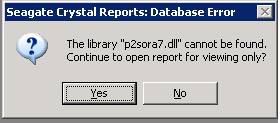
When I open that report created by crystal report that installed on citrix server, It shows following error message,

the library “p2sora7.dll” cannot be found.

Actually The crystal report DLL are installed on %systemroot%\crystal directory which is not include in the User path variable , so we need to set that dll library for user path.

Copy the files from %systemroot%\crystal

Start –> run –> %systemroot%\crystal   Enter

copy — “p2sora7.dll”

Paste the files to %systemroot%\system32   

Start –> run –>  %systemroot%\system32   Enter

Paste — “p2sora7.dll”

Now I just try to open my crystal report, Its okay now. 🙂

ORA-00600: internal error code, arguments: [kxspoac : EXL 1], [23], [23], [], [], [], [], []

When user upload a xml file into schema, it was hang during upload operation and then it shows Ora-12801 error. So I focused at alert log file, it show a error message like

ORA-00600: internal error code, arguments: [kxspoac : EXL 1], [23], [23], [], [], [], [], []

The issues happen due to this error if a SQL statement fails with Ora-600 [kxspoac : EXL 1] when executed by a parallel execution slave and that SQL statement has numeric binds then you are probably seeing this bug and this is bug for Oracle 10.2.0.1, So we need to upgrade 10.2.0.4 But We can fix this errors after disable parallel query operation during session level or system level. Here I’m used to resolved  by system level operation…

Please refer

ORA-8103 and ORA-12801 On Insert Operation Within a Select (Doc ID 428694.1)


Initialization Parameter log_checkpoints_to_alert to TRUE

You can view your database SCN information in several ways.

You can use Logminer to determine an SCN accociated with a DDL or DML statement.

Alert.log file

Trace Files

You can query the FIRST_CHANGE# column of v$LOG, v$LOG_HISTORY and V$archived_log.

If you have set the Init parameter “log_checkpoints_to_alert to TRUE”, then every time a log switch occurs, Oraclw will write the SCN of each checkpoint to your target database alert.log file.

How do I Find Alert log File in Oracle 11g ?

Note : An interesting , you cannot look your alert log file location as like Oracle previous Version location (Oracle/admin). It should be in another location, you can use this view v$diag_info. The log file should be as a XML file and also you can find your alert file in trace locations.

“C:\app\mazar\diag\rdbms\own\own\trace ” “

SQL> alter system set log_checkpoints_to_alert=TRUE;

System altered.

After I set this parameter, you can view SCN  in your alert log file every log switch occurs.

SQL> alter system switch logfile;

System altered.

You can see alert.log file

“Beginning log switch checkpoint up to RBA [0x2.2.10], SCN: 1055739
Thread 1 advanced to log sequence 2 (LGWR switch)
  Current log# 2 seq# 2 mem# 0: C:\APP\MAZAR\ORADATA\OWN\REDO02.LOG
Sat Sep 18 10:12:05 2010
Archived Log entry 17 added for thread 1 sequence 1 ID 0x5c50fd4d dest 1:”

Can I increase SGA target size greater than SGA max size ?

Answer is NO. Can I increase SGA_MAX_SIZE greater than memory_target ?.....NO.Now we can see some examples. However you can clear more about from oracle document. Here I just mentioned some usefull url about this related.

SGA_TARGET specifies the total size of all SGA components. If SGA_TARGET is specified, then the following memory pools are automatically sized:

  • Buffer cache (DB_CACHE_SIZE)
  • Shared pool (SHARED_POOL_SIZE)
  • Large pool (LARGE_POOL_SIZE)
  • Java pool (JAVA_POOL_SIZE)
  • Streams pool (STREAMS_POOL_SIZE)

If these automatically tuned memory pools are set to non-zero values, then those values are used as minimum levels by Automatic Shared Memory Management. You would set minimum values if an application component needs a minimum amount of memory to function properly.

C:\Users\mazar>set oracle_sid=own

C:\Users\mazar>sqlplus

SQL*Plus: Release 11.2.0.1.0 Production on Mon Aug 30 12:33:38 2010

Copyright (c) 1982, 2010, Oracle.  All rights reserved.

Enter user-name: sys/sys@own as sysdba

Connected to:
Oracle Database 11g Enterprise Edition Release 11.2.0.1.0 – Production
With the Partitioning, OLAP, Data Mining and Real Application Testing options

SQL> show parameter sga_target;

NAME                                 TYPE        VALUE
———————————— ———– ——————————
sga_target                           big integer 0

This below view to see the shared pool or buffer pool size.
SQL> select * from v$sgainfo;

NAME                                  BYTES RES
——————————– ———- —
Fixed SGA Size                      1375792 No
Redo Buffers                        5804032 No
Buffer Cache Size                 339738624 Yes
Shared Pool Size                  146800640 Yes
Large Pool Size                     4194304 Yes
Java Pool Size                      4194304 Yes
Streams Pool Size                         0 Yes
Shared IO Pool Size                       0 Yes
Granule Size                        4194304 No
Maximum SGA Size                  535662592 No
Startup overhead in Shared Pool    58720256 No

NAME                                  BYTES RES
——————————– ———- —
Free SGA Memory Available          33554432

12 rows selected.

SQL> show parameter sga_max_size;

NAME                                 TYPE        VALUE
———————————— ———– ——————————
sga_max_size                         big integer 512M


Here I want to increase my sga target size 500m. The system will be altered.Because SGA_MAX_SIZE is 512m. Suppose to be if you’re increase more than sga_max_size, it will throw error. See below,SQL> alter system set sga_target=500m;

System altered.

SQL> show parameter sga_target;

NAME                                 TYPE        VALUE
———————————— ———– ——————————
sga_target                           big integer 500M
SQL> show parameter sga_max_size;

NAME                                 TYPE        VALUE
———————————— ———– ——————————
sga_max_size                         big integer 512M
SQL> show parameter sga_target;

NAME                                 TYPE        VALUE
———————————— ———– ——————————
sga_target                           big integer 4M
SQL> alter system set sga_target=600m;
alter system set sga_target=600m
*
ERROR at line 1:
ORA-02097: parameter cannot be modified because specified value is invalid
ORA-00823: Specified value of sga_target greater than sga_max_size

SQL> shutdown immediate
Database closed.
Database dismounted.
ORACLE instance shut down.

C:\Users\mazar>sqlplus

SQL*Plus: Release 11.2.0.1.0 Production on Mon Aug 30 12:43:47 2010

Copyright (c) 1982, 2010, Oracle.  All rights reserved.

Enter user-name: sys/sys as sysdba
Connected to an idle instance.

SQL> startup
ORACLE instance started.

Total System Global Area  535662592 bytes
Fixed Size                  1375792 bytes
Variable Size             167772624 bytes
Database Buffers          360710144 bytes
Redo Buffers                5804032 bytes
Database mounted.
Database opened.
SQL> select * from v$sgainfo;

NAME                                  BYTES RES
——————————– ———- —
Fixed SGA Size                      1375792 No
Redo Buffers                        5804032 No
Buffer Cache Size                 360710144 Yes
Shared Pool Size                  146800640 Yes
Large Pool Size                     4194304 Yes
Java Pool Size                      4194304 Yes
Streams Pool Size                         0 Yes
Shared IO Pool Size                       0 Yes
Granule Size                        4194304 No
Maximum SGA Size                  535662592 No
Startup overhead in Shared Pool    58720256 No

NAME                                  BYTES RES
——————————– ———- —
Free SGA Memory Available          12582912

12 rows selected.

Here I tried to increase my sga_max_size , but it show error because memory target is low compared to increase your sga max size values.

SQL> alter system set sga_max_size=1512m scope=spfile;

System altered.

SQL> show parameter sga_max_size;

NAME                                 TYPE        VALUE
———————————— ———– ——————————
sga_max_size                         big integer 512M
SQL> shutdown immediate
Database closed.
Database dismounted.
ORACLE instance shut down.
SQL> startup
ORA-00844: Parameter not taking MEMORY_TARGET into account
ORA-00851: SGA_MAX_SIZE 1585446912 (1512mb) cannot be set to more than MEMORY_TARGET 8388
60800. (800mb)
SQL> select status from v$instance;
select status from v$instance
*
ERROR at line 1:
ORA-01034: ORACLE not available
Process ID: 0
Session ID: 9 Serial number: 5

So I created pfile and modified in pfile.
SQL> create pfile=’c:\initown.ora’ from spfile;

File created.

SQL> startup pfile=’C:\azar\initown.ora’;
ORACLE instance started.

Total System Global Area  535662592 bytes
Fixed Size                  1373996 bytes
Variable Size             176163028 bytes
Database Buffers          352321536 bytes
Redo Buffers                5804032 bytes
Database mounted.
Database opened.

If you want to increase your SGA_MAX_SIZE, you should increase your  memory target size..

http://download.oracle.com/docs/cd/B28359_01/server.111/b28310/memory003.htm#BGBGJFHE

Very interestng quesition here about this post related.

http://asktom.oracle.com/pls/asktom/f?p=100:11:0::::P11_QUESTION_ID:30011178429375

http://asktom.oracle.com/pls/asktom/f?p=100:11:0::::P11_QUESTION_ID:1137385000346840516

ORA-27101: shared memory realm does not exist

Yesterday evening,  When i tried to increase my SGA size in Oracle 9i on 32 bit Windows server 2003, It shows ORA-27101: shared memory realm does not exist and Out of memory.I am aware of this error.

I tried to fix this error like I just added 3gb switch on boot.ini file and then I just shutdown the server and up again. the database working properly. where you can find this boot.ini file on windows server 2003.

Note : windows 2000 not applicable.

After added 3gb switch, I can increase SGA max size manually and other components of SGA size also.

What is 3gb switch and How to set up?

http://technet.microsoft.com/en-us/library/bb124810(EXCHG.65).aspx

TNS-01201: Listener cannot find executable

After configured the listener file, i tried to start my listener following error occurs, 

LSNRCTL> start
Starting /home/oracle/oracle/product/10.2.0/db_1/bin/tnslsnr: please wait…  

TNSLSNR for Linux: Version 10.2.0.1.0 – Production
System parameter file is /home/oracle/oracle/product/10.2.0/db_1/network/admin/listener.ora
Log messages written to /home/oracle/oracle/product/10.2.0/db_1/network/log/listener.log
Listening on: (DESCRIPTION=(ADDRESS=(PROTOCOL=tcp)(HOST=localhost.localdomain)(PORT=1521)))
TNS-01201: Listener cannot find executable /home/oracle/oracle/product/10.2.0/db_1/bin/orcl for SID orcl Listener failed to start. See the error message(s) above… 

 This is my listener.ora file 

SID_LIST_LISTENER =
(SID_LIST =
(SID_DESC =
(SID_NAME = PLSExtProc)
(ORACLE_HOME = /home/oracle/oracle/product/10.2.0/db_1)
(PROGRAM = extproc)
)
(SID_DESC =
(SID_NAME = orcl)
(ORACLE_HOME = /home/oracle/oracle/product/10.2.0/db_1)
(PROGRAM= orcl)
)
(SID_DESC =
(SID_NAME = mydb)
(ORACLE_HOME = /home/oracle/oracle/product/10.2.0/db_1)
(PROGRAM= mydb)
)
) LISTENER =
(DESCRIPTION_LIST =
(DESCRIPTION =
(ADDRESS = (PROTOCOL = TCP)(HOST = localhost.localdomain)(PORT = 1521))
)

 Tnsnames.ora file 

MYDB =
(DESCRIPTION =
(ADDRESS_LIST =
(ADDRESS = (PROTOCOL = TCP)(HOST = localhost.localdomain)(PORT = 1521))
)
(CONNECT_DATA =
(SERVICE_NAME = mydb)
)
) ORCL =
(DESCRIPTION =
(ADDRESS_LIST =
(ADDRESS = (PROTOCOL = TCP)(HOST = localhost.localdomain)(PORT = 1521))
)
(CONNECT_DATA =
(SERVICE_NAME = orcl)
)

EXTPROC_CONNECTION_DATA =
(DESCRIPTION =
(ADDRESS_LIST =
(ADDRESS = (PROTOCOL = IPC)(KEY = EXTPROC1))
)
(CONNECT_DATA =
(SID = PLSExtProc)
(PRESENTATION = RO)
)

My mistake was when i configured the listener file, I couldnot change the SID_NAME where PROGRAM located in listener file. 

 (SID_DESC =
(SID_NAME = orcl)
(ORACLE_HOME = /home/oracle/oracle/product/10.2.0/db_1)
(PROGRAM= orcl)
)
(SID_DESC =
(SID_NAME = mydb)
(ORACLE_HOME = /home/oracle/oracle/product/10.2.0/db_1)
(PROGRAM= mydb)

Here We should be put it SID_NAME here.
 

(SID_DESC =
(SID_NAME = orcl)
(ORACLE_HOME = /home/oracle/oracle/product/10.2.0/db_1)
(SID_NAME= orcl)
)
(SID_DESC =
(SID_NAME = mydb)
(ORACLE_HOME = /home/oracle/oracle/product/10.2.0/db_1)
(SID_NAME= mydb)

Now my listener started and I could be able to connect with string. 

Status: 

Service “PLSExtProc” has 1 instance(s).
Instance “PLSExtProc”, status UNKNOWN, has 1 handler(s) for this service…
Service “mydb” has 1 instance(s).
Instance “mydb”, status UNKNOWN, has 1 handler(s) for this service…
Service “orcl” has 1 instance(s).
Instance “orcl”, status UNKNOWN, has 1 handler(s) for this service…
The command completed successfully

Character Set migration Oracle 11g

When i tried to transport the tablespace from linux to windows, during import it shows charachter set error, so I just looked on linux database and windows database character set is different .

Linux is WE8IS08859P1

Windows is AR8ISO8859P6

So i plan to migrate the charater set of windows and change to WE8IS08859P1 character set. Here I provided step by step guide , How to migrate character set. I play with CSSCAN

Step1 : On windows Env

SQL> select * from nls_database_parameters;

PARAMETER                      VALUE
—————————— ————————————
NLS_LANGUAGE                   AMERICAN
NLS_TERRITORY                  AMERICA
NLS_CURRENCY                   $
NLS_ISO_CURRENCY               AMERICA
NLS_NUMERIC_CHARACTERS         .,
NLS_CHARACTERSET               AR8ISO8859P6
NLS_CALENDAR                   GREGORIAN
NLS_DATE_FORMAT                DD-MON-RR
NLS_DATE_LANGUAGE              AMERICAN
NLS_SORT                       BINARY
NLS_TIME_FORMAT                HH.MI.SSXFF AM

21 rows selected.

Step 2:

C:\Users\mazar>CSSCAN
Character Set Scanner v2.2 : Release 11.2.0.1.0 – Production on Tue May 18 11
:43 2010

Copyright (c) 1982, 2009, Oracle and/or its affiliates.  All rights reserved.
Username: SYS AS SYSDBA

Password:

Connected to:
Oracle Database 11g Enterprise Edition Release 11.2.0.1.0 – Production
With the Partitioning, OLAP, Data Mining and Real Application Testing options

CSS-00107: Character set migration utility schema not installed

So CSSCAN utility doesnot installed on your computer, so we want to install the CSSCAN utility. Go to csminst.sql script

Step 3:

SQL> @C:\app\mazar\product\11.2.0\dbhome_1\RDBMS\ADMIN\csminst.sql
Synonym created.
View created.
View created.
View created.
View created.
Grant succeeded.
Grant succeeded.

Disconnected from Oracle Database 11g Enterprise Edition Release 11.2.0.1.0 – Pr
oduction
With the Partitioning, OLAP, Data Mining and Real Application Testing options

C:\Users\mazar>

Step 4:

C:\Users\mazar>CSSCAN
Character Set Scanner v2.2 : Release 11.2.0.1.0 – Production on Tue May 18 11:38
:37 2010

Copyright (c) 1982, 2009, Oracle and/or its affiliates.  All rights reserved.
Username: SYS AS SYSDBA

Password:

Connected to:
Oracle Database 11g Enterprise Edition Release 11.2.0.1.0 – Production
With the Partitioning, OLAP, Data Mining and Real Application Testing options

(1)Full database, (2)User, (3)Table, (4)Column: 1 > 1

Current database character set is  AR8ISO8859P6.

Enter new database character set name: > WE8ISO8859P1

Enter array fetch buffer size: 1024000 >

Enter number of scan processes to utilize(1..64): 1 > 64

. process 51 scanning EXFSYS.RLM$EVENTSTRUCT
. process 63 scanning EXFSYS.RLM$RULESETSTCODE
. process 59 scanning EXFSYS.RLM$RULESETPRIVS
. process 27 scanning EXFSYS.RLM$INCRRRSCHACT
. process 62 scanning EXFSYS.RLM$ORDERCLSALS
. process 21 scanning EXFSYS.RLM$RSPRIMEVENTS
. process 31 scanning EXFSYS.RLM$VALIDPRIVS
. process 10 scanning EXFSYS.RLM$DMLEVTTRIGS
. process 60 scanning EXFSYS.RLM$COLLGRPBYSPEC
. process 32 scanning EXFSYS.RLM$PRIMEVTTYPEMAP
. process 5 scanning EXFSYS.RLM$EQUALSPEC

Creating Database Scan Summary Report…

Creating Individual Exception Report…

Scanner terminated successfully.

C:\Users\mazar>

Step 5:

SQL> SHUTDOWN IMMEDIATE
Database closed.
Database dismounted.
ORACLE instance shut down.
SQL> STARTUP RESTRICT
ORACLE instance started.

Total System Global Area  535662592 bytes
Fixed Size                  1375792 bytes
Variable Size             301990352 bytes
Database Buffers          226492416 bytes
Redo Buffers                5804032 bytes
Database mounted.
Database opened.

Step 6: Run the csalter.plb script

SQL> @C:\app\mazar\product\11.2.0\dbhome_1\RDBMS\ADMIN\csalter.plb
0 rows created.
Function created.
Function created.
Procedure created.

This script will update the content of the Oracle Data Dictionary.
Please ensure you have a full backup before initiating this procedure.
Would you like to proceed (Y/N)?Y
old   6:     if (UPPER(‘&conf’) <> ‘Y’) then
new   6:     if (UPPER(‘Y’) <> ‘Y’) then
Checking data validity…
begin converting system objects

PL/SQL procedure successfully completed.
0 rows deleted.
Function dropped.
Function dropped.
Procedure dropped.

SQL>

Step 7:

SQL> SHUTDOWN IMMEDIATE
Database closed.
Database dismounted.
ORACLE instance shut down.
SQL> STARTUP
ORACLE instance started.

Total System Global Area  535662592 bytes
Fixed Size                  1375792 bytes
Variable Size             301990352 bytes
Database Buffers          226492416 bytes
Redo Buffers                5804032 bytes
Database mounted.
Database opened.

Step 8: Check the current character set.

SQL> select * from nls_database_parameters where parameter=’NLS_CHARACTERSET’;

PARAMETER                                  VALUE
—————————— —————————————-
NLS_CHARACTERSET               WE8ISO8859P1

SQL>