Skip to content

Posts from the ‘Administration’ Category

OTN forum question about windows schedule batch

Today morning OTN user asked ,How do we do following scenario

“TASK: Create a script that would backup, truncate, and import data on the 2 schema of DEV server.
This script will be attached in the Scheduled Task in Windows.

I am task to periodically refresh a developement environment using the prod database for users testing
Every weekend, I have to export the PROD schema from the prod server and import it to the DEV schema at the dev server.

I am task to create a scheduled batch job (.bat) to do this activity at the DEV server side only. The PROD export file backup is assumed the be in place at dev server c:\prod1.dmp

1. export DEV schema (backup first)
2. kill all oracle user in dev server.
3. truncate all tables in DEV schema.
4. import the prod dump.

I have simple .bat script for #1,3,4 (e.g. exp dev_schema/dev_schema file=c:\dev_bak(date).dmp log=c:\dev_bak(date).log rows=y)

How do I make variable date in the backupfile?

Can you help me create .bat to kill oracle users? Can my truncate get error if there are users accessing the tables?

Do you have sample .bat script that check first the first program if successful, then proceed to next program? “

http://forums.oracle.com/forums/thread.jspa?threadID=2212289&tstart=0

I just worked out about the scenario and after done it I just posted here, It may get a idea for OTN user.

SQL> create table emptest(city varchar2(20));

Table created.

SQL> insert into emptest values('trichy');

1 row created.

SQL> insert into emptest values('dubai');

1 row created.

SQL> insert into emptest values('khobar');

1 row created.

SQL> insert into emptest values('dammam');

1 row created.

SQL> insert into emptest values('riyadh');

1 row created.

SQL> insert into emptest values('chennai');

1 row created.

SQL> commit;

Commit complete.

SQL>

Now I’m going to export particular table rows only

SQL> $exp tempuser/tempuser file=d:\temp\tempuser.dmp log=d:\temp\tempuser.log tables=emptest 
rows=y

Export: Release 11.2.0.2.0 - Beta on Mon Apr 25 10:58:16 2011

Copyright (c) 1982, 2009, Oracle and/or its affiliates.  All rights reserved.

Connected to: Oracle Database 11g Enterprise Edition Release 11.2.0.1.0 - Production
With the Partitioning, OLAP, Data Mining and Real Application Testing options
Export done in WE8MSWIN1252 character set and AL16UTF16 NCHAR character set

About to export specified tables via Conventional Path ...
. . exporting table                        EMPTEST          6 rows exported
Export terminated successfully without warnings.

SQL>

Now I’m going to write windows batch file for What OTN user asked
Open notepad and write it following scripts and Saved as D:\temp\exp.bat

C:

set oracle_sid=rmantbs

exp tempuser/tempuser file=d:\temp\tempuser01.dmp log=d:\temp\tempuser01.log direct=y consistent=y
 statistics='none'

sqlplus / as sysdba @D:\temp\killsession.sql

sqlplus tempuser/tempuser @D:\temp\truncate.sql

imp tempuser/tempuser file=d:\temp\tempuser.dmp log=d:\temp\tempuser.log tables=emptest 
rows=y ignore=y
 

Here I want explain about the above commands
C: –> I’m going to run from D:\temp path, so that I move to C: path
set oracle_sid=rmantbs — Set database name
exp — Export schema data
sqlplus / as sysdba @D:\temp\killsession.sql — Here I attached one killsession script here, this script killed who logged this particular schema,
Killsession.sql contain following

create or replace procedure kill_session( p_sid in number, p_serial# in number )
as
begin
 for x in ( select *
 from v$session 
 where username = 'TEMPUSER'
 and sid = p_sid
 and serial# = p_serial# )
 loop
 execute immediate 'alter system kill session ''' || 
 p_sid || ',' || p_serial# || '''';
 dbms_output.put_line( 'Alter session done' );
 end loop;
end;
/

exit
 
I got this script from http://asktom.oracle.com/pls/apex/f?p=100:11:0::::P11_QUESTION_ID:6633782199868

and then
sqlplus tempuser/tempuser @D:\temp\truncate.sql — Here I attached one truncate.sql script here, this script used to truncate particular table and exit from sql prompt
truncate.sql script contain following

truncate table emptest;

exit
 

and finally
imp — I just imported table rows into particular truncate table.


Now It’s works fine.It may get idea for you, you can develop from this one 🙂
mount ntfs file system to linux

When i tried to load my usb (NTFS),It showing “Could not open NTFS file system on Linux”.  So I just followed follow steps and then I can easily access NTFS file system on my Linux machine

Step 1: After inserted USB, Identify file system


[root@localhost ~]# fdisk -l | grep NTFS
/dev/sdh1               1        1940     1955488+   7  HPFS/NTFS

Step 2: Make one directory for mounting point

[root@localhost ~]# mkdir /mount/usb

Step 3: Download Fuse

http://easynews.dl.sourceforge.net/sourceforge/fuse/fuse-2.7.1.tar.gz

Step 4: Install Fuse


[root@localhost tmp]# tar xzf fuse-2.7.1.tar.gz
[root@localhost tmp]# ls
fuse-2.7.1         gconfd-oracle  gedit.oracle.2790729715  mapping-root  ssh-bTFQuC4798       VMwareDnD    VMwareTools-8.1.4-227600.tar.gz
fuse-2.7.1.tar.gz  gconfd-root    keyring-iqtBmT           orbit-root    virtual-root.drjpsz  vmware-root  vmware-tools-distrib
[root@localhost tmp]# cd fuse-2.7.1
[root@localhost fuse-2.7.1]# ls
aclocal.m4  compile       config.sub    COPYING      doc      Filesystems  INSTALL     lib          Makefile.in    NEWS        util
AUTHORS     config.guess  configure     COPYING.LIB  example  fuse.pc.in   install-sh  ltmain.sh    missing        README
ChangeLog   config.rpath  configure.in  depcomp      FAQ      include      kernel      Makefile.am  mkinstalldirs  README.NFS
[root@localhost fuse-2.7.1]# ./configure --exec-prefix=/;
checking build system type... i686-pc-linux-gnu
checking host system type... i686-pc-linux-gnu
checking target system type... i686-pc-linux-gnu
checking for a BSD-compatible install... /usr/bin/install -c
checking whether build environment is sane... yes
checking for gawk... gawk
checking whether make sets $(MAKE)... yes
checking for style of include used by make... GNU
checking for gcc... gcc
checking for C compiler default output file name... a.out
checking whether the C compiler works... yes
checking whether we are cross compiling... no
checking for suffix of executables...
checking for suffix of object files... o
checking whether we are using the GNU C compiler... yes
checking whether gcc accepts -g... yes
checking for gcc option to accept ISO C89... none needed
checking dependency style of gcc... gcc3
checking for a sed that does not truncate output... /bin/sed
checking for grep that handles long lines and -e... /bin/grep
checking for egrep... /bin/grep -E
checking for fgrep... /bin/grep -F
checking for ld used by gcc... /usr/bin/ld
checking if the linker (/usr/bin/ld) is GNU ld... yes
checking for BSD- or MS-compatible name lister (nm)... /usr/bin/nm -B
checking the name lister (/usr/bin/nm -B) interface... BSD nm
checking whether ln -s works... yes
checking the maximum length of command line arguments... 32768
checking whether the shell understands some XSI constructs... yes
checking for /usr/bin/ld option to reload object files... -r
checking how to recognise dependent libraries... pass_all
checking for ar... ar
checking for strip... strip
checking for ranlib... ranlib
checking command to parse /usr/bin/nm -B output from gcc object... ok
checking how to run the C preprocessor... gcc -E
checking for ANSI C header files... yes
checking for sys/types.h... yes
checking for sys/stat.h... yes
checking for stdlib.h... yes
checking for string.h... yes
checking for memory.h... yes
checking for strings.h... yes
checking for inttypes.h... yes
checking for stdint.h... yes
checking for unistd.h... yes
checking for dlfcn.h... yes
checking for objdir... .libs
checking if gcc supports -fno-rtti -fno-exceptions... no
checking for gcc option to produce PIC... -fPIC -DPIC
checking if gcc PIC flag -fPIC -DPIC works... yes
checking if gcc static flag -static works... yes
checking if gcc supports -c -o file.o... yes
checking if gcc supports -c -o file.o... (cached) yes
checking whether the gcc linker (/usr/bin/ld) supports shared libraries... yes
checking whether -lc should be explicitly linked in... no
checking dynamic linker characteristics... GNU/Linux ld.so
checking how to hardcode library paths into programs... immediate
checking whether stripping libraries is possible... yes
checking if libtool supports shared libraries... yes
checking whether to build shared libraries... yes
checking whether to build static libraries... yes
checking for gcc... (cached) gcc
checking whether we are using the GNU C compiler... (cached) yes
checking whether gcc accepts -g... (cached) yes
checking for gcc option to accept ISO C89... (cached) none needed
checking dependency style of gcc... (cached) gcc3
checking whether gcc and cc understand -c and -o together... yes
checking for fork... yes
checking for setxattr... yes
checking for fdatasync... yes
checking for struct stat.st_atim... yes
checking for struct stat.st_atimespec... no
checking for library containing dlopen... -ldl
checking for library containing clock_gettime... -lrt
checking for ld used by GCC... /usr/bin/ld
checking if the linker (/usr/bin/ld) is GNU ld... yes
checking for shared library run path origin... done
checking for iconv... yes
checking for iconv declaration...
         extern size_t iconv (iconv_t cd, char * *inbuf, size_t *inbytesleft, char * *outbuf, size_t *outbytesleft);
configure: creating ./config.status
config.status: creating fuse.pc
config.status: creating Makefile
config.status: creating lib/Makefile
config.status: creating util/Makefile
config.status: creating example/Makefile
config.status: creating include/Makefile
config.status: creating include/config.h
config.status: executing depfiles commands
config.status: executing libtool commands
=== configuring in kernel (/tmp/fuse-2.7.1/kernel)
configure: running /bin/sh ./configure '--prefix=/usr/local'  '--exec-prefix=/' --cache-file=/dev/null --srcdir=.
checking for a BSD-compatible install... /usr/bin/install -c
checking if FUSE is loaded as a module... no
checking if FUSE module is built into the kernel... no
checking if FUSE module is from official kernel... yes
configure:
NOTE:     Detected that FUSE is already present in the kernel, so
NOTE:     building of kernel module is disabled.  To force building
NOTE:     of kernel module use the '--enable-kernel-module' option.
configure: creating ./config.status
config.status: creating Makefile
config.status: creating config.h
[root@localhost fuse-2.7.1]#

[root@localhost fuse-2.7.1]# make
Making all in kernel
make[1]: Entering directory `/tmp/fuse-2.7.1/kernel'
make[1]: Nothing to be done for `all'.
make[1]: Leaving directory `/tmp/fuse-2.7.1/kernel'
Making all in include
make[1]: Entering directory `/tmp/fuse-2.7.1/include'
make  all-am
make[2]: Entering directory `/tmp/fuse-2.7.1/include'
make[2]: Nothing to be done for `all-am'.
make[2]: Leaving directory `/tmp/fuse-2.7.1/include'
make[1]: Leaving directory `/tmp/fuse-2.7.1/include'
Making all in lib
make[1]: Entering directory `/tmp/fuse-2.7.1/lib'
if /bin/sh ../libtool --tag=CC --mode=compile gcc -DHAVE_CONFIG_H -I. -I. -I../include  -I../include -DFUSERMOUNT_DIR=\"//bin\" -D_FILE_OFFSET_BITS=64 -D_REENTRANT -DFUSE_USE_VERSION=26   -Wall -W -Wno-sign-compare -Wstrict-prototypes -Wmissing-declarations -Wwrite-strings -g -O2 -fno-strict-aliasing -MT fuse.lo -MD -MP -MF ".deps/fuse.Tpo" -c -o fuse.lo fuse.c; \
[root@localhost fuse-2.7.1]# make install
Making install in kernel
make[1]: Entering directory `/tmp/fuse-2.7.1/kernel'
make[1]: Nothing to be done for `install'.
make[1]: Leaving directory `/tmp/fuse-2.7.1/kernel'
Making install in include
make[1]: Entering directory `/tmp/fuse-2.7.1/include'
make[2]: Entering directory `/tmp/fuse-2.7.1/include'
make[2]: Nothing to be done for `install-exec-am'.
test -z "/usr/local/include/fuse" || mkdir -p -- "/usr/local/include/fuse"
 /usr/bin/install -c -m 644 'fuse.h' '/usr/local/include/fuse/fuse.h'
 /usr/bin/install -c -m 644 'fuse_compat.h' '/usr/local/include/fuse/fuse_compat.h'
 /usr/bin/install -c -m 644 'fuse_common.h' '/usr/local/include/fuse/fuse_common.h'
 /usr/bin/install -c -m 644 'fuse_common_compat.h' '/usr/local/include/fuse/fuse_common_compat.h'
 /usr/bin/install -c -m 644 'fuse_lowlevel.h' '/usr/local/include/fuse/fuse_lowlevel.h'
 /usr/bin/install -c -m 644 'fuse_lowlevel_compat.h' '/usr/local/include/fuse/fuse_lowlevel_compat.h'
 /usr/bin/install -c -m 644 'fuse_opt.h' '/usr/local/include/fuse/fuse_opt.h'
test -z "/usr/local/include" || mkdir -p -- "/usr/local/include"

Step 5:  Download ntfs-3g

http://linux.softpedia.com/get/System/Hardware/ntfs-3g-15028.shtml

Step 6: Install ntfs-3g


[root@localhost tmp]# tar xzf ntfs-3g-2011.1.15.tgz
[root@localhost tmp]# ls
fuse-2.7.1         gconfd-oracle  gedit.oracle.2790729715  mapping-root       ntfs-3g-2011.1.15.tgz  ssh-bTFQuC4798       VMwareDnD    VMwareTools-8.1.4-227600.tar.gz
fuse-2.7.1.tar.gz  gconfd-root    keyring-iqtBmT           ntfs-3g-2011.1.15  orbit-root             virtual-root.drjpsz  vmware-root  vmware-tools-distrib
[root@localhost tmp]# cd ntfs-3g-2011.1.15
[root@localhost ntfs-3g-2011.1.15]# ls
aclocal.m4  autogen.sh  compile       config.h.in  configure     COPYING      CREDITS  include  install-sh    libntfs-3g  m4           Makefile.in  NEWS    src
AUTHORS     ChangeLog   config.guess  config.sub   configure.ac  COPYING.LIB  depcomp  INSTALL  libfuse-lite  ltmain.sh   Makefile.am  missing      README
[root@localhost ntfs-3g-2011.1.15]#  ./configure
checking build system type... i686-pc-linux-gnu
checking host system type... i686-pc-linux-gnu
checking target system type... i686-pc-linux-gnu
checking for a BSD-compatible install... /usr/bin/install -c
checking whether build environment is sane... yes
checking for a thread-safe mkdir -p... /bin/mkdir -p
checking for gawk... gawk
checking whether make sets $(MAKE)... yes
checking whether to enable maintainer-specific portions of Makefiles... no
checking for gcc... gcc
checking for C compiler default output file name... a.out
checking whether the C compiler works... yes
[root@localhost ntfs-3g-2011.1.15]# make
make  all-recursive
make[1]: Entering directory `/tmp/ntfs-3g-2011.1.15'
Making all in include
make[2]: Entering directory `/tmp/ntfs-3g-2011.1.15/include'
Making all in ntfs-3g
make[3]: Entering directory `/tmp/ntfs-3g-2011.1.15/include/ntfs-3g'
make[3]: Nothing to be done for `all'.
make[3]: Leaving directory `/tmp/ntfs-3g-2011.1.15/include/ntfs-3g'
Making all in fuse-lite
make[3]: Entering directory `/tmp/ntfs-3g-2011.1.15/include/fuse-lite'
make[3]: Nothing to be done for `all'.
make[3]: Leaving directory `/tmp/ntfs-3g-2011.1.15/include/fuse-lite'
make[3]: Entering directory `/tmp/ntfs-3g-2011.1.15/include'
make[3]: Nothing to be done for `all-am'.
[root@localhost ntfs-3g-2011.1.15]# make install
Making install in include
make[1]: Entering directory `/tmp/ntfs-3g-2011.1.15/include'
Making install in ntfs-3g
make[2]: Entering directory `/tmp/ntfs-3g-2011.1.15/include/ntfs-3g'
make[3]: Entering directory `/tmp/ntfs-3g-2011.1.15/include/ntfs-3g'
make[3]: Nothing to be done for `install-exec-am'.
test -z "/usr/local/include/ntfs-3g" || /bin/mkdir -p "/usr/local/include/ntfs-3g"
 /usr/bin/install -c -m 644 'acls.h' '/usr/local/include/ntfs-3g/acls.h'
 /usr/bin/install -c -m 644 'attrib.h' '/usr/local/include/ntfs-3g/attrib.h'
 /usr/bin/install -c -m 644 'attrlist.h' '/usr/local/include/ntfs-3g/attrlist.h'
 /usr/bin/install -c -m 644 'bitmap.h' '/usr/local/include/ntfs-3g/bitmap.h'
 /usr/bin/install -c -m 644 'bootsect.h' '/usr/local/include/ntfs-3g/bootsect.h'
 /usr/bin/install -c -m 644 'cache.h' '/usr/local/include/ntfs-3g/cache.h'
 /usr/bin/install -c -m 644 'collate.h' '/usr/local/include/ntfs-3g/collate.h'
 /usr/bin/install -c -m 644 'compat.h' '/usr/local/include/ntfs-3g/compat.h'

Step 7:  Mount ntfs

[root@localhost ~]# mount -t ntfs-3g /dev/sdh1 /mount/usb
The disk contains an unclean file system (0, 0).
The file system wasn't safely closed on Windows. Fixing.
[root@localhost ~]# cd /mount/usb
[root@localhost usb]# ls
hinew.txt  rpm11g
[root@localhost usb]# rm hinew.txt
rm: remove regular empty file `hinew.txt'? y
[root@localhost usb]# ls
rpm11g
[root@localhost usb]#

Unmount
[root@localhost ~]# umount /mount/usb
[root@localhost ~]# cd /mount/usb
[root@localhost usb]# ls
[root@localhost usb]# ls -ltr
total 0
[root@localhost usb]#

ORA-12203: TNS:unable to connect to destination

I just created one test db on my local PC (Windows 7) .This pc connected through Domain network.When I trying to connect this db one of the schema from application server. It shows
Enter user-name: prem_saico_auh/prem_saico_auh@azardb
ERROR:
ORA-12203: TNS:unable to connect to destination

This Error may be occur, your db server not reachable for client machine Either Ipaddress wrong or ping or Firewall Blocked.

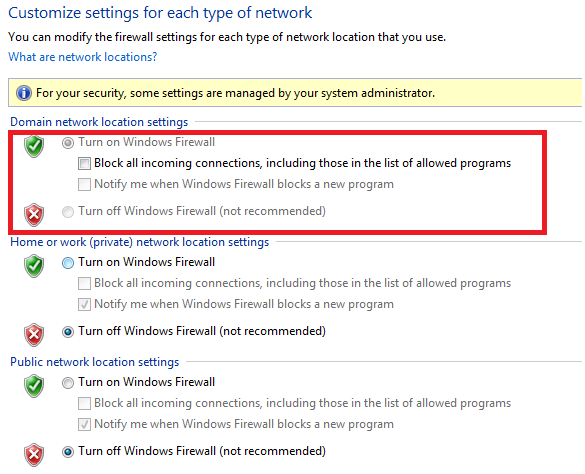
Firewall : This is the case for me. So I looked my firewall settings of my local PC, The Firewall is OFF. But the Domain network firewall is ON.

So I need to Switch OFF firewall for my domain network. But I cann’t without Network Administrator Advise. So I just decided , Atleast I want to Enable allow inbound connections, I just fixed and then I can easily connect my db from Appication Server.

How do We do?

Go –> Control Panel –> Adminisrative Tools –> Windows Firewal with Advanced Security

It shows like

So I need to change or allow Inbound connections for Domain network.

Click –> Windows Firewall Properties.

Choose Domain Profile

Choose Inbound connections –> Allow and then Apply.Now I just try to connect my db from client, Its works fine.

Enter user-name: prem_saico_auh/prem_saico_auh@azardb

Connected to:
Oracle Database 11g Enterprise Edition Release 11.2.0.1.0 – Production
With the Partitioning, OLAP, Data Mining and Real Application Testing options

SQL>

How do i connect remotely Linux desktop through windows using NX machine

Very bore when i connect linux terminal session  through telnet. I need to see linux desktop also , so I just configured and Here i’m go to show How can we connect remotely linux desktop through by windows usins NX machine.

Requirements :

Download NX machine software

Check your Linux x86 or x86_64, Mine x86 So I just downloaded linux NX server edition from here

http://www.nomachine.com/download-package.php?Prod_Id=2248

You need to download  ” Client, Node, Server ”

& then if you want linux desktop from Windows, you must install ‘Client NX Software for Windows ”

http://www.nomachine.com/download-client-windows.php

Now Let’s Start Installation Process.

Go Linux Machine

Copied RPM packages from USB Drive or where downloaded rpm copy avilable.

Install RPM copy like below


[root@azardb tmp]# ls
gconfd-root            nxclient-3.4.0-7.i386.rpm   ssh-TxRrrm2695
gedit.root.1943051511  nxnode-3.4.0-14.i386.rpm    VBoxLinuxAdditions-x86.run
keyring-hSXRFi         nxserver-3.4.0-14.i386.rpm  virtual-root.wx4sy5
mapping-root           orbit-root
[root@azardb tmp]# rpm -Uvh nxclient-3.4.0-7.i386.rpm
Preparing...                ########################################### [100%]
   1:nxclient               ########################################### [100%]
Showing file: /usr/NX/share/documents/client/cups-info

 CUPS Printing Backend

 The NX Client set-up procedure detected that your "IPP CUPS" printing
 backend doesn't allow printing from the NX session. In order to have
 printing support in your NX system, you need to set proper permissions
 on the IPP backend. Please execute:

   chmod 755 /usr/lib/cups/backend/ipp
[root@azardb tmp]# chmod 755 /usr/lib/cups/backend/ipp
[root@azardb tmp]# rpm -Uvh nxnode-3.4.0-14.i386.rpm
Preparing...                ########################################### [100%]
   1:nxnode                 ########################################### [100%]
NX> 700 Starting: install node operation at: Tue Jan 04 03:57:35 2011.
NX> 700 Autodetected system 'redhat'.
NX> 700 Install log is '/usr/NX/var/log/install'.
NX> 700 Creating configuration in /usr/NX/etc/node.cfg.
NX> 700 Inspecting local CUPS environment.
NX> 700 Generating CUPS entries in: /usr/NX/etc/node.cfg.
NX> 700 Installation of version: 3.4.0-14 completed.
NX> 700 Bye.

[root@azardb tmp]# rpm -Uvh nxserver-3.4.0-14.i386.rpm
Preparing...                ########################################### [100%]
   1:nxserver               ########################################### [100%]
NX> 700 Installing: server at: Tue Jan 04 03:57:57 2011.
NX> 700 Autodetected system: redhat.
NX> 700 Install log is: /usr/NX/var/log/install.
NX> 700 Creating configuration file: /usr/NX/etc/server.cfg.
NX> 723 Cannot start NX statistics:
NX> 709 NX statistics are disabled for this server.
NX> 700 Version '3.4.0-14' installation completed.
NX> 700 Showing file: /usr/NX/share/documents/server/install-notices

Server keys

The initial login between client and server happens through a DSA key
pair, i.e. a couple of specially generated cryptographic keys, called
the private key and the public key, which allow you to establish a
secure connection, by means of SSL encryption, between NX client and
NX server.

..... Blah Blah blah

Documentation

For further information on how to manage the configuration of your
NX system, please refer to the System Administrator's Guide available
on the NoMachine Web site at:

http://www.nomachine.com/documentation/admin-guide.php

The NoMachine Team.
NX> 700 Bye.

After Installed

We need to check SSH Key generation .


http://www.nomachine.com/ar/view.php?ar_id=AR01C00126

 [root@azardb ~]# cat  /usr/NX/home/nx/.ssh/default.id_dsa.pub
no-port-forwarding,no-agent-forwarding,command="/usr/NX/bin/nxserver --login" ssh-dss AAAAB3NzaC1kc3MAAACBAJe/0DNBePG9dYLWq7cJ0SqyRf1iiZN/IbzrmBvgPTZnBa5FT/0Lcj39sRYt1paAlhchwUmwwIiSZaON5JnJOZ6jKkjWIuJ9MdTGfdvtY1aLwDMpxUVoGwEaKWOyin02IPWYSkDQb6cceuG9NfPulS9iuytdx0zIzqvGqfvudtufAAAAFQCwosRXR2QA8OSgFWSO6+kGrRJKiwAAAIEAjgvVNAYWSrnFD+cghyJbyx60AAjKtxZ0r/Pn9k94Qt2rvQoMnGgt/zU0v/y4hzg+g3JNEmO1PdHh/wDPVOxlZ6Hb5F4IQnENaAZ9uTZiFGqhBO1c8Wwjiq/MFZy3jZaidarLJvVs8EeT4mZcWxwm7nIVD4lRU2wQ2lj4aTPcepMAAACANlgcCuA4wrC+3Cic9CFkqiwO/Rn1vk8dvGuEQqFJ6f6LVfPfRTfaQU7TGVLk2CzY4dasrwxJ1f6FsT8DHTNGnxELPKRuLstGrFY/PR7KeafeFZDf+fJ3mbX5nxrld3wi5titTnX+8s4IKv29HJguPvOK/SI7cjzA+SqNfD7qEo8=
[root@azardb ~]#

And also Give NX permission for this file.


[root@azardb ~]# chown nx:root /usr/NX/home/nx/.ssh/authorized_keys2
[root@azardb ~]# chmod 0644 /usr/NX/home/nx/.ssh/authorized_keys2

[root@azardb ~]# chown nx:root /usr/NX/home/nx/.ssh/default.id_dsa.pub
[root@azardb ~]# chmod 0644 /usr/NX/home/nx/.ssh/default.id_dsa.pub

Now Install NX Windows client for Windows

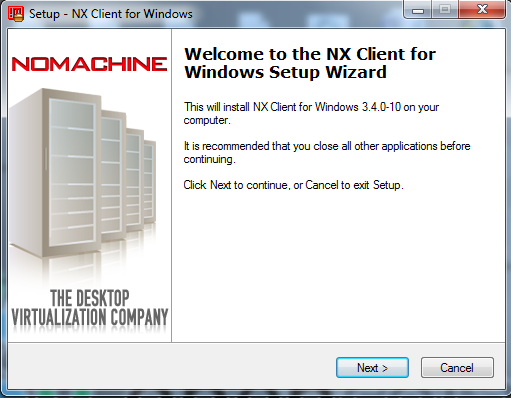
Double Click *.exe file, I just showing some screenshots here

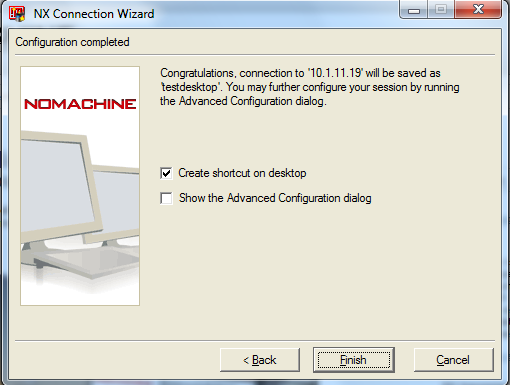
After Installed , Go to Start –> NX client for Windows –> Click NX Connection Wizard

 Session Name : Put any name

Hostname : linux machine hostname or ipaddress. Default port 22

Select Internet connection type also Like LAN, WAN


 Now Client software also successfully installed, But if you’re trying to login, It should show error.

You must copy SSH generation key from linux machine to Windows machine


[root@azardb ~]# cat  /usr/NX/home/nx/.ssh/default.id_dsa.pub

no-port-forwarding,no-agent-forwarding,command="/usr/NX/bin/nxserver --login" ssh-dss AAAAB3NzaC1kc3MAAACBAJe/0DNBePG9dYLWq7cJ0SqyRf1iiZN/IbzrmBvgPTZnBa5FT/0Lcj39sRYt1paAlhchwUmwwIiSZaON5JnJOZ6jKkjWIuJ9MdTGfdvtY1aLwDMpxUVoGwEaKWOyin02IPWYSkDQb6cceuG9NfPulS9iuytdx0zIzqvGqfvudtufAAAAFQCwosRXR2QA8OSgFWSO6+kGrRJKiwAAAIEAjgvVNAYWSrnFD+cghyJbyx60AAjKtxZ0r/Pn9k94Qt2rvQoMnGgt/zU0v/y4hzg+g3JNEmO1PdHh/wDPVOxlZ6Hb5F4IQnENaAZ9uTZiFGqhBO1c8Wwjiq/MFZy3jZaidarLJvVs8EeT4mZcWxwm7nIVD4lRU2wQ2lj4aTPcepMAAACANlgcCuA4wrC+3Cic9CFkqiwO/Rn1vk8dvGuEQqFJ6f6LVfPfRTfaQU7TGVLk2CzY4dasrwxJ1f6FsT8DHTNGnxELPKRuLstGrFY/PR7KeafeFZDf+fJ3mbX5nxrld3wi5titTnX+8s4IKv29HJguPvOK/SI7cjzA+SqNfD7qEo8=

Copy this Key, and paste it in your windows machine, Where ?


C:\Program Files\NX Client for Windows\share\keys\server.id_dsa

Replace old key Adn save with new key.
 

Now You can go to login As Root user & password but before login as Root user, you need to add some lines in linux machine, Otherwise you can get error like  “User ‘root’ cannot be used as an NX user”


[root@azardb ~]# gedit /usr/NX/etc/server.cfg

EnableAdministratorLogin = "1"

And restart Nxserver[root@azardb ~]# /etc/init.d/nxserver restart
Trying to restart NX server:
NX> 123 Service stopped.
NX> 153 Stopping NX server monitor.
NX> 153 NX server monitor already stopped.
NX> 122 Service started.
NX> 999 Bye.
Trying to restart NX statistics:
NX> 723 Cannot start NX statistics:
NX> 709 NX statistics are disabled for this server.
NX> 999 Bye.
[root@azardb ~]#

Now You can Successully login as a Root user through windows and Linux Desktop should be appear in your windows Desktop.

ORA-30012: undo tablespace ‘UNDOTBS02’ does not exist or of wrong type

When i try startup my test db , the following error will be occur.

SQL> startup
ORACLE instance started.

Total System Global Area 535662592 bytes
Fixed Size 1375792 bytes
Variable Size 331350480 bytes
Database Buffers 197132288 bytes
Redo Buffers 5804032 bytes
Database mounted.
ORA-01092: ORACLE instance terminated. Disconnection forced
ORA-30012: undo tablespace 'UNDOTBS02' does not exist or of wrong type
Process ID: 14328
Session ID: 125 Serial number: 5

Actually what i’am wrong here, I created new undo tablespace for existing tablespace & then I dropped existing undo tablespace. I startup using pfile and worked, later i shutdown database without creating spfile for existing db. SO I just startup using spfile, the above error will be shown.

Solution :

Enter user-name: / as sysdba
Connected to an idle instance.

SQL> startup mount
ORACLE instance started.

Total System Global Area 535662592 bytes
Fixed Size 1375792 bytes
Variable Size 331350480 bytes
Database Buffers 197132288 bytes
Redo Buffers 5804032 bytes
Database mounted.
SQL> select * from v$tablespace;

TS# NAME INC BIG FLA ENC
---------- ------------------------------ --- --- --- ---
0 SYSTEM YES NO YES
1 SYSAUX YES NO YES
20 ADDME YES NO YES
4 USERS YES NO YES
3 TEMP NO NO YES
6 EXAMPLE YES NO YES
9 RCRMAN YES NO YES
10 USERS_TBS YES NO YES
5 UNDOTBS2 YES NO YES
19 TESTTBS YES NO YES
14 TESTTB YES NO YES

TS# NAME INC BIG FLA ENC
---------- ------------------------------ --- --- --- ---
15 TESTDB YES NO YES

12 rows selected.

SQL> create pfile='d:\backupnew\initazardb.ora' from spfile;

File created.

SQL> shutdown immediate
ORA-01109: database not open

Database dismounted.
ORACLE instance shut down.
Edit Pfile UNDO_TABLESPACE PARAMETER
SQL> startup pfile='d:\backupnew\initazardb.ora';
ORACLE instance started.

Total System Global Area 535662592 bytes
Fixed Size 1375792 bytes
Variable Size 331350480 bytes
Database Buffers 197132288 bytes
Redo Buffers 5804032 bytes
Database mounted.
Database opened.
SQL>
SQL> create spfile from pfile;

File created.

SQL> create spfile from pfile='d:\backupnew\initazardb.ora';

File created.

SQL> shutdown immediate
Database closed.
Database dismounted.
ORACLE instance shut down.
SQL> startup
ORACLE instance started.

Total System Global Area 535662592 bytes
Fixed Size 1375792 bytes
Variable Size 331350480 bytes
Database Buffers 197132288 bytes
Redo Buffers 5804032 bytes
Database mounted.
Database opened.
SQL> show parameter undo;

NAME TYPE VALUE
------------------------------------ ----------- ------------------------------
undo_management string AUTO
undo_retention integer 900
undo_tablespace string UNDOTBS2
SQL>

Screen Resolution Oracle Virtual Box

I installed Oracle virtual Box for Windows 7 and then I installed Oracle Enterprise Linux guest OS for Virtual Box. When i open my Guest OS, This Screen Resolution is 800×600 and below.so my screen was very small .So that i plan to modify  screen resolution for Guest OS.

Method 1 : Install Guest Additions

For Oracle Enterprise Linux 5. 

After Started Gust OS at  Virtual Box,  Choose Devices –> Install guest Additions.

It should be appear in guest operating system.

Step 1:


[root@localhost media]# ls

TOSHIBA  VBOXADDITIONS_3.2.10_66523

[root@localhost media]# cd VBOXADDITIONS_3.2.10_66523

[root@localhost VBOXADDITIONS_3.2.10_66523]# ls

32Bit        VBoxLinuxAdditions-amd64.run    VBoxWindowsAdditions.exe 64Bit        VBoxLinuxAdditions-x86.run      VBoxWindowsAdditions-x86.exe
AUTORUN.INF  VBoxSolarisAdditions.pkg autorun.sh   VBoxWindowsAdditions-amd64.exe

[root@localhost VBOXADDITIONS_3.2.10_66523]# cp VBoxLinuxAdditions-x86.run /tmp

[root@localhost ~]# cd /tmp

[root@localhost tmp]# ls

gconfd-root     mapping-root  ssh-ZMDjDI2464              virtual-root.Ob9cyx
keyring-xmJ5Gd  orbit-root    VBoxLinuxAdditions-x86.run  xorg.conf

Step 2: Run x86 VBox linux additions


[root@localhost tmp]# ./VBoxLinuxAdditions-x86.run

Verifying archive integrity... All good.

Uncompressing VirtualBox 3.2.10 Guest Additions for Linux........VirtualBox Guest Additions installer

Uninstalling old VirtualBox DKMS kernel modules            [  OK  ]

Building the VirtualBox Guest Additions kernel modules     [FAILED]

Your system does not seem to be set up to build kernel modules.
Look at /var/log/vboxadd-install.log to find out what went wrong.  Once you have corrected it,
 you can
run

  /etc/init.d/vboxadd setup
to build them.
Doing non-kernel setup of the Guest Additions              [  OK  ]
Installing the Window System drivers Installing X.Org 7.1 modules          [  OK  ]

Setting up the Window System to use the Guest Additions    [  OK  ]

You may need to restart the hal service and the Window System (or just restart
the guest system) to enable the Guest Additions.
Installing graphics libraries and desktop services component[  OK  ]

 Oops :!…….It shows Kernel modules Errors, I just looked and spent some few minutes and fix it, What Errors need, Some Packages Yes.

The Following package need to install , Using rpm -Uvh <package-name>


libstdc++-devel-4.1.2-48.el5.i386.rpm

libgomp-4.4.0-6.el5.i386.rpm

libaio-devel-0.3.106-3.2.i386.rpm

kernel-headers-2.6.18-194.el5.i386.rpm

kernel-devel-2.*

glibc-devel-2.5-49.i386.rpm

glibc-headers-2.5-49.i386.rpm

gcc-4.1.2-48.el5.i386.rpm

gcc-c++-4.1.2-48.el5.i386.rpm

Note : You must installed all packages, Otherwise the above Kernel module Errors will be appear. you can get this package from your OEL CD or DVD  /server folder.

After installed Package, you can run


[root@localhost tmp]# ./VBoxLinuxAdditions-x86.run

Verifying archive integrity... All good. Uncompressing VirtualBox 3.2.10 Guest Additions for Linux........

VirtualBox Guest Additions installer Removing installed version 3.2.10 of VirtualBox Guest Additions...

Uninstalling old VirtualBox DKMS kernel modules            [  OK  ]

Building the VirtualBox Guest Additions kernel modules

Your guest system does not seem to have sufficient OpenGL support to enable
accelerated 3D effects (this requires Linux 2.6.27 or later in the guest
system).  This Guest Additions feature will be disabled.
Building the main Guest Additions module  [  OK  ]

Building the shared folder support module                  [  OK  ]

Doing non-kernel setup of the Guest Additions              [  OK  ]

Starting the VirtualBox Guest Additions                    [  OK  ]

Installing the Window System drivers Installing X.Org 7.1 modules [  OK  ]

Setting up the Window System to use the Guest Additions    [  OK  ]

You may need to restart the hal service and the Window System (or just restart
the guest system) to enable the Guest Additions.

Installing graphics libraries and desktop services componen[  OK  ]
[root@localhost tmp]#

Now Guest Additions successfully Installed…. Now I want to set Screen resolution, Unfortunately I rebooted my machine, During Restart It shows some error for Display.I set again old values like “800×600” , After I set it, I started the machine, the old value appear.I thinked Why its not appear Display screen resoltion after installed Guest Addtions.

The answer is , We need to add one line for /etc/X11/xorg.conf        Not Like Ubuntu. OEL some needs.

so I again Startup my vbox X11 setup, [no need this setup, if once your installed Guset additions before reboot, By mistake I rebooted, so the I ran again. you just add one line, its enough ]


#/etc/init.d/vbox-add-X11 setup 

'''''''

After run it, you just go to ADD   “Modes    “1024×768” “800×600″ ” for /etc/X11/xorg.conf


#gedit /etc/X11/xorg.conf

Section "Screen"
  SubSection "Display"
    Depth      24
    Modes    "1024x768" "800x600"
  EndSubSection
  Device       "Device[0]"
  Identifier   "Screen[0]"
  Monitor      "Monitor[0]"
EndSection

Now After Rebooted, Your screen resolution Should be changed. 🙂

——-

Method 2: Without Install Guest Additions, But Oracle Recommand , Install guest Additions.

you can modify from here /etc/X11/xorg.conf

AS a root user,     

Before Copy xorg.conf  

#cp /etc/X11/xorg.conf /tmp

then

Write a new line for xorg.conf

#gedit /etc/X11/xorg.conf

# Xorg configuration created by system-config-display
Section “Device” 
  Identifier  “Videocard0” 
  Driver      “vesa” 
EndSection 

Section “Monitor” 
  Identifier “WXGA+ Inspiron” 
  HorizSync 31.5-90.0 
  VertRefresh 60.0-60.0 
  Option “DPMS” 
EndSection 

Section “Screen” 
  Identifier “Screen0” 
  Device     “Videocard0” 
  Monitor    “WXGA+ Inspiron” 
  DefaultDepth     16 
  SubSection “Display” 
   Viewport   0 0 
   Depth     16 
   Modes “1280×1024” “1024×768” “800×600” “640×480” 
  EndSubSection 
 SubSection “Display” 
   Viewport   0 0 
   Depth     24 
   Modes “1280×1024” “1024×768” “800×600” “640×480” 
  EndSubSection 
EndSection

After modified, you just reboot your Guest OS.

Now you can see your screen resolution.

# Enable USB Device For Oracle Virtual Box.

ORA-39170: Schema expression ‘AZAR$RIY’ does not correspond to any schemas

SQL> create user "azar$riy" identified by azar;

User created.

SQL> grant connect,resource,dba to "azar$riy";

Grant succeeded.

SQL> grant read,write on directory data_pump_dir to "azar$riy";

Grant succeeded.

SQL> conn "azar$riy"/azar;
Connected.
SQL> create table a as select * from scott.emp;

Table created.

SQL> commit;

Commit complete.

SQL> exit
Disconnected from Oracle Database 11g Enterprise Edition Release 11.2.0.1.0 - Production
With the Partitioning, OLAP, Data Mining and Real Application Testing options


C:\Users\mazar>expdp system/Admin123@azardb directory=data_pump_dir schemas="azar$riy" dumpfile=azartest.dmp log=azartest.log 
Export: Release 11.2.0.1.0 - Production on Sun Nov 7 15:42:09 2010

Copyright (c) 1982, 2009, Oracle and/or its affiliates.  All rights reserved.

Connected to: Oracle Database 11g Enterprise Edition Release 11.2.0.1.0 - Production
With the Partitioning, OLAP, Data Mining and Real Application Testing options
ORA-39001: invalid argument value
ORA-39170: Schema expression 'AZAR$RIY' does not correspond to any schemas.


C:\Users\mazar>expdp system/Admin123@azardb directory=data_pump_dir schemas='\"azar$riy\"'
 dumpfile=azartest.dmp log=azartest.log 

Export: Release 11.2.0.1.0 - Production on Sun Nov 7 15:42:20 2010

Copyright (c) 1982, 2009, Oracle and/or its affiliates.  All rights reserved.

Connected to: Oracle Database 11g Enterprise Edition Release 11.2.0.1.0 - Production
With the Partitioning, OLAP, Data Mining and Real Application Testing options
Legacy Mode Active due to the following parameters:
Legacy Mode Parameter: "log=azartest.log" Location: Command Line, Replaced with: "logfile=azartest.log"
Legacy Mode has set reuse_dumpfiles=true parameter.
Starting "SYSTEM"."SYS_EXPORT_SCHEMA_01":  system/********@azardb directory=data_pump_dir dumpfile=azartest.dmp logfile=azartest.log schemas='"azar$riy"' reuse
_dumpfiles=true
Estimate in progress using BLOCKS method...
Processing object type SCHEMA_EXPORT/TABLE/TABLE_DATA
Total estimation using BLOCKS method: 64 KB
Processing object type SCHEMA_EXPORT/USER
Processing object type SCHEMA_EXPORT/SYSTEM_GRANT
Processing object type SCHEMA_EXPORT/ROLE_GRANT
Processing object type SCHEMA_EXPORT/DEFAULT_ROLE
Processing object type SCHEMA_EXPORT/PRE_SCHEMA/PROCACT_SCHEMA
Processing object type SCHEMA_EXPORT/TABLE/TABLE
. . exported "azar$riy"."A"                              8.578 KB      14 rows
Master table "SYSTEM"."SYS_EXPORT_SCHEMA_01" successfully loaded/unloaded
******************************************************************************
Dump file set for SYSTEM.SYS_EXPORT_SCHEMA_01 is:
  C:\APP\ORACLE\MAZAR\ADMIN\AZARDB\DPDUMP\AZARTEST.DMP
Job "SYSTEM"."SYS_EXPORT_SCHEMA_01" successfully completed at 15:43:10
C:\Users\mazar>

Rename and Relocate datafiles

This post will show you How to rename your datafiles and also relocate datafiles.

Rename Datafiles in Single Tablespace  (Database Open Mode) :-

Caution : Backup your tablespace Before you will do some change in your tablespace.

Step 1:  I just create tablespaces with two datafiles


SQL> create tablespace renametbs datafile 'd:\backup\renametbs01.dbf' size 50m;

Tablespace created.

SQL> alter tablespace renametbs add datafile 'd:\backup\renametbs02.dbf' size 50m;

Tablespace altered.

SQL> select file_name,tablespace_name from dba_data_files where tablespace_name='RENAMETBS';

FILE_NAME
--------------------------------------------------------------------------------
TABLESPACE_NAME
------------------------------
D:\BACKUP\RENAMETBS01.DBF
RENAMETBS

D:\BACKUP\RENAMETBS02.DBF
RENAMETBS

Step 2: Tablespace Offline

SQL> alter tablespace renametbs offline normal;

Tablespace altered.

Step  3: Rename your datafile, Here you need to listen something , when you’re execute rename command, It will show some errors like below


L> alter tablespace renametbs rename datafile 'd:\backup\renametbs01.dbf','d:\backup\renametbs02.dbf' TO 'd:\backup\renametbs1.dbf','d:\backup\renametbs2.dbf

ter tablespace renametbs rename datafile 'd:\backup\renametbs01.dbf','d:\backup\renametbs02.dbf' TO 'd:\backup\renametbs1.dbf','d:\backup\renametbs2.dbf'

ROR at line 1:
A-01525: error in renaming data files
A-01141: error renaming data file 8 - new file 'd:\backup\renametbs1.dbf' not
und
A-01110: data file 8: 'D:\BACKUP\RENAMETBS01.DBF'
A-27041: unable to open file
D-04002: unable to open file
S-Error: (OS 2) The system cannot find the file specified.

What is this means, After tablespace offline, you need to copy and paste same location of your datafiles and rename manully (OS level) which name you will implement, Otherwise the system cannot find the files. 

SQL> alter tablespace renametbs rename datafile 'D:\BACKUP\RENAMETBS01.DBF','D:\BACKUP\RENAMETBS02.DBF' TO 'D:\BACKUP\RENAMETBS1.DBF','D:\BACKUP\RENAMETBS2.DBF
';

Tablespace altered.

Step 4: Tablespace Online and Take backup.


SQL> alter tablespace renametbs online;

Tablespace altered.

SQL> select file_name,tablespace_name from dba_data_files where tablespace_name='RENAMETBS';

FILE_NAME
--------------------------------------------------------------------------------
TABLESPACE_NAME
------------------------------
D:\BACKUP\RENAMETBS1.DBF
RENAMETBS

D:\BACKUP\RENAMETBS2.DBF
RENAMETBS
SQL>

Relocate Datafiles in Single Tablespace (Database Open Mode) :

Step 1: Check your current Datafiles location


SQL> select file_name,tablespace_name from dba_data_files where tablespace_name='RENAMETBS';

FILE_NAME
--------------------------------------------------------------------------------
TABLESPACE_NAME
------------------------------
D:\BACKUP\RENAMETBS1.DBF
RENAMETBS

D:\BACKUP\RENAMETBS2.DBF
RENAMETBS

Step 2: you need to know your datafiles size,

SQL> select file_name,bytes from dba_data_files where tablespace_name='RENAMETBS';

FILE_NAME
--------------------------------------------------------------------------------
     BYTES
----------
D:\BACKUP\RENAMETBS1.DBF
  52428800

D:\BACKUP\RENAMETBS2.DBF
  52428800

Step 3: Tablespace offline


SQL> alter tablespace renametbs offline normal;

Tablespace altered.

Step 4: Copy your datafiles to New location and Rename it manually (OS level).


SQL> alter tablespace renametbs rename datafile 'D:\BACKUP\RENAMETBS1.DBF','D:\BACKUP\RENAMETBS2.DBF' TO 'C:\RENAMETB\RENAMETBS1.DBF','C:\RENAMETB\RENAMETBS2.D
BF';

Tablespace altered.

Step 5:  After relocated , your current datafile location and tablespace online , take backup.


SQL> select file_name,tablespace_name from dba_data_files where tablespace_name='RENAMETBS';

FILE_NAME
--------------------------------------------------------------------------------
TABLESPACE_NAME
------------------------------
C:\RENAMETB\RENAMETBS1.DBF
RENAMETBS

C:\RENAMETB\RENAMETBS2.DBF
RENAMETBS

SQL> alter tablespace renametbs online;

Tablespace altered.

SQL>

Rename Datafile for Multiple Tablespace  (Database Mount Mode):

Step 1: Startup mount


SQL> startup mount
ORACLE instance started.

Total System Global Area  535662592 bytes
Fixed Size                  1375792 bytes
Variable Size             209715664 bytes
Database Buffers          318767104 bytes
Redo Buffers                5804032 bytes
Database mounted.

Step 2: Check your datafile


SQL> select name from v$datafile;

NAME
--------------------------------------------------------------------------------
C:\APP\ORACLE\MAZAR\ORADATA\AZARDB\SYSTEM01.DBF
C:\APP\ORACLE\MAZAR\ORADATA\AZARDB\SYSAUX01.DBF
C:\APP\ORACLE\MAZAR\ORADATA\AZARDB\UNDOTBS01.DBF
C:\APP\ORACLE\MAZAR\ORADATA\AZARDB\USERS01.DBF
C:\APP\ORACLE\MAZAR\ORADATA\AZARDB\EXAMPLE01.DBF
D:\BACKUP\RCRMAN01.DBF
D:\BACKUP\USERSTBS01.DBF
C:\RENAMETB\RENAMETBS1.DBF
D:\BACKUP\TBSPITR01.DBF
C:\RENAMETB\RENAMETBS2.DBF
D:\BACKUP\TESTTB01.DBF

11 rows selected.

Here I choosed “C:\RENAMETB\RENAMETBS1.DBF ” to ” C:\RENAMETB\RENAMETBS01.DBF “, AS Same Like “D:\BACKUP\TESTTB01.DBF” to “D:\BACKUP\TESTTB1.DBF 

Step 3: Rename Datafile for multiple tablespace


SQL> alter database rename file 'C:\renametb\renametbs1.dbf','D:\backup\testtb01.dbf' to 'C:\renametb\renametbs01.dbf','D:\backup\testtb1.dbf';

Database altered.

SQL> select name from v$datafile;

NAME
--------------------------------------------------------------------------------
C:\APP\ORACLE\MAZAR\ORADATA\AZARDB\SYSTEM01.DBF
C:\APP\ORACLE\MAZAR\ORADATA\AZARDB\SYSAUX01.DBF
C:\APP\ORACLE\MAZAR\ORADATA\AZARDB\UNDOTBS01.DBF
C:\APP\ORACLE\MAZAR\ORADATA\AZARDB\USERS01.DBF
C:\APP\ORACLE\MAZAR\ORADATA\AZARDB\EXAMPLE01.DBF
D:\BACKUP\RCRMAN01.DBF
D:\BACKUP\USERSTBS01.DBF
C:\RENAMETB\RENAMETBS01.DBF
D:\BACKUP\TBSPITR01.DBF
C:\RENAMETB\RENAMETBS2.DBF
D:\BACKUP\TESTTB1.DBF

11 rows selected.

Step 4: Alter your database opened.


SQL> alter database open;

Database altered.

SQL> select file_name,tablespace_name from dba_data_files where tablespace_name in ('RENAMETBS','TESTTB');

FILE_NAME
--------------------------------------------------------------------------------
TABLESPACE_NAME
------------------------------
C:\RENAMETB\RENAMETBS01.DBF
RENAMETBS

C:\RENAMETB\RENAMETBS2.DBF
RENAMETBS

D:\BACKUP\TESTTB1.DBF
TESTTB
SQL>

Refer :-

http://download.oracle.com/docs/cd/E11882_01/server.112/e17120/dfiles005.htm#i1006457

ORA-20446 The Owner of the job is not registered

When i try import dump files into one schema using Datapump in EMdbconsole, it shows follwoing Error.

ORA-20446: The owner of the job is not registered
ORA-06512: at “SYSMAN.MGMT_JOBS”, line 168
ORA-06512: at “SYSMAN.MGMT_JOBS”, line 86

Solution : We need to run

SQL> conn sysman/Admin123;
Connected.
SQL> execute MGMT_USER.MAKE_EM_USER(‘PREM_ACE_RUH’);

PL/SQL procedure successfully completed.

Note : Prem_ace_ruh — > Username.

Can’t locate CompEMdbconsole.pm during EM dbconsole creation Oracle 11gR2

Most of the Oracle 11gR2 user asked OTN forums , Why we cann’t create Oracle EMdbconsole during database creation.They are all say same error like below

Can’t locate CompEMdbconsole.pm in @INC

where they were mistaken ?

Yes, They were mistaken at Extract or unzip the Oracle Software Files (1 & 2). They were unzipped separate folder not in one folder like linux enviornment , you can see after unzipped only one folder showing “database”. Windows , they were unzipped the two disk files using some Utility like Winzip or anyone. What happen  here, It will unzipped separate folder, so When you’re going to install, some opf the components are missed out in this folder (First disk unzipped folder).

What should we do? How do we unzip this Files?

c:\software\oracle11gr2>dir
 Volume in drive C has no label.
 Volume Serial Number is 725B-4DA0

 Directory of c:\software\oracle11gr2

10/17/2010  02:23 PM    <DIR>          .
10/17/2010  02:23 PM    <DIR>          ..
10/17/2010  01:06 PM     1,625,721,289 win32_11gR2_database_1of2.zip
10/17/2010  01:51 PM       631,934,821 win32_11gR2_database_2of2.zip
               2 File(s)  2,257,656,110 bytes
               2 Dir(s)  106,398,171,136 bytes free

c:\software\oracle11gr2>mkdir c:\azar\software

c:\software\oracle11gr2>copy *.zip c:\azar\software
win32_11gR2_database_1of2.zip
win32_11gR2_database_2of2.zip
        2 file(s) copied.

c:\azar\software>dir
 Volume in drive C has no label.
 Volume Serial Number is 725B-4DA0

 Directory of c:\azar\software

10/17/2010  02:25 PM    <DIR>          .
10/17/2010  02:25 PM    <DIR>          ..
10/17/2010  01:06 PM     1,625,721,289 win32_11gR2_database_1of2.zip
10/17/2010  01:51 PM       631,934,821 win32_11gR2_database_2of2.zip
               2 File(s)  2,257,656,110 bytes
               2 Dir(s)  104,139,374,592 bytes free

c:\azar\software>unzip win32_11gR2_database_1of2.zip

” ” ” “” “” ‘ ‘ ‘ ‘ ” ‘

After unzipped first disk files , I should go to unzip second disk files on same directory In this case , Some of the componets overwritten  at “database”  folder.

c:\azar\software>dir
 Volume in drive C has no label.
 Volume Serial Number is 725B-4DA0

 Directory of c:\azar\software

10/17/2010  02:26 PM    <DIR>          .
10/17/2010  02:26 PM    <DIR>          ..
04/03/2010  05:29 AM    <DIR>          database
10/17/2010  01:06 PM     1,625,721,289 win32_11gR2_database_1of2.zip
10/17/2010  01:51 PM       631,934,821 win32_11gR2_database_2of2.zip
               2 File(s)  2,257,656,110 bytes
               3 Dir(s)  102,475,350,016 bytes free
c:\azar\software>unzip win32_11gR2_database_2of2.zip

“”  “”” “””‘””””””

After unzipped , I can see only one folder like Linux , see below

c:\azar\software>dir
 Volume in drive C has no label.
 Volume Serial Number is 725B-4DA0

 Directory of c:\azar\software

10/17/2010  02:26 PM    <DIR>          .
10/17/2010  02:26 PM    <DIR>          ..
04/03/2010  05:29 AM    <DIR>          database
10/17/2010  01:06 PM     1,625,721,289 win32_11gR2_database_1of2.zip
10/17/2010  01:51 PM       631,934,821 win32_11gR2_database_2of2.zip
               2 File(s)  2,257,656,110 bytes
               3 Dir(s)  101,823,766,528 bytes free

Now I’m got Install , After Installation, the DBconsole also created succesfully.

c:\azar\software>cd database

c:\azar\software\database>dir
 Volume in drive C has no label.
 Volume Serial Number is 725B-4DA0

 Directory of c:\azar\software\database

04/03/2010  05:29 AM    <DIR>          .
04/03/2010  05:29 AM    <DIR>          ..
03/26/2010  11:42 PM    <DIR>          doc
04/02/2010  09:15 PM    <DIR>          install
04/02/2010  10:46 PM    <DIR>          response
03/12/2010  11:49 AM           542,088 setup.exe
04/02/2010  10:46 PM    <DIR>          stage
03/03/2010  02:52 AM             5,038 welcome.html
               2 File(s)        547,126 bytes
               6 Dir(s)  119,008,116,736 bytes free

c:\azar\software\database>setup.exe

After installed, DB console create successful.